
Can you sell digital products on TikTok Shop?
US TikTok Shop allows virtual goods only for invited, approved sellers. Its current policy includes categories such as software, digital games and online courses, with additional conditions. That does not establish that an ordinary seller’s PDF or template qualifies. Check your product and market against the official Virtual Goods Requirements before listing.
| Route | Where buyers pay | What to verify |
|---|---|---|
| TikTok Shop virtual goods | Inside TikTok Shop | Invitation, approval, category eligibility and the rules for your market. |
| Ordinary profile website link | Your linked external checkout | Profile-link eligibility, permitted content, payment readiness and file delivery. |
The steps below use the second route. Genesize supplies the external product page, checkout and delivery. This is not a TikTok Shop integration. Do not redirect TikTok Shop customers elsewhere to pay: the US policy distinguishes permitted external redemption from external purchase or payment. Read the Shop payment and fulfillment rules.
Platform details in this guide were checked on November 19, 2026. TikTok’s account features and Shop rules can vary by market and change over time.
A worked example: sell a finished $19 PDF
Imagine you already made a Freelance Client Kickoff Guide: a PDF with a meeting agenda, questions to ask a new client and a project handover checklist. Your audience is freelancers preparing for their next client call. The offer is a useful starting structure, not a promise of more clients or income.
- 1. Show one useful page
- 2. Open the product link
- 3. Pay on your checkout
- 4. Receive the PDF
- Upload the finished file. In Genesize, choose to add an existing product and attach the PDF. AI creation is optional. Use an original file you have the rights to sell.
- Write the offer. Say who it is for, what pages it includes, the file format, whether it is editable, and the price. Show a real sample page and state the permitted use and refund terms.
- Connect payments. Complete your own Stripe seller setup for paid sales. Resolve any outstanding requirements before advertising the product as ready to buy.
- Review, test and publish. Use Test buyer experience, check the file, then publish the product page. Copy its public
/p/link rather than a Studio, preview or private delivery link.
On Genesize Free to Sell, there is no monthly subscription. The current fee is 10% for direct sales and 30% for Genesize Marketplace sales, before tax. For a $19 direct sale, the Genesize fee is $1.90, leaving $17.10 before Stripe processing and any other applicable costs. A TikTok profile visit is not the Genesize Marketplace route. Paid plans have different fees; compare them in the fee calculator.
Free to Sell covers uploading, selling and delivery; it does not include paid AI, CRM or email-marketing tools. A purchase receipt is part of delivery. You do not need a marketing campaign to deliver the bought file.
Plan your first three product videos
Get the fictional $19 offer, three adaptable scripts, a mobile checklist and a blank results log.
Need a packaging example? Download our fictional kickoff PDF sample. It is a free teaching sample, not evidence of customer sales.
How to add a product link to your TikTok bio
TikTok’s Personal Account guidance lists 1,000 followers for adding a website link. Its business documentation describes a Verified Business Account, formerly called a Registered Business Account, after formal business verification. Simply switching account type is not a guarantee of a clickable link. See the account entitlements and business verification availability.
- Open Profile → Edit profile in TikTok. Check the available website or links control; its availability and label can depend on your account and market.
- Paste the public product-page URL. If you promote one PDF, send visitors to that PDF’s page rather than making them search an unrelated catalogue.
- Make the bio specific: “Client kickoff PDF for freelancers. See the pages and get the guide below.” Keep the same product name in the video, profile and sales page.
- Save and open the link from your actual profile. Confirm the page loads with the right product, price and download description.
What if the website field is missing?
Check TikTok’s current eligibility for your account and country. If you have a genuine business, review whether formal business verification is available and appropriate. Do not buy followers or assume an ordinary caption URL becomes clickable. While eligibility is unresolved, demonstrate the product and use another supported channel where people can actually reach your product link, such as Instagram or Pinterest. Treat the unavailable link as a launch constraint.
Keep tracking simple
You can add source labels to your public product URL. This is an illustrative address; replace the entire base with your own published link:
https://store.example/client-kickoff?utm_source=tiktok&utm_medium=social&utm_campaign=kickoff-launch
A single bio link with one campaign label identifies that campaign, not the exact video that caused a purchase. Changing the label later affects future visits. Never put a buyer’s email address or a private access token in a campaign label.
Three TikTok videos for a product you already made
Demonstrate a small, real use case. Record your screen or show the PDF on your phone, use fictional client information, and keep the most useful page readable. These scripts are creative starting points, not tested conversion results.
| Video | What to show and say | Call to action |
|---|---|---|
| A useful question | Show the agenda. “Before a kickoff call, ask who approves the work. Here’s where I put that answer so it doesn’t get lost.” Fill one field with fictional details. | “See the full kickoff PDF through my profile link.” |
| What the buyer receives | Scroll through the agenda, question prompts and handover checklist. Explain that this example is a downloadable PDF, not a coaching call or an editable app. | “The page linked in my profile shows what’s included and the $19 price.” |
| Who it fits | “If you already have your first freelance client and want a structure for the kickoff meeting, this guide gives you a place to start.” Show one completed example. | “Look at the sample before deciding whether it fits your project.” |
Disclose that you are promoting your own product
TikTok requires commercial-content disclosure when a post promotes a brand, product or service. On the post screen, open Content disclosure and ads (under More options when needed), turn on Disclose commercial content and select Your brand for your own product. Follow the current in-app steps. TikTok’s disclosure instructions.
For sound, use your own narration, TikTok’s Commercial Music Library or music you have the necessary commercial rights to use. A selectable trending sound does not establish those rights. TikTok’s commercial music guidance.
Test the buyer journey before sending traffic
The link must work for someone who is not signed in as you. Test the public page and the protected delivery separately:
- From TikTok: tap your saved profile link on a phone. Check the in-app browser, the price, sample pages and buy button. Confirm that the live checkout opens for the correct product; stop before paying if you are only inspecting it.
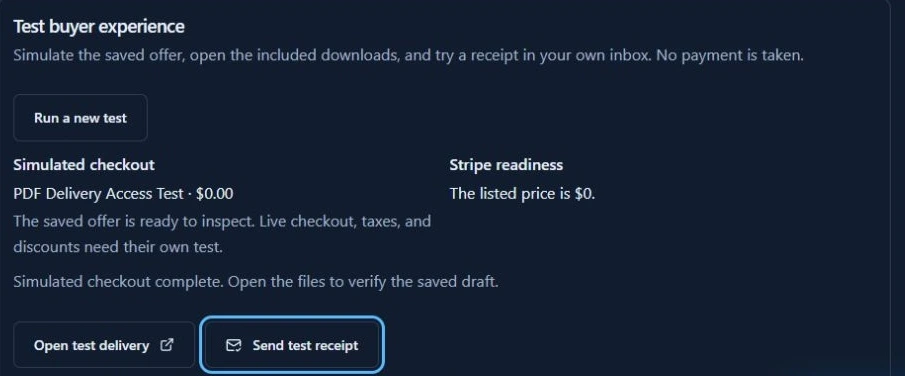
- From Genesize: in the product’s Review & publish area, open Test buyer experience, complete the simulated checkout, then choose Open test delivery or Send test receipt.
- From your inbox: open that receipt on a phone while signed out of Genesize. Tap Open test purchase and download the file under Included downloads. Open the downloaded file in the app you recommend to buyers.
In our earlier PDF delivery check, the tester confirmed that the receipt arrived and its PDF opened in signed-out Safari on an iPhone. See the verified PDF receipt walkthrough. That confirms the tested Safari delivery path; it does not establish TikTok in-app browser or real paid-payment success. Repeat those checks for your account and product.
Simulated checkout makes no payment or real order. Its private link lasts 30 minutes from the simulation; generate a new one if it expires, and never put it in your public bio. Use a supported payment sandbox for a separate end-to-end paid test.
TikTok views but no sales: find the next broken step
Record the video’s angle, the reporting dates, measured product-page visits and verified paid orders. Free sample downloads, trial starts and simulated checkouts are not paid sales. Compare equivalent periods and meaningful counts; one video or a handful of visits is too little to diagnose price or demand.
| What you observe | What to check | One useful change |
|---|---|---|
| Views, few product visits | Is there a clickable profile link? Does the video tell the right person why to open it? | Show a useful product page and give one clear call to action. |
| Visits, few checkout starts | Does the landing page match the video’s offer and show the format, contents and price? | Use a specific headline and a readable sample. See the $19 sales-page example. |
| Checkout opens, no paid orders | Can a signed-out phone user reach the correct checkout? Are payment requirements complete? | Repeat the buyer checks and resolve an observed error before changing the offer. |
| Paid orders, download questions | Can the receipt be found? Does the link open the right file and explain the required app? | Test receipt delivery and clarify access instructions. Check the delivery guide. |
On a paid Genesize plan, look in Analytics → Overview → Tracked traffic sources for measured TikTok visits and campaign labels. On Free to Sell, check the product’s order list and whatever link metrics TikTok makes available to your account. Full source reporting is a paid feature. Reporting depends on browser and analytics choices, so some orders have an unknown source. A tagged link does not prove which video caused a sale.
Once the journey works, change one thing at a time: the demonstrated problem, the preview or the offer explanation. Keep what you tested and the dates in the worksheet. If you need a broader first-buyer plan, use the finished-product guide for selling without an audience.
Common questions about selling digital products on TikTok
Can I sell digital products on TikTok without TikTok Shop?
You can promote an eligible digital product in ordinary TikTok content and use an available profile website link to send people to your product page. Buyers pay on your external checkout and receive their download there. Follow TikTok’s current content, link and commercial-disclosure rules; this is separate from a TikTok Shop listing.
Can I sell a PDF or template through TikTok Shop?
Do not assume your file is eligible. Under the US TikTok Shop Virtual Goods policy checked November 19, 2026, virtual goods require invitation and approval. Read the current category rules for your market and product. This guide uses an external product page rather than TikTok Shop checkout.
Do I need 1,000 followers to add a website link?
TikTok’s Personal Account guidance lists 1,000 followers for a profile website link. Its business documentation also describes verified business access, subject to account and market availability. Simply switching to a Business account does not guarantee the field will appear. Check the website or links controls in Edit profile.
Can I sell a digital product from TikTok without my own website?
You can use a hosted product page with checkout and delivery. For example, upload your finished file to Genesize, publish its product page and put that public link in your eligible TikTok profile. You still need a way for visitors to reach the link and a payment-ready store for paid sales.
Does Genesize publish videos to TikTok for me?
This workflow uses a link to your Genesize product page. You create and publish the TikTok content yourself. It does not connect a TikTok Shop, list a product there or automatically publish videos.
Why am I getting TikTok views but no sales?
Check the next step in order: can viewers find your link, does the page match the video, can they understand what they receive, and does checkout and delivery work on a phone? Views alone do not establish purchase intent. Use comparable reporting periods and verified paid orders before deciding which part to change.
Give your finished product a link people can buy from
Upload your download, explain what it includes, and test the buyer journey before sending traffic.
Explore Free to Sell