
What a digital product sales page needs to explain
A visitor usually cannot inspect your download or course as fully as you can. The page needs to close that information gap. “A complete toolkit to transform your business” gives them little to assess. “Three editable client-handoff templates, with instructions and a completed example” makes the offer easier to understand.
Keep one main action. A page selling an ebook should make buying that ebook straightforward. A page offering a free resource should explain the resource and the signup clearly. If you need help connecting several stages, use our sales funnel guide; this article focuses on the page itself.
| Section | Buyer’s question | What to show |
|---|---|---|
| Headline and explanation | Who is this for, and what useful task does it help with? | Name the reader, task and product format. |
| Contents and preview | What will I actually receive? | List the files or lessons and show a readable sample. |
| Fit and requirements | Will this work for my situation? | Explain prerequisites, compatibility and important exclusions. |
| Creator and evidence | Why should I trust this? | Use accurate background, actual material and genuine, permitted feedback. |
| Price and access | What do I pay, and what happens next? | State currency, one-time or recurring terms, delivery and support. |
| Questions and next action | What might stop me buying? | Answer real objections and link to the correct checkout. |
How to use the examples
These are original fictional offers, not live products, customer case studies or pages with measured conversion results. Prices are illustrative. The copy shows a complete section sequence, but square brackets mark facts, links and policy details you must supply before publishing. Read the annotations separately from the sample sales copy.
Example 1: an ebook sales page
A focused guide for freelance designers preparing their first client kickoff. The fictional offer is $19 USD, paid once, for a PDF guide and a separate one-page PDF checklist.
First Client Kickoff Guide
- Headline and explanation
Walk into your first client kickoff with a clear plan.
The First Client Kickoff Guide helps new freelance designers prepare questions, agree the next step and write a useful meeting recap. Get a practical PDF guide and a one-page checklist you can keep beside you.
Why this belongs: The headline names a situation the reader recognizes. The explanation identifies both the audience and the actual format.
- What is inside
Four focused chapters: prepare the project facts; ask about goals and constraints; confirm who reviews the work; and record decisions and next actions. The separate checklist brings those prompts onto one page.
Why this belongs: Specific contents are easier to assess than a claim such as “everything you need to succeed.” Match this list to the actual files.
- A useful sample
Before the meeting, ask: “Who will give the final approval, and how should we collect their feedback?” Record the approver, the feedback channel and the next review date. If the client has not decided, mark it as unresolved in the recap.
Why this belongs: This gives a real example of the method. It demonstrates usefulness without inventing a customer result.
- Who it fits
For designers who already have a client project and want a more organized kickoff. It does not find clients, replace a contract or provide legal advice. Both files are PDFs; no specialist design software is required to read them.
Why this belongs: State the boundary before purchase. A guide about running a kickoff is different from a promise to win paid work.
- Creator and proof
Created by [your name]. [Add a short, accurate explanation of your relevant design and client-project experience.] Preview [an actual page from the guide] before deciding whether the approach fits your work.
Why this belongs: Supply real credentials and a real preview. Leave out testimonials when none have been collected and approved.
- Price and access
$19 USD · one-time purchase.
After confirmed payment, follow the purchase-access link to download the guide and checklist. Save your own copies. Read [your actual usage, access, support and refund terms] before buying; contact [your support address] with questions.
Why this belongs: The buyer can see the amount, currency, files and next step together. Replace policy and support placeholders before publication.
- A question worth answering
Is this a client contract? No. It is a preparation and communication guide. You still need to agree your own scope, payment arrangements, responsibilities and contract terms separately.
Why this belongs: Answer the concern directly. Do not use the FAQ to introduce benefits that are absent from the product.
- Purchase action
Get the kickoff guide — $19 USD
PDF guide + one-page PDF checklist. One-time purchase. [Link this action to the reviewed offer’s checkout.]
Why this belongs: A specific action repeats the product and price. The bracketed instruction is for the creator, not copy to leave on a live button.
Example 2: a written-course sales page
A self-paced written course for freelance copywriters. The fictional $79 USD, one-time offer contains four modules, eight written lessons and a downloadable PDF workbook. It includes no video, live sessions or certificate.
Write a Clear Client Website Brief
- Headline and explanation
Turn a vague website request into a brief you can write from.
Work through eight written lessons to define the reader, choose a useful next action, organize the pages and ask for missing facts. Practice on a fictional workshop website before applying the process to a client project.
Why this belongs: This describes the work the learner will do. It avoids promising a complete website, more clients or a guaranteed business outcome.
- The curriculum
Module 1: identify the reader and the page’s job. Module 2: map questions to the agreed pages. Module 3: collect evidence and request missing information. Module 4: review the brief and prepare the handoff. Each module has two written lessons; the PDF workbook holds the practice exercises.
Why this belongs: The four modules and eight lessons agree with the offer. A buyer can inspect the learning path instead of guessing from a course title.
- An exercise preview
Practice brief: Northbank Bicycle Workshop wants a Home page, Repairs page and About page. A visitor can request a repair appointment; staff confirm the time separately. Write the Home page’s main action, then identify one fact you still need before drafting. The lesson explains how to distinguish a request from a confirmed booking.
Why this belongs: One consistent fictional scenario makes the teaching tangible. Clearly label it as practice material, not a client case study.
- Format and prerequisites
Self-paced written online lessons plus a downloadable PDF workbook. Read at your own pace and complete the exercises yourself. You need a browser and a way to read the PDF. This course does not include video lessons, live feedback, coaching or a completion certificate.
Why this belongs: A written course should be sold as a written course. Do not let familiar course imagery imply a service or format that is not included.
- Creator and proof
Taught by [your name]. [Describe your relevant copywriting experience truthfully.] Read [an actual sample lesson] to see the level of detail and the exercise format. [Include genuine learner feedback only if you have permission and can support the claim.]
Why this belongs: A sample lesson can help buyers judge fit before you have reviews. No placeholder should become a fabricated endorsement.
- Price and access
$79 USD · one-time purchase.
After confirmed payment, use the purchase-access link to open the written lessons and download the workbook. [State the hosted-access duration you actually provide, download rights, support scope and refund policy.] Questions before enrolling? Contact [support address].
Why this belongs: Hosted access and downloaded files are different promises. Choose and disclose terms you can honor; do not add “lifetime access” by default.
- A question worth answering
Will this write the client’s website for me? No. You will produce a clearer brief and a list of questions to resolve. The client’s final facts, copy, design and approval still require their own work and agreement.
Why this belongs: This makes the course outcome assessable and prevents the title being mistaken for a done-for-you service.
- Purchase action
Get the written course — $79 USD
Eight written lessons + PDF workbook. One-time purchase. [Link to the reviewed course offer’s checkout.]
Why this belongs: The action names the format again. Someone who wants a video course can make an informed decision before paying.
Example 3: a digital template-pack sales page
The fictional toolkit from our templates and email guides: $24 USD, paid once, for a website content brief, a missing-information email and a copy-approval checklist. All three assets are packaged in one editable DOCX and a matching PDF reading copy.
Website Content Handoff Kit
- Headline and explanation
Collect the right facts before you write a client’s website.
The Website Content Handoff Kit gives freelance copywriters three reusable assets to organize the brief, request missing information and collect a clearer copy review.
Why this belongs: The page opens with a concrete task, then explains what the kit contributes. It does not promise that templates eliminate every revision.
- The three assets
Website Content Brief: agree the reader, pages, next action and confirmed facts. Missing-Information Email: turn gaps in the brief into specific questions. Copy-Approval Checklist: organize one consolidated review. Get all three in an editable DOCX and a matching PDF reading copy, with instructions and a completed fictional example.
Why this belongs: The asset names, formats and count are consistent. The buyer should receive working files rather than only a description of templates.
- A sample from the kit
Missing fact: what happens after someone requests a repair appointment?
Question to the workshop owner: “Who confirms the requested time, and how will the customer receive confirmation?” Record the answer in the brief before describing the appointment process on the website.
Why this belongs: Show a small piece of the actual workflow. A screenshot of decorative covers alone would not demonstrate how the templates work.
- Compatibility and fit
For copywriters who already provide website writing and want a reusable handoff process. Use a DOCX-compatible editor for the editable file and a PDF reader for the reading copy. The kit does not include native Canva, Notion or spreadsheet templates, complete website copy or a legal agreement.
Why this belongs: Compatibility affects whether the buyer can use the purchase. State the tools and formats accurately instead of calling everything “fully editable.”
- Creator and proof
Built by [your name] from [a truthful description of your relevant process]. Preview [one actual blank asset and its completed example] to see the prompts and level of detail. No client information is included in the public sample.
Why this belongs: Use your own permitted materials. If you show client work, obtain the necessary permission and remove private information first.
- Price, license and access
$24 USD · one-time purchase.
Download the three assets in one editable DOCX and a matching PDF reading copy after confirmed payment. This example license allows use and adaptation for your own business and client projects, but not resale or redistribution of the templates as a standalone product. Read [your full access, support and refund terms] before buying.
Why this belongs: These are fictional offer terms, not Genesize’s default license for every creator. Replace them with the rights and policies you actually grant.
- A question worth answering
Does this replace my client agreement? No. The kit organizes information and review. Agree scope, fees, revision arrangements and responsibilities separately. It also does not confirm any client fact on your behalf.
Why this belongs: A useful FAQ can prevent the wrong purchase. It should clarify the boundaries rather than bury them.
- Purchase action
Get the handoff kit — $24 USD
Three reusable assets · one editable DOCX + matching PDF · one-time purchase. [Link to the reviewed toolkit offer’s checkout.]
Why this belongs: Repeat the main deliverables close to the action. Check that the displayed price and the checkout refer to the same offer.
For the product behind this third example, see how to create and sell digital templates. The three assets and formats should stay the same across the product, sales copy, checkout description and delivery.
A digital product sales page copy template you can adapt
Start with verified product information. Fill in the outline below, then read it as someone who has never heard of you. If they cannot explain the purchase back to you, make the offer clearer before adding more persuasion.
Headline: Help [specific reader] do [useful task].
Explanation: [Product name] is a [format] that helps you [practical process]. You receive [exact contents].
Contents: For each asset or module: [name], [what it helps with] and [format or delivery].
Preview: Show [an actual excerpt or lesson]. Explain what the reader should notice.
Fit: Best for [situation]. You need [prerequisites/software]. It does not include [important exclusions].
Trust: Created by [real name/brand], with [truthful relevant background]. Add only genuine evidence you can publish.
Offer and terms: [Amount + currency] · [payment frequency]. Access: [how and for how long]. Usage, support and refunds: [your accurate terms and links].
Questions: Answer the specific questions a reasonable buyer needs resolved before paying.
Action: [Get the specific product] → [the correct offer]. Repeat the price and key contents nearby.
The same outline works at different lengths. An inexpensive download with one format may need a short page. A course with prerequisites, multiple lessons and hosted access may need more explanation. Page length should follow the questions a buyer needs answered, not a fixed word-count target.
When using AI, supply the actual product contents, audience, formats, price, exclusions and approved facts. Ask it to flag gaps rather than inventing proof. A useful instruction is: “Draft from these verified facts only. Mark missing policies and credentials as questions. Do not add testimonials, sales numbers, guarantees, video lessons or scarcity.”
Before and after: make vague sales copy specific
These revisions are editorial examples, not A/B test results. Their purpose is to reduce ambiguity and make the promise match the deliverable.
Unlock your potential with the ultimate course for unstoppable success.
Learn to turn a client’s website request into a clear brief through eight written lessons and a practical PDF workbook.
What changed: the reader can identify the task, format and scope. The revised headline does not promise success beyond what the course teaches.
Everything you need. Fully editable. Instant transformation.
Three client-handoff assets in one editable DOCX, with a matching PDF reading copy, instructions and a completed fictional example.
What changed: “everything” becomes a concrete inventory and “editable” names the format. A buyer can compare the statement with the actual files.
Only a few copies left. Buy now before it is too late.
Get the handoff kit — $24 USD, paid once. Preview the brief and check the file requirements before buying.
What changed: the action uses accurate purchase details instead of an unsupported stock claim. If a real event, enrollment window or limited service creates a deadline, explain that specific constraint truthfully.
What if you do not have testimonials yet?
Show a useful excerpt, a completed example, the curriculum and an honest explanation of your background. A reader can assess those things directly. Collect feedback from real users, request permission to publish it and keep their wording and context accurate. Do not use decorative stars, invented customer counts or AI-generated quotes as evidence.
Build and review your sales page in Genesize
Begin with a saved product whose contents you have reviewed. An AI sales-page draft uses product context, but you remain responsible for checking that every promise matches the material buyers receive.
- Open Sell → Sales funnels → Create funnel. Select your product and choose “Sell product” for a direct purchase page. “Generate leads” and “Sell + build a list” serve different goals; select the route you actually need.
- Choose the page style and starting mode. Styles include Digital ebook, Online course and Template / toolkit. “Start from template · no credits” supports manual editing. “Generate with AI” shows a product-based credit quote before generation. Manual edits and publication use no AI credits.
- Edit the actual sections. Review Heading, Body, Button label and Section image. Add or reorder sections when that makes the offer easier to understand. Remove unsupported claims rather than leaving them because they sound persuasive.
- Check Product & checkout. Confirm Price type, Price, Currency and Checkout description. Product pricing supports a one-time purchase or free resource. A saved Store price is a draft shared with that product’s Store listing and other funnels; inspect the publication review before making it live.
- Preview the page and the delivery. Use Desktop and Mobile views, then Review & publish. Open “Preview buyer experience” to inspect the reader and actual download. Draft forms and checkout are disabled; this preview does not prove that a real payment has completed.
- Publish the reviewed offer. Complete Store settings, support details and Stripe onboarding for paid products. Resolve review blockers, acknowledge that you checked the price, sales copy and contents, then use “Publish reviewed funnel.” Open the live page afterward and check the links.
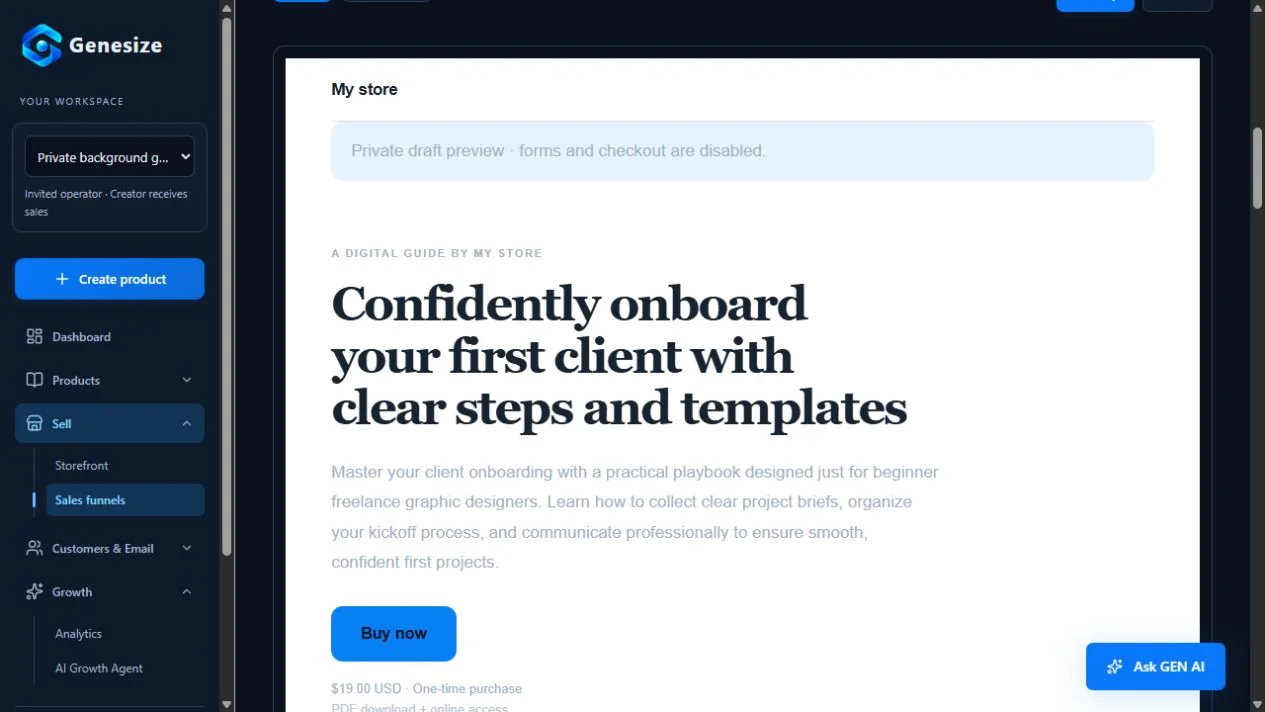
Starter includes the storefront, funnels and product-delivery workflow. Customer email campaigns and automations require an eligible paid Creator or Business plan after the first payment. Creating or publishing a funnel does not automatically activate a marketing sequence. Check current plans and allowances when choosing your workflow.
Keep access promises accurate. Genesize’s courses use written lessons and downloads; do not imply built-in video hosting, coaching or certificates. Creators also need their own accurate customer terms and tax arrangements. Genesize’s subscription policy does not establish the refund policy for your digital product.
Review the page as a mobile visitor and a buyer
Read the top of the page on a phone without referring to your notes. Can you identify the product, reader and format? Then follow the whole page to the purchase action. A polished desktop layout is only one part of the review.
- The headline and explanation are readable without zooming or horizontal scrolling.
- The product image shows actual material, and important information is also available as text.
- The price, currency, payment frequency and key contents appear close to the purchase action.
- Buttons have clear labels, comfortable spacing and the correct destination.
- The preview, FAQ, policy links and support route work on a narrow screen.
- Compatibility, prerequisites, exclusions and access duration are stated before payment.
- The page, checkout description, product files and buyer-access instructions agree.
- The real download opens and contains the files, lessons and usage terms you advertised.
Make the page discoverable and keep it practical
Use a descriptive page title, a concise summary and headings that explain the actual offer. Write accurate image descriptions and keep important copy in readable page text. Use appropriately sized images with reserved dimensions so they do not push the page around as they load. Avoid adding a large autoplay video just to make the page look more elaborate.
Search visibility also depends on content people find useful. Google’s guidance emphasizes original value, accurate descriptions and a satisfying page experience. No page length, keyword repetition or markup guarantees a ranking.
After launch, compare tracked visits, checkouts and completed orders over a meaningful window. If people ask the same question, clarify the relevant section. If they misunderstand the format, improve the headline and preview. A small sample of visits is not enough to declare a layout “proven to convert.”
For follow-up after the page visit, use our email marketing templates. For the amount you charge, see the digital product pricing guide.
Download the free sales-page writing template
This two-page worksheet helps you collect the offer facts and draft the core page sections. It includes interactive text fields and review checkboxes. It is a separately prepared editorial resource, not a ready-published website or an unmodified AI output.
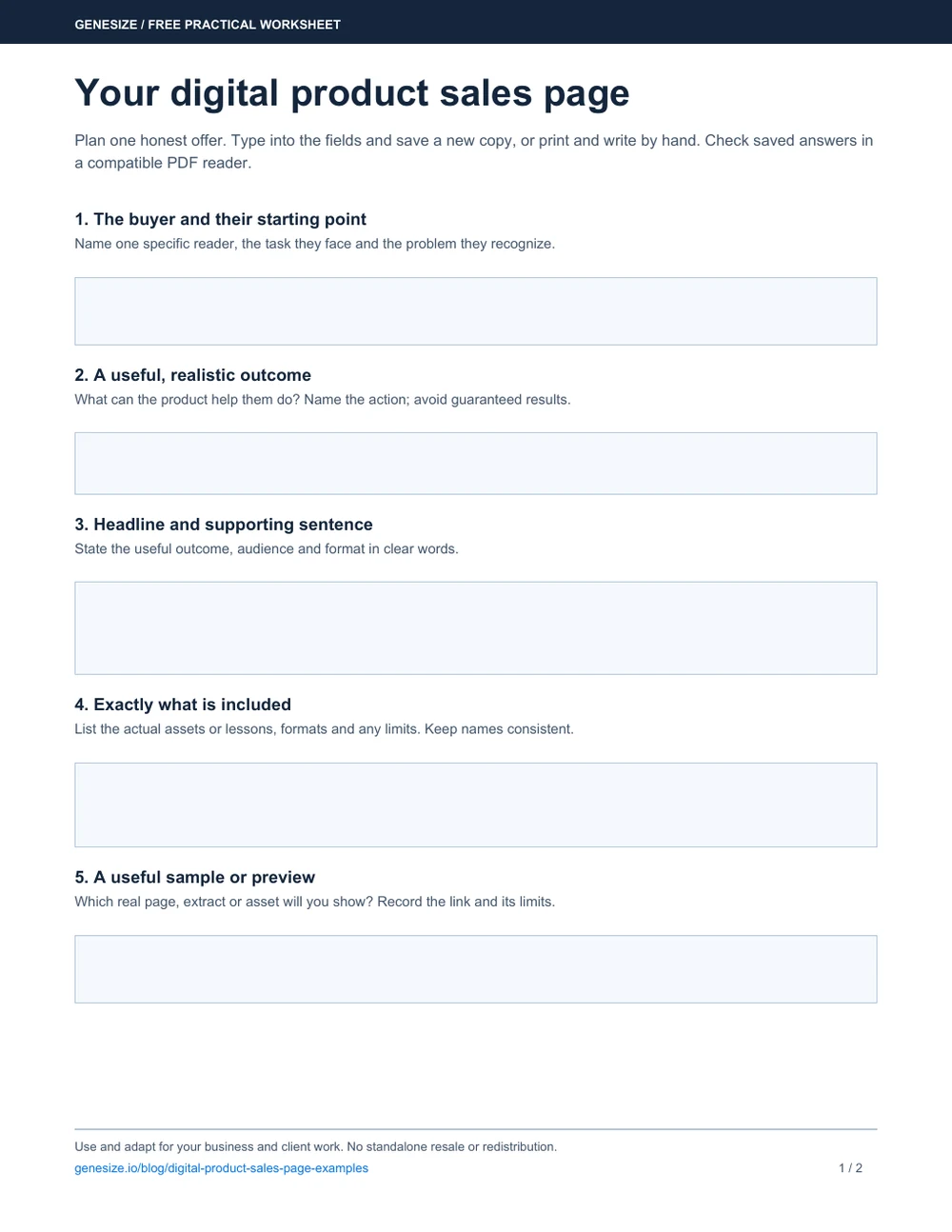
Your digital product sales page
Download it, open it in a compatible PDF reader and save a new copy after filling it in. Reopen the saved file to check your answers. You can also print it and write by hand; use a separate document for longer sales copy.
Download the free sales-page templateUse and adapt the worksheet for your own business and client work. Do not resell or redistribute the blank or modified worksheet as a standalone product. Supply and verify your own offer, policies, evidence and links before publishing.
Frequently asked questions about digital product sales pages
What should a digital product sales page include?
Explain the intended reader, useful outcome, exact contents, format, sample, compatibility, price, access and support. Add truthful creator information, answer relevant questions and provide one clear purchase action. The page, checkout and delivered product should describe the same offer.
What is the difference between a sales page and a landing page?
A landing page is a page someone arrives on for a particular purpose, such as joining a list or buying a product. A sales page is specifically designed to help someone evaluate and purchase an offer. A lead-capture page and a paid-product sales page can use different messages and actions.
How long should a digital product sales page be?
Long enough to explain the offer and answer the questions needed for a decision. A small PDF may need less explanation than a course with prerequisites and hosted access. There is no universal word count that guarantees conversions or search rankings. Remove repetition while keeping important purchase details visible.
Can I sell a digital product without testimonials?
Yes. Show useful material from the product, explain your actual background, state the contents and limitations clearly, and answer buyer questions. Do not invent quotes, star ratings, customer counts or results. Request permission before publishing genuine feedback.
What should an ebook sales page show?
Name the reader and topic, describe the chapters or practical tasks, show an actual sample and state the file format. Explain whether it is a PDF, EPUB or another format, what additional assets are included, how access works and what the buyer pays. Only advertise formats you actually deliver.
How is a written-course sales page different?
A course page should show the learning path, lessons, prerequisites, exercises and delivery format. Say explicitly when the course is written rather than video-based. Explain hosted-access duration, downloads and support, and do not imply coaching, grading or certificates unless they are actually included.
Can AI create my sales page?
AI can draft a page from your product information, but you must check its claims, contents, price, examples and policies. In Genesize, choose a saved product and review the quoted AI cost before generation, or start from a template for manual editing without AI credits. Neither option supplies genuine testimonials or verifies every claim for you.
Can I preview a sales page before publishing in Genesize?
Yes. The funnel editor supports desktop and mobile previews, and the publishing review includes a buyer-experience preview for the product reader and downloads. Draft forms and checkout are disabled. Review the price, copy and product contents before publishing; a draft preview is not a real completed payment test.
Are the examples on this page proven to convert?
No. They are original fictional examples showing how to explain an ebook, written course and template pack. Their prices, products and wording are illustrative, and no conversion or revenue result is claimed. Use your own verified offer, test the buying journey and improve the page using appropriate analytics and real feedback.
Give buyers a clear view of what you created
Create and review your product, build its sales page and check the buyer’s delivery before publishing. Start with a focused offer you can explain honestly.
Start your 14-day trialEligible new subscribers receive 400 total AI credits and up to 3 saved projects during the 14-day trial. Payment method required. Your selected paid subscription starts after the trial and automatically renews unless canceled. Review current plans and allowances before subscribing.