
What is a digital template people would pay for?
A digital template is a reusable starting point for completing a task. It supplies structure, decisions or wording that the buyer adapts to their situation. It might be a client questionnaire, an editable email, a planning worksheet or a working spreadsheet. The value comes from helping someone do useful work with less uncertainty, rather than from the number of pages in the download.
A guide explains how to collect website content. A template gives the copywriter the actual questions to send, spaces for answers, an example of a helpful response and a check for missing material. You can combine teaching and templates, but keep the reusable asset easy to find and copy.
Before building a large pack, ask: what will the buyer have completed after using this? “A usable content brief for a small business website” is a clearer outcome than “everything you need to succeed online.” Templates still require the buyer’s inputs and judgment. They do not guarantee clients, revenue or results.
Step 1: choose one buyer and a repeated task
Begin with work you understand. Look for a task people repeat, struggle to start or complete inconsistently. Useful sources are your own process notes, questions from clients and patterns in feedback you have permission to use. Remove confidential details before turning any client process into a public example.
Match the asset to the problem: a teacher might need a lesson planning sheet; a consultant might need a discovery-call brief; a freelance copywriter might need a way to collect content before drafting. Do not assume every audience wants a complex dashboard when a simple document would do the job.
Website Content Handoff Kit
- Buyer
- A freelance copywriter working on small business websites.
- Task
- Collect the information and approvals needed before writing three website pages.
- Included assets
- A content brief, a missing-information email and a copy-approval checklist, each with instructions and a filled example.
- Example project
- Northbank Bicycle Workshop: Home, Repairs and About pages. The desired visitor action is to request a repair appointment.
- Proposed offer
- $24 USD, one-time, for an editable DOCX and reading PDF. This is an illustrative price hypothesis; the kit is not a live offer.
Ask a suitable person to show how they currently handle that task. Where do answers go missing? Which decisions cause rework? Show one sample asset and observe whether they can use it. A polite “looks good” is weaker evidence than someone completing the task and explaining what still gets in their way. Our product validation guide gives you a way to investigate before building the whole pack.
Step 2: choose a format the buyer can actually use
Choose the format before writing the sales description. “Editable” means different things in Word, a PDF reader, Canva and Notion. Name the delivered file, any required account or software, and what the buyer can change. A screenshot of a calculator is not a working spreadsheet.
| Format | Useful for | What to deliver | Check before selling |
|---|---|---|---|
| Document template | Client briefs, email scripts and repeatable procedures | An editable DOCX or carefully configured document-copy link | Can the buyer change the wording without changing your master? |
| Printable worksheet | Planning sheets, interview prompts and checklists | A print-ready PDF with enough writing space | Does it print clearly at the stated paper size? |
| Fillable PDF | Structured briefs and forms completed on a device | A PDF with real interactive form fields | Do entered values save and reopen in a compatible PDF reader? |
| Spreadsheet template | Calculators, budgets and tracking tools | A tested spreadsheet file or copy link | Do formulas, sample data, units and blank inputs work? |
| Canva or Notion template | Editable visual layouts or connected workspaces | A working template/duplication link with access instructions | Can a buyer with the stated account type use an independent copy? |
For our kit, DOCX lets the copywriter edit the questions and email wording. A PDF supplies a consistent reading or printing copy. Test the DOCX in the applications you claim to support, especially after changing fonts or tables. A PDF is not automatically fillable simply because it contains blank boxes.
Build native designs, databases and formulas in their appropriate tools. Genesize’s Template Pack workflow creates document-based assets; it does not automatically create a Canva design, Notion workspace or spreadsheet formula system. You can use a written plan to guide that separate work, but the finished deliverable needs its own testing.
Genesize also offers a Fillable workbook export with response, next-action and notes fields, and a Progress tracker spreadsheet. These are supporting exports, rather than automatic conversion of every placeholder into a bespoke form or specialist calculator. Choose and inspect the exact output your offer promises.
Step 3: build the actual asset, then add instructions
Give each asset one job. Include the blank template, when to use it, what information is needed, a completed example and a short quality check. Instructions should explain a decision when it is made. “List the proof you can verify” is more helpful than a box labeled only “Proof.”
Asset 1: a website content brief
Project: [business and agreed pages]
Reader: [who the website must help]
Next action: [one action the visitor should take]
Page plan: [page / visitor question / useful answer / next action]
Verified facts: [services, process and evidence the business can substantiate]
Materials: [approved copy, images and links; owner and due date for missing items]
Review: [one approver, feedback method and agreed deadline]
Complete the blank with the same fictional business throughout. For Northbank Bicycle Workshop, the reader is a local commuter looking for a bicycle repair. On the Repairs page, answer “What happens after I request an appointment?” The example process is: submit a request, receive confirmation from the workshop, then bring in the bicycle at the confirmed time. The website should not promise an instant booking when staff confirmation is required.
Leave unsupported facts explicitly unresolved. If opening hours, service prices or a customer quote have not been supplied, mark them “confirm before publication.” Do not fill those gaps with plausible claims. Separate the example business’s repair prices from the toolkit’s $24 purchase price.
Asset 2: a missing-information email
Subject: Two details needed for the Northbank website draft Hi [client name], I have the brief for Home, Repairs and About. Before I draft, please confirm: 1. Which repair services should appear on the Repairs page? 2. What contact link should visitors use to request an appointment? Please add the answers to [brief link] by [agreed date]. If that date is difficult, let me know so we can agree on the next step. I will keep unconfirmed details out of the draft. Thanks, [copywriter name]
In the blank version, turn the business name, page list and missing questions into obvious placeholders. Ask for information the client can reasonably provide. Do not silently add new deadlines or assume a response grants approval of unrelated work.
Asset 3: a copy-approval checklist
- The page list matches the agreed brief.
- Services, contact details and any prices are confirmed.
- The appointment wording matches the actual request process.
- Every image and quotation has permission for its intended use.
- One approver supplies consolidated feedback by the agreed date.
- Unresolved items are recorded instead of presented as approved facts.
This is a workflow aid, not a legal contract or an automatic sign-off system. Put professional advice, legal documents and specialist calculations outside the scope of a general-purpose template unless you have the expertise and review they require.
How to create a digital template pack with AI in Genesize
AI is useful for turning a known process into consistent fields, instructions and examples. Start with the method you want to teach or reuse, rather than asking for a “profitable template.” A long generated document is not evidence that the workflow works.
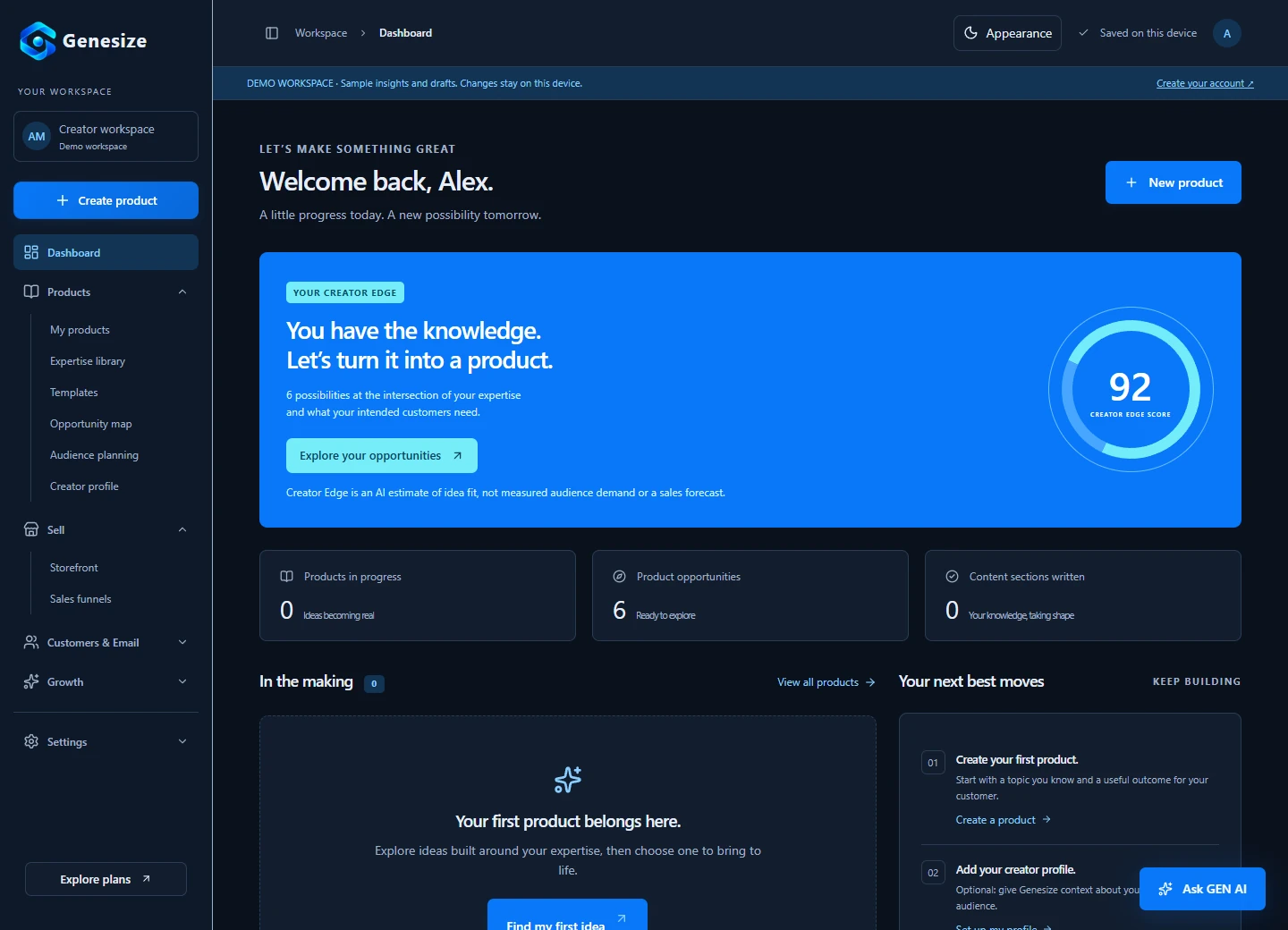
- Open Products → Templates → Template Pack. Choose the Template Pack starting format, then use Advanced Create when you want to control the brief and structure.
- Define the buyer, task and boundaries. Explain who will use the pack, what they need to complete and which claims or deliverables must stay outside its scope.
- Set the asset count and examples. Under Structure, this example uses three templates, Detailed complexity and filled-in examples. Keep all examples tied to Northbank Bicycle Workshop and the same three website pages.
- Review the credit quote before generation. The quote depends on your settings. AI covers, rewrites and funnel generation are separate actions with their own costs. Manual editing and document exports do not require another AI generation.
- Review the generated assets. Read the actual copyable template in every unit. Check that instructions match its fields and that the filled example uses the same facts, names, scope and deadlines.
- Design, export and test. Use the product’s Design & Export area for supported formats. Open the actual DOCX and PDF, check page breaks and try the template yourself. A preview alone does not validate the file.
A brief you can adapt
Create a three-asset Website Content Handoff Kit for freelance copywriters working on small business websites. Include a content brief, a missing-information email and a copy-approval checklist. Each asset needs the actual blank template, clear placeholders, short instructions, a filled example and a final quality check. Use the same fictional business throughout: Northbank Bicycle Workshop, with Home, Repairs and About pages. The visitor requests a repair appointment; the workshop confirms the time separately. Keep unconfirmed opening hours, service prices and claims marked for confirmation. Do not invent testimonials, legal terms or working files in external apps. Deliver copyable document content.
Replace that example with your own process and audience. Remove padding, repeated advice and inconsistent instructions. If the output describes a checklist without supplying its actual items, it still needs work. The buyer should receive usable assets, not a plan for creating them.
Step 4: test the pack with a realistic task
Use the blank version from beginning to end. For the Northbank example, complete the brief, identify missing repair information, adapt the email and run the approval checklist. Check that each step uses information supplied earlier. If the instructions refer to a field that does not exist, fix the pack before selling it.
Give a suitable tester the same files a buyer would receive. Observe where they pause, misinterpret a placeholder or need another tool. Ask what they completed, what remained unclear and what they would change. Record the conditions of the test rather than turning one person’s feedback into an unsupported performance claim.
- The blank version and completed example have matching fields and instructions.
- Names, page counts, dates and business facts remain consistent across all assets.
- Placeholders are easy to replace and contain no real customer information.
- The actual files open, print or duplicate in the applications you name.
- Links lead to buyer-accessible resources without edit access to your master.
- A short start-here note explains which asset to use first and where to get help.
Keep the first package simple. One editable DOCX containing the three named assets and a matching reading PDF may be enough. Label them with a product name and edition, such as Website-Content-Handoff-Kit-v1.0.docx. If you promise individual files, formulas, ZIP downloads or interactive forms, prepare and verify those exact deliverables separately.
Explain permitted use and protect the master
Tell buyers whether they can adapt the template for their own business, use completed documents with clients or redistribute the blank asset. Check the rights to fonts, images, stock elements and source material before selling. Buying an asset or generating text with AI does not establish every permission you might need.
For external tools, consult their current terms. For example, Canva’s official selling guidance requires original designs and places specific restrictions on templates using Pro Content, including delivery through Canva template links. A subscription is not blanket permission to redistribute library assets.
Notion’s Marketplace guidance also matters when distributing the same template elsewhere: paid Marketplace links can redirect to checkout and affect duplication. It instructs sellers using third-party payment sites to prepare a separate template copy and link. Test the exact buyer route instead of assuming every shared URL behaves alike.
Step 5: price the task solved, with realistic costs
There is no reliable universal price for a “digital template.” A simple worksheet, a specialist calculation tool and a complete client workflow have different uses, support needs and alternatives. Consider who buys it, what the pack includes, the work required to adapt it and the cost of maintaining it.
Our fictional $24 USD price is a starting hypothesis for the three-asset kit. It is not a market average or evidence that buyers will pay it. Put a useful sample and the complete contents in front of relevant people, then learn from actual interest, purchases, questions and refunds. Do not invent a higher “regular price” to create a discount.
A simple planning calculation
If one sale is $24 and you assume $3 in combined fees and variable support cost, the remaining contribution is $21. Recovering an illustrative $168 creation cost would require eight such sales: $168 ÷ $21 = 8. These are invented planning inputs, not actual provider fees, profit or a sales forecast. Taxes, refunds and other expenses may change the calculation.
Use your provider’s actual fee schedule and your own costs. Explain one-time versus recurring payment, currency, support, updates and required third-party accounts before checkout. Our digital product pricing guide includes a fuller worksheet for comparing offers and testing a price.
Step 6: show what buyers get and make delivery reliable
Build the sales page around the task and the actual files. Show a readable sample, list the assets and explain the required software. A polished cover helps someone recognize the product; the inside preview helps them evaluate it. Show a filled example as an example, rather than as evidence of customer results.
Collect the content before you write the website
The Website Content Handoff Kit helps freelance copywriters organize a small business website brief, request missing information and check copy before approval.
Includes three assets with instructions and fictional filled examples: a content brief, a missing-information email and a copy-approval checklist. Delivered as an editable DOCX and a reading PDF. $24 USD, one-time.
You will need to adapt the wording to your process and client. This kit does not include website development, a legal contract, a native Notion workspace or automatic client approval.
State the usage terms, support contact, refund policy and how access works. Keep promises consistent across the page, checkout and download. If a tool requires a paid account to use an included feature, disclose that requirement rather than leaving the buyer to discover it afterward.
In Genesize, prepare the saved product’s offer in Storefront, complete the creator’s Stripe connection and resolve payment readiness requirements. Use Sales funnels for a focused page when needed; a template starting mode is available alongside AI generation. Review the quoted cost before using AI.
Use Review & publish to inspect the draft and delivery preview before making the offer live. Check the buyer’s actual reader and download, then the page on mobile. A draft preview disables live checkout and forms; it does not prove that a payment has completed. Keep any sandbox payment tests separate from real orders.
For the complete page-to-purchase sequence, follow our digital product sales funnel guide. Selling a template does not require a long funnel, but it does require a working path from the offer to the promised resource.
Step 7: help suitable people discover and use it
Demonstrate the task, not just the cover. A short walkthrough of a vague content request becoming a completed brief gives buyers something concrete to judge. Explain which decisions your template helps organize and show the part they still need to complete. Use your own work or clearly labeled fictional examples.
Publish useful content around the problem: “questions to ask before writing a small business website” connects naturally to our sample. Share it where that advice is welcome, follow community rules and agree on any partner promotion. Search content takes time to gain visibility; neither a new page nor a marketplace listing guarantees visits. Our guide to selling without an audience explores practical discovery routes.
A free sample can help someone test your approach. If you collect an email address, explain delivery and any optional promotional follow-up. Send marketing only to people who chose it, honor unsubscribes and stop repeated promotion of the same offer after purchase. Email setup and allowances are separate from creating the template or its sales page.
After launch, watch the questions behind the numbers. Relevant visits without checkouts may suggest unclear fit or contents; downloads followed by repeated support requests may reveal a confusing instruction. These are hypotheses to investigate, not proof of a cause. Compare consistent time windows and use actual feedback before changing the offer.
Keep an edition log when you update the pack. Explain what changed and whether existing buyers need to download another copy. Downloaded documents and duplicated workspaces do not necessarily update when you edit your master. Improve the instructions or example that causes friction before expanding into unrelated assets.
Try the free website content brief template
This two-page sample helps organize a website project’s audience, action, page plan, evidence, materials and approval process. It contains fillable text fields and checkboxes, with prompts explaining what to enter. It is a separately prepared editorial resource, not an unmodified AI output or a complete copy of the fictional paid kit.
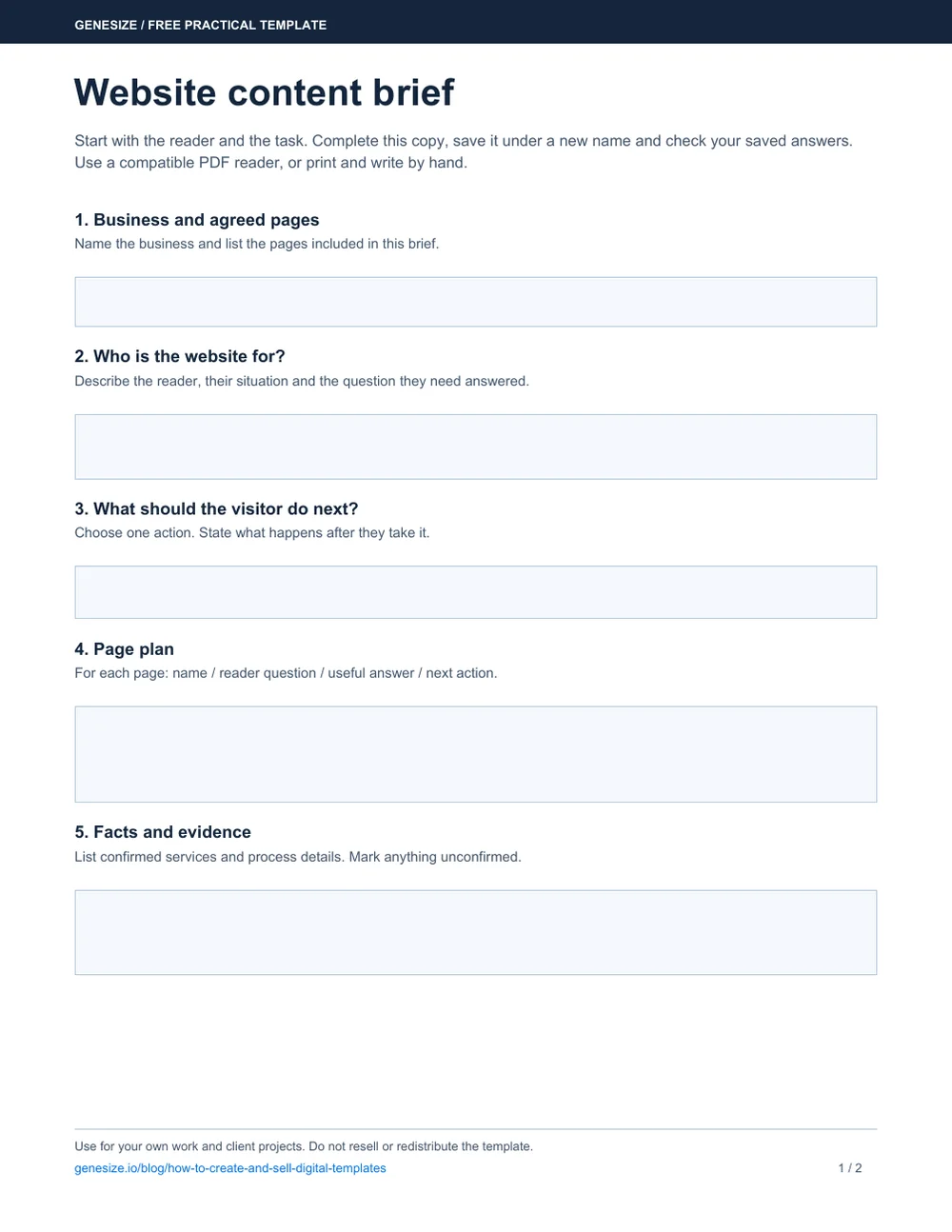
Website content brief
Download a copy and open it in a compatible PDF reader. Fill it in, save it under a new name and reopen it to check your answers. You can also print it and write by hand. For longer answers, attach a separate document rather than shrinking the text.
Download the free briefYou may use and adapt the sample for your own work and client projects. Do not resell or redistribute the blank or modified template as a standalone product. To build a product for sale, create your own assets and check the rights to included material.
Try it with Northbank Bicycle Workshop first: three pages, a local commuter audience and a request for a repair appointment. Then compare the sample’s prompts with the information your own process needs. The goal is a useful completed brief, not filling every box with words that do not help the next task.
Frequently asked questions about selling templates
How do I create and sell digital templates online?
Choose a specific buyer and repeated task, build an original reusable asset, add instructions and a completed example, and test the actual delivery format. Then publish a clear offer with the contents, compatibility, price, usage terms and access instructions. Bring relevant visitors to the offer and improve the product using real questions and feedback.
What digital templates can a beginner sell?
Start with a task you understand: a client brief, content-planning worksheet, email script pack, lesson-planning sheet or process checklist. Keep the first product narrow enough to test completely. A useful small template is a better starting point than a large collection of generic pages.
Can I use AI to create templates to sell?
AI can help draft fields, instructions, scripts and worked examples. Supply your own method and review the result for accuracy, consistency, usefulness and rights to included material. An AI description of a spreadsheet or design is not the working file. Build and test any external formats separately.
What template formats does Genesize create?
Genesize’s Template Pack workflow creates document-based assets such as copyable templates, scripts, checklists, worksheets and procedures, with instructions and optional filled examples. Supported document exports include PDF, editable DOCX and text. It does not turn a written template into a native Canva design, Notion database or working spreadsheet automatically.
Does a Genesize PDF export automatically contain fillable fields?
A Designed PDF export is a reading or printing copy. The separate Fillable workbook export adds response, next-action and notes fields; it does not convert every bracketed template placeholder into a custom form field. Test the chosen output in a compatible PDF reader. The free brief linked here has separately authored fields and is an editorial sample, not an unmodified Genesize export.
How much should I charge for a digital template?
There is no universal price. Consider the task, completeness, alternatives, compatibility, support and delivery costs, then test a clear offer with relevant buyers. This guide’s $24 USD toolkit price is a fictional starting hypothesis, not a market average, recommended minimum or verified sales result.
Can I sell templates without an audience?
Yes, but you still need a route to suitable buyers. Useful search content, demonstrations, appropriate communities and agreed partnerships can help people discover your work. A storefront does not supply traffic by itself, and neither AI generation nor a marketplace listing guarantees sales.
Can I sell Canva and Notion templates through another website?
The delivery and licensing rules depend on the tool and your setup. Use the correct template or duplication link, explain account requirements and test buyer access. Canva places specific conditions on templates using Pro Content. Notion’s paid Marketplace setup can change duplication behavior, so consult the current official guidance before distributing the same link elsewhere.
Can I resell the free template in this article?
No. You may use and adapt this Genesize sample for your own work and client projects, but you may not resell or redistribute the blank or modified template as a standalone product. To sell your own toolkit, develop original assets based on your expertise and check the rights to any material you include.
Turn your process into something others can use
Draft a focused Template Pack, refine the actual assets and test the buyer’s files. Then connect a clear offer to your storefront and delivery, with room to improve it as you learn.
Start your 14-day trialEligible new subscribers receive 400 total AI credits and up to 3 saved projects during the 14-day trial. Payment method required. Your selected paid subscription starts after the trial and automatically renews unless canceled. Review current plans and allowances before subscribing.