
Choose a problem you can help someone solve
An ebook is easier to explain when it helps a particular person do something specific. Start with questions you already answer, a process you use or a task you can teach clearly.
For this walkthrough, our example is The Freelancer Project Kickoff Guide. It helps freelance designers prepare a more organized start to a client project: clarify the brief, define deliverables, collect assets, agree on reviews and document the first milestone.
- Reader
- Freelance designers preparing client projects.
- Problem
- Missing assets, scattered questions and unclear responsibilities at the start.
- Useful outcome
- A prepared kickoff with an organized brief, asset list and written next steps.
- Format
- A concise ebook with a brief template, deliverable record, asset tracker and review checklist.
The sample content was prepared for this guide. Screenshots show the real Genesize interface in an isolated sample workspace, and the downloadable PDF uses Genesize’s export pipeline. This is an illustrative walkthrough, not a customer sales case study.
Before committing to the topic, talk to people who fit the reader. Ask what they find difficult and what a useful resource would contain. An AI-generated idea can help you brainstorm; it does not establish demand.
Plan the outcome and chapters before generating
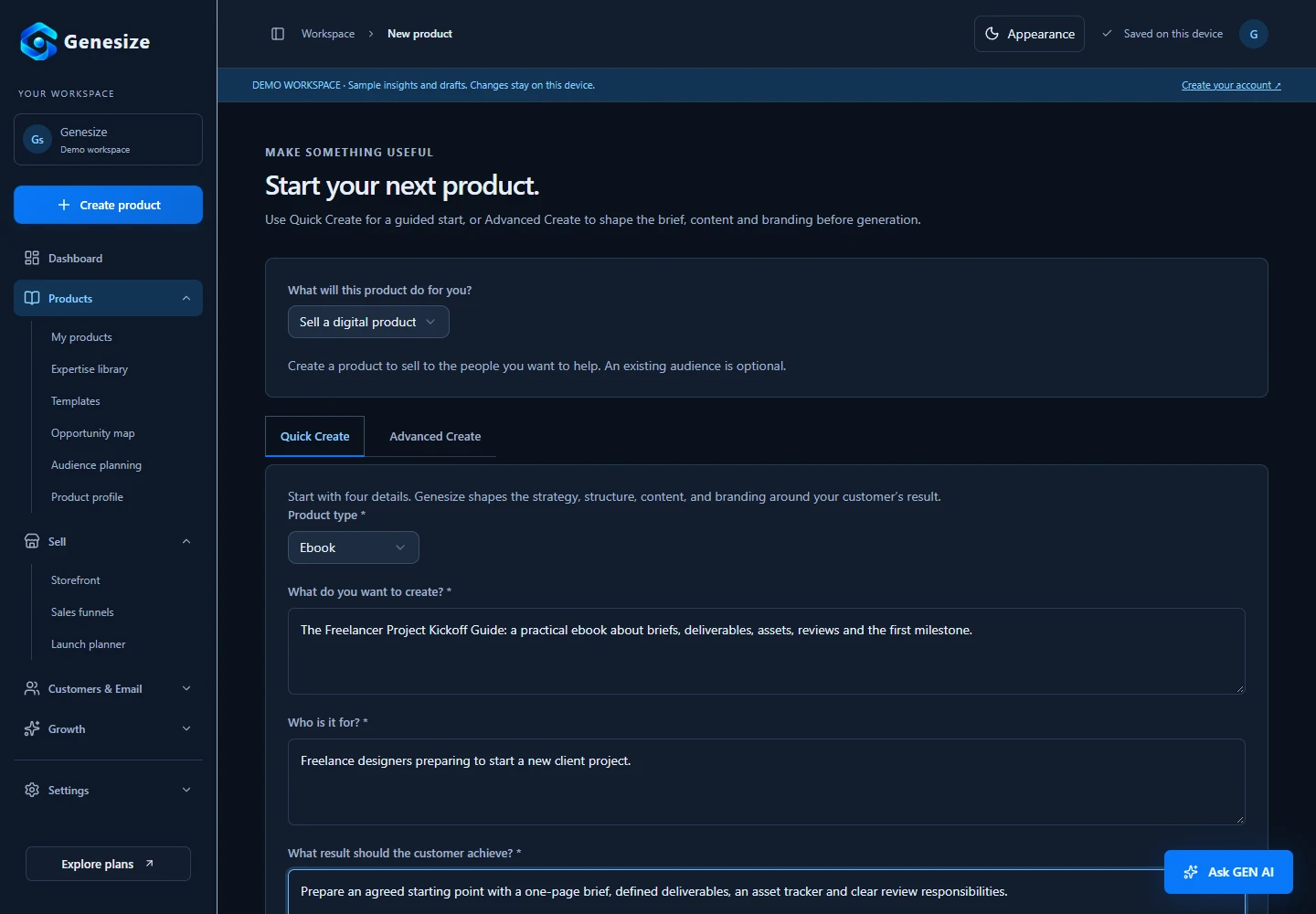
In Genesize, select New product and choose Ebook. Quick Create starts with the topic, audience and desired result. Advanced Create gives you more control over the content, structure, tone and branding.
A useful creation brief for our sample would be:
Create a practical ebook for freelance designers preparing a client kickoff. Explain how to write a brief, define deliverables, collect assets, organize feedback and confirm the first milestone. Use clear language, realistic examples and short checklists. Avoid promises about income or guaranteed project results.
Break the outcome into a sequence the reader can follow. For this example, the five chapters move from preparation to follow-through:
- Write the one-page brief.
- Define the deliverables.
- Gather assets without guessing.
- Agree on useful feedback.
- Confirm the first milestone.
In Advanced Create, select Create blueprint and review the proposed structure. Change the outline before selecting Approve blueprint and create product. Add relevant experience through the Expertise library when you have it; the AI should work from your knowledge, not invent your credentials.
Know the credit cost before you create
A five-chapter ebook at Standard depth with Balanced chapter depth contains 8 content sections, including the introduction, conclusion and resources. The current quote is 10 AI credits. An optional AI cover uses 2 more credits; an Expertise interview uses 3. Other AI actions have their own quotes.
Manual edits, design changes and exports use no AI credits. Your settings and additional actions affect the total, so use the quote in the app rather than assuming every ebook costs the same amount.
Generate the draft, then improve it chapter by chapter
AI can give you structure and a first draft. The next job is to make the material accurate, specific and practical. Open Content and review the chapters as if you were the reader trying to use them.
- Replace vague advice with actions a reader can carry out.
- Check facts, references and claims. Remove anything you cannot support.
- Add examples drawn from your experience, with permission where needed.
- Remove repetition and explain unfamiliar terms.
- Check that each chapter contributes to the promised outcome.
“Ask your client for feedback on the design. It helps to be clear about what you need and when you need it. Keep their comments together so you can review everything before making changes.”
“Send one review link and name the version being reviewed. Ask the client contact to collect comments in that document, resolve conflicting requests with their team, and return one agreed list. For each change, request the location, the problem, and the intended result. Agree on a review date together; if a decision is still open, record who will resolve it before revising that part of the design.”
The edited passage gives the reader a process. This staged example demonstrates the kind of revision to look for; it is not a claim that an AI tool produced either exact passage.
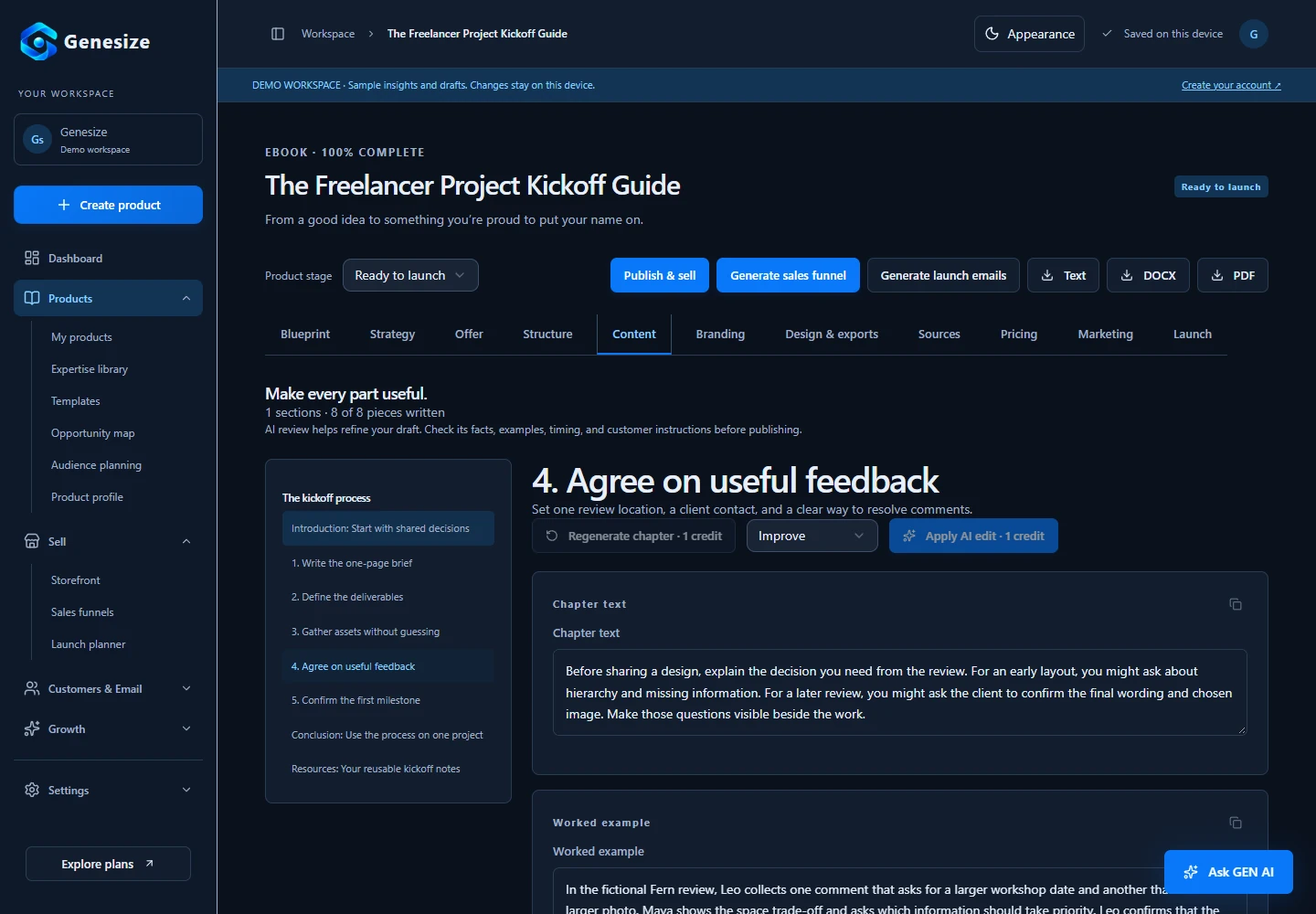
Use an AI rewrite when it helps you revise a selected passage, then review the result. For important details, your judgment and source material should guide the final wording.
Design a clear cover and export the finished ebook
Open Branding to review the title, subtitle and description. A cover should make the topic readable at a small size. Choose a clear visual direction and avoid clutter that competes with the title.
In Design & exports, choose a layout and accent color, enter the author information and review cover and contents settings. Our sample uses an editorial layout with a blue accent and a typography-based cover, without AI-generated artwork.
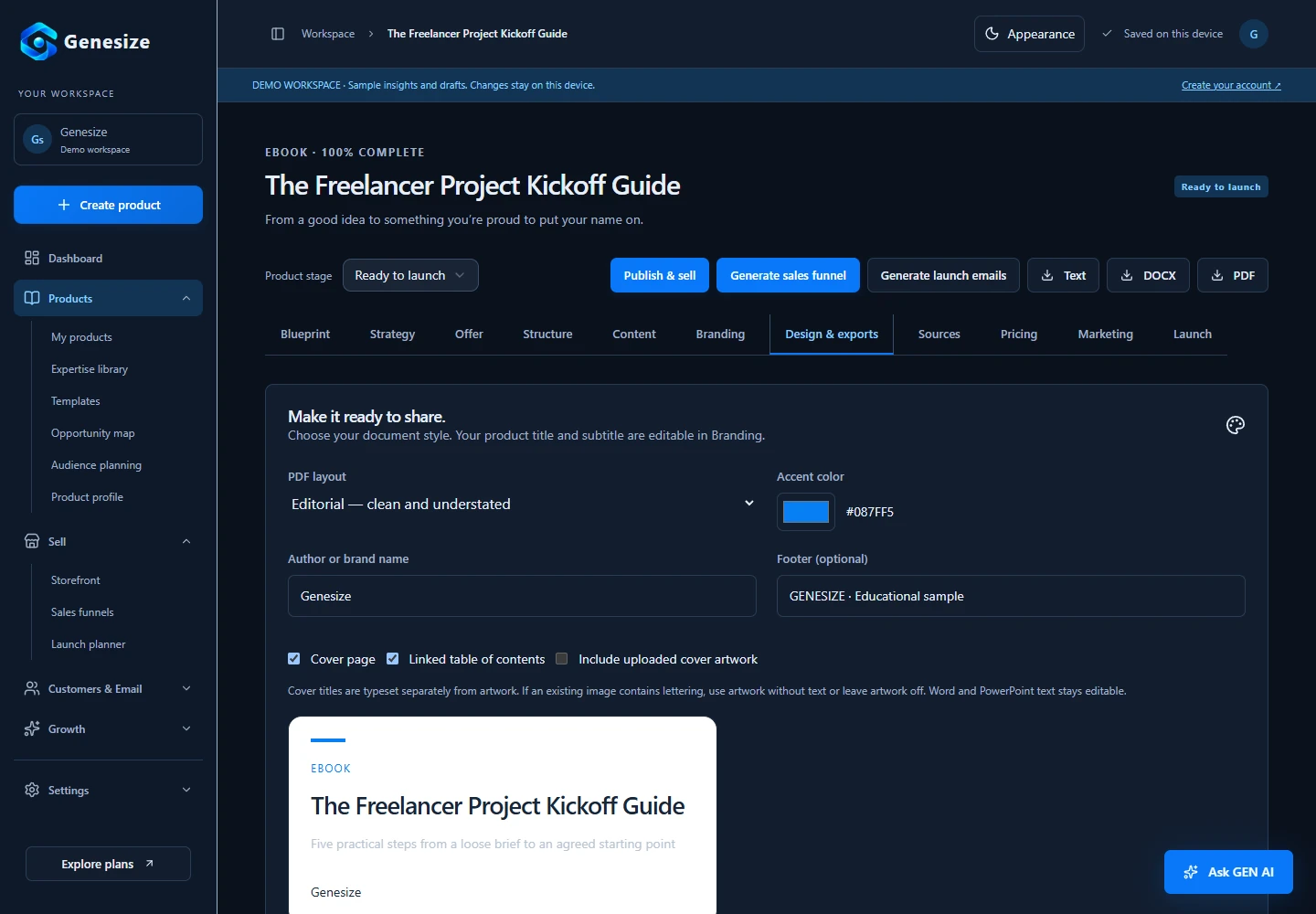
Export a PDF for a designed reading copy, DOCX for an editable Word document, or Text for plain content. Open the exported file and check every page. Look for clipped titles, awkward page breaks, missing text and links that do not work.
The Freelancer Project Kickoff Guide
Download the short illustrative ebook to see the contents, chapter layout and practical exercises produced by the export pipeline.
Prepare your Store listing and checkout
Select Publish & sell from the product to prepare its Store listing. Give a buyer enough information to decide whether the ebook suits them: who it helps, what is inside, the file format, the price and how they receive it.
A clear description for our example could be: “A practical guide for freelance designers preparing client kickoffs, with a brief template, deliverable record, asset tracker and review checklist.” Describe what the file contains without promising income, sales or guaranteed client outcomes.
For paid selling, open Storefront → Settings, enter your store and support information, and complete Stripe onboarding. Make sure payments and payouts are ready before publishing a paid listing.
Buyers use Stripe-hosted Checkout. Confirmed payment creates the Store order and grants access to the purchased product. Buyers do not need a paid Genesize subscription. Genesize does not take a platform revenue share of Store sales; Stripe’s processing fees still apply.
Price the product you actually made
Choose a price based on the usefulness, depth and audience of the resource. Explain what is included and show a preview. A price suggested by AI is a starting hypothesis, not evidence of what buyers will pay.
Generate a sales page from the finished ebook
Select Generate sales funnel, choose Sell product and use the Digital ebook template. Genesize can use the product’s existing information to draft the sales page and supporting checkout and thank-you copy.
- Headline: make the reader and useful outcome clear.
- Contents: show the chapters, exercises or resources they receive.
- Preview: help buyers understand the quality and format.
- FAQ: answer genuine questions about experience, delivery and the offer.
- CTA: give visitors an obvious next step connected to checkout.
Review all generated copy. Edit the sections and design, preview the mobile layout and publish the funnel. Editing a published funnel saves draft changes; republish when you want those changes on the live page.
The funnel’s AI cost is quoted separately from the ebook. A storefront gives visitors a place to browse your products; a sales funnel focuses attention on one offer. Choose the link that fits the traffic you plan to send.
Choose one realistic route to potential buyers
Creating an ebook and publishing its page does not automatically bring customers. Start with one relevant distribution route: a creator partnership, helpful content, a community that permits sharing or existing professional relationships.
For the kickoff guide, you could share a practical client-review tip with freelance designers and link to the resource for the full process. Make the connection between the useful advice and the paid product easy to understand.
If readers need to experience your work first, offer a small free resource such as a client-brief checklist. Use a lead-capture funnel when appropriate, and request separate permission for marketing emails.
Learn how to create a useful lead magnetOn eligible plans, customer records, email follow-ups and Growth Agent recommendations help you decide what to improve. Customer campaign sending unlocks after the first payment on plans that include email. Review and activate campaigns yourself.
Read the guide to selling without an audienceCheck the complete experience before launching
- The title, contents and sales copy describe the same product.
- Every chapter has been reviewed for accuracy and usefulness.
- The exported file opens correctly and every page is readable.
- The published offer looks clear on a phone.
- Stripe onboarding and paid checkout are ready.
- A controlled test confirms payment, access and file delivery.
- Support information and purchase terms are visible.
- There is a realistic plan to reach potential readers.
For a payment test, ask Genesize support to arrange a designated sandbox checkout. Store checkout mode is controlled by Genesize; switching your Stripe Dashboard to test mode does not change a live Store checkout. Never enter test card details into live checkout. After launch, use actual visits, checkout starts and paid orders to understand the next problem to solve.
A working ebook business combines a useful resource, a credible offer, reliable delivery and distribution. AI can help with the work, but publishing the file alone does not guarantee sales.
Creating and selling ebooks with AI: FAQs
Can AI write an entire ebook?
AI can help create a structured draft, but you should review every chapter. Your expertise, accurate examples, useful exercises and editing make the resource worth reading. Do not treat generated text as automatically correct or ready to sell.
What ebook files can I export from Genesize?
Genesize’s ebook workflow exports PDF, DOCX and plain text. PDF provides a designed reading copy; DOCX gives you an editable Word document. EPUB export and publishing directly to ebook marketplaces are not part of this workflow.
How many AI credits does an ebook use?
A five-chapter ebook at Standard depth with Balanced chapter depth is quoted at 10 credits. An optional AI cover costs 2 credits. Larger products, deeper content and additional AI actions can cost more. Check the quote shown before each action; manual editing, design adjustments and exports use no AI credits.
Can I sell an ebook without an audience?
Yes, but you still need a route to potential buyers. You can partner with a creator, share useful material in relevant communities, publish helpful content or reach people through existing business relationships. A storefront and funnel support the sale; they do not automatically bring traffic.
Does Genesize take a cut of ebook sales?
Genesize does not take a platform share of product sales through its Store. Payments go through the workspace’s connected Stripe account, and payment-processing fees still apply.
Bring your knowledge. Build the product and the offer.
Use Genesize to develop an editable ebook, prepare its design and connect the selling workflow in the same workspace.
Start your 14-day free trialEligible new subscribers receive 14 days with 30 total AI credits and up to 3 saved projects. A payment method is required. The selected subscription renews unless canceled. The total credit cost depends on your settings and additional AI actions.