

What does selling a $19 PDF cost?
Suppose your finished client-kickoff guide sells for $19 USD. The figures below cover platform charges only: one pre-tax order, monthly subscription billing, no discount or refund. Payment processing and other costs are excluded.
On a phone, swipe the table to see each sales route.
| Plan | Monthly plan | One direct-sale fee | One Marketplace-sale fee | Plan + 20 direct-sale fees |
|---|---|---|---|---|
| Free to Sell | $0 | $1.90 | $5.70 | $38 |
| Starter | $34 | $1.23 | $3.80 | $58.60 |
| Scale | $58 | $0.66 | $1.90 | $71.20 |
| Business | $128 | $0.28 | $0.95 | $133.60 |
Twenty orders produce $380 in gross sales. On Free to Sell, 20 direct-sale commissions total $38; 20 Marketplace commissions total $114. Marketplace pricing replaces the direct rate for that sale. Listing a product does not guarantee Marketplace traffic or sales.
For the same $19 sale through your own Podia link, Mover’s 5% platform fee is $0.95. Add its $49 monthly subscription and 20 such fees: $68 before processing. Shaker’s 0% Podia sales fee leaves its $99 monthly subscription in this partial example. These costs buy different capabilities; this is not an overall cheapest-platform ranking.
Podia rates: official fee schedule and published monthly prices. Genesize figures use its current commission rules, rounded to cents separately for each order.
Use your own sales mix
Enter the actual plan/channel percentage, your processor quote and any subscription cost in the fee and break-even calculator. For mixed Genesize traffic, calculate direct and Marketplace orders separately, then add the subscription once. No tax, processing rate or sales volume is assumed for your business.
Genesize vs Podia at a glance
Compare the workflow your existing files need. Neither an AI draft nor a longer feature list is a reason to recreate a finished product.
On a small screen, swipe the table to compare both platforms.
| What you need | Genesize | Podia |
|---|---|---|
| Ongoing selling subscription | Free to Sell: $0/month. Optional paid plans from $34/month | $49/month |
| Finished products | Uploaded downloads and existing courses; no uploaded-product count cap, with file and storage limits | Downloads and courses; Mover allows 50 products |
| Course delivery | Written lessons, supported YouTube/Vimeo links, downloads, manual completion and saved progress; no native video hosting | Hosted video/audio lessons, resources and course-learning tools |
| Selling and delivery | Storefront, connected Stripe checkout and delivery | Online store, checkout and product delivery |
| Sales pages | Product pages for uploaded products; paid plans add editable AI sales funnels | Customizable product sales pages and landing pages |
| Email and customer tools | Free purchase receipts and delivery; CRM, marketing and Growth Agent on Scale/Business | Email on all plans, with subscriber limits |
| AI assistance | Optional paid AI creation; Growth Agent on Scale/Business. Free to Sell excludes AI | Built-in Podia Agent and optional external AI through MCP; usage limits apply |
| Community and memberships | All paid plans; paid community memberships use USD card/Link. Free excluded | Included, with plan-dependent community space limits |
| Platform fee on product sales | Free to Sell 10% direct · 30% Marketplace. Starter 6.45% direct · 20% Marketplace. Scale 3.45% direct · 10% Marketplace. Business 1.45% direct · 5% Marketplace. Rates apply before tax. Stripe processing is separate. | 5% on Mover; 0% on Shaker and Earthquaker |
Payment-processing fees apply separately on both platforms. Subscription limits and included features differ; these entry-level plans are not equivalent packages.
Podia sources: annual pricing and limits, monthly plan prices and features.
You can sell what you already made
On Free to Sell, add your existing PDF, ZIP, spreadsheet, template files or course. Uploading existing content and editing it manually use no AI credits. Free to Sell excludes AI, CRM, email marketing and communities; purchase receipts and private delivery are part of selling.
- Finished downloads: attach the actual supported files, describe what is included and set your price.
- Existing courses: arrange modules and lessons with written notes, supported YouTube/Vimeo links and original resource files.
- Catalog size: uploaded products have no product-count cap. Each product supports up to ten original files of 50 MB each, within workspace storage allowances.
- Buyer access: check the downloads and lesson order. Course learners can mark lessons complete manually and resume saved progress.
Already have the file? Start with delivery.
Use the PDF selling and receipt walkthrough for a download, or the existing-course publishing guide for lessons and hosted recordings.
Videos stay with their YouTube or Vimeo host, which controls availability and privacy. An MP4 attachment is a download, not native streaming. Genesize does not include graded quizzes or course certificates. Community scheduling and learning analytics are separate from standalone purchased courses.
If you still need to create material, compare both AI options
Paid Genesize tools can draft written products, examples and sales funnels; Scale and Business add the Growth Agent. Review the output and the displayed credit quote before generating.
Podia Agent is built into its dashboard and can draft lessons, products and campaigns and perform supported actions. It has plan-dependent daily message allowances shared across the site. Podia MCP is a separate route for connecting external AI tools. Compare the actual result and usage rules rather than treating messages and Genesize credits as equivalent.
Check what the buyer receives before you share
For the example guide, your offer should say that the buyer receives the client-kickoff PDF, not a service or live session. Check the file, page, price and private access before publishing your link. Paid plans can add an editable sales funnel when you need one.
- 1
Add your files
Use the finished PDF or original course resources.
- 2
Check the offer
Review the price, included files and buyer experience.
- 3
Publish
Complete Stripe setup and share your published sales link.
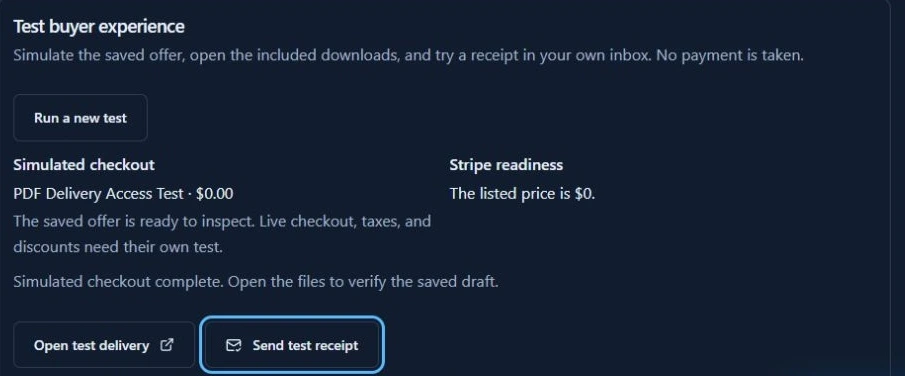
In Studio’s Test buyer experience panel, open the test delivery and inspect the files. You can send a test receipt to your own verified inbox and check its link while signed out on your phone. This simulation does not verify live payment, tax or discount handling; those need their own supported checkout test.
Preview the page on desktop and mobile before publishing. On Scale and Business, CRM, email follow-ups and Growth Agent recommendations help you manage customer activity and decide what to improve next. You review recommendations and activate campaigns yourself.
Follow the PDF buyer-check stepsWhere Podia may be the better fit
Podia is worth considering if your business needs a broader website and hosted learning environment. Its course tools include video lessons, quizzes, drip content, progress tracking and completion certificates. Podia course tools
Podia also offers community spaces, a website builder, blogging and custom domains. Its email platform includes broadcasts, automated sequences, segmentation and sales tracking. Podia website and community features; Podia email tools.
What do Genesize communities include?
Every paid plan includes discussions, member resources and free or paid community memberships. Paid community memberships currently use USD card or Link checkout; that restriction does not apply to ordinary Store product currencies. Free to Sell excludes communities. Genesize does not currently provide custom storefront domains or a general website builder.
Compare the cost of your actual workflow
Genesize Free to Sell is $0 per month with sales commissions. Paid subscriptions start at $34 USD per month. Paid annual billing saves 30% compared with twelve monthly payments and is paid upfront. The paid plans below are optional when selling uploaded products.
Starter
$34/month
or $285.60 billed yearly
- 3 saved product projects
- 1000 AI credits/month
Scale
$58/month
or $487.20 billed yearly
- 10 saved product projects
- 2500 AI credits/month
Business
$128/month
or $1,075.20 billed yearly
- 30 saved product projects
- 6000 AI credits/month
Saved product project allowances concern Genesize-created projects; they do not cap uploaded products. File and storage limits apply on every tier. Free to Sell has no monthly AI credits.
Starter includes product creation and selling tools. Scale and Business add CRM, email and Growth Agent tools. All paid plans include communities and paid memberships. Business adds more capacity.
AI credits are charged by action. One credit does not mean one complete product. Costs are shown before generation; manual editing, design adjustments and exports use no credits. Monthly plan credits refresh monthly and do not roll over.
Podia’s published plans combine hosting, selling and other business tools. Its 14-day trial does not require a card; ongoing selling uses a paid plan.
| Plan | Monthly billing | Annual upfront | Products | Included email subscribers |
|---|---|---|---|---|
| Mover | $49 | $504 | 50 | 100 |
| Shaker | $99 | $1,008 | 150 | 500 |
| Earthquaker | $179 | $1,800 | Unlimited | 1,000 |
Sources: official monthly plan list, annual pricing and fees, plan limits and trial FAQ. Annual prices are upfront commitments, not month-to-month billing. Check the current checkout quote and applicable taxes.
Mover’s 5% Podia sales fee and Shaker/Earthquaker’s 0% platform fee are separate from payment processing. Included email subscribers are not the same as all customers or community members. A larger marketing list can add to the subscription cost. Genesize’s marketing and CRM tools require Scale or Business; customer marketing sending starts after the first paid subscription payment and has allowances.
Compare all Genesize plan featuresComparing another digital-product selling platform? See our Genesize vs Gumroad comparison.
06 / YOUR QUESTIONSFrequently asked questions
Is Genesize a Podia alternative?
Yes, for selling finished downloads or an existing course using supported hosted-video links. Free to Sell is $0 per month plus sales commissions and separate Stripe processing. Paid plans add AI creation and communities; Scale and Business add CRM, marketing and Growth Agent tools. Compare Podia when native course hosting, its website builder or other school tools are essential.
Is Genesize Free to Sell the same as a free trial?
No. Free to Sell is an ongoing $0 monthly tier for uploaded products and existing courses, with 10% direct · 30% Marketplace commissions before tax and separate Stripe processing. It excludes AI, CRM, email marketing and communities. Uploaded products have no count cap; file and workspace storage limits still apply. Podia offers a temporary 14-day trial, followed by a paid selling plan.
Does Podia have AI features?
Yes. Podia Agent is built into its dashboard and can draft products, lessons and campaigns and perform supported tasks. Daily message allowances depend on the plan and are shared across the site. Podia also supports external AI connections through MCP. Genesize offers paid AI creation and, on Scale/Business, Growth Agent tools; the outputs and usage allowances are not equivalent units.
Podia Agent documentationDoes Genesize take a percentage of product sales?
Yes, on Free to Sell and paid plans. Free to Sell 10% direct · 30% Marketplace. Starter 6.45% direct · 20% Marketplace. Scale 3.45% direct · 10% Marketplace. Business 1.45% direct · 5% Marketplace. Rates apply before tax. Stripe processing is separate. The worked example on this page uses a $19 pre-tax one-time order and rounds each Genesize commission to the nearest cent before adding orders. Subscription charges and processing are separate costs.
Can buyers watch my existing course in Genesize?
Existing courses support written lesson notes and supported YouTube/Vimeo video links, with private buyer access, manual completion and saved progress. Video availability and privacy remain controlled by the host. An MP4 attachment is a downloadable file, not native streaming. Genesize does not provide graded quizzes or course certificates. Community lesson scheduling and analytics are separate from standalone purchased courses.
Does Free to Sell include customer emails and CRM?
It includes purchase receipts and private purchase delivery, but not email marketing or CRM. Scale and Business include campaigns and follow-ups with allowances; live customer marketing sending requires the first paid subscription payment. All paid plans include communities and memberships. The USD card/Link scope applies to paid community memberships, not ordinary Store product currencies.
How does the separate Genesize paid-plan AI trial work?
Eligible new subscribers receive 14 days with 400 total AI credits and up to 3 saved product projects. A payment method is required, and the selected subscription renews unless canceled. On plans that include email marketing, customer campaign sending unlocks after the first payment.
Can I move my customers and subscriptions automatically?
Do not assume so. Product files, course lessons, student progress, existing access, recurring payments and email permissions are separate migration tasks. Test a small offer and confirm the supported import and export paths before changing access for existing customers. This comparison does not claim automatic migration between the platforms.
Give your finished product a place to sell.
Upload your existing files or organize your course, check buyer access and publish your sales link.
Sell your finished productFree to Sell is $0 per month with sales commissions and separate Stripe processing.
Need help creating the product? Explore paid AI plans instead.
Separate paid-plan AI trial for eligible new subscribers: 14 days, 400 total AI credits and up to 3 saved product projects. A payment method is required. Your chosen plan renews unless canceled.
Published by Genesize. Comparison checked November 19, 2026 using current Genesize capabilities and Podia’s official documentation. Prices are in USD; applicable taxes and payment-processing fees are additional. Features and prices may change. Compare a small new offer before moving existing customers, subscriptions or learning history; no automatic migration between the platforms is claimed here.