
What makes repurposed content worth buying?
A folder of articles is source material. A useful product gives the reader a clearer route through a problem: what to do first, why it matters, how to do it and how to check their work. Changing the cover or collecting posts into a longer PDF does not automatically create that value.
Imagine a copywriter who has taught a workshop about gathering information before writing a client’s website. Their notes contain useful questions, but the workshop also relied on spoken explanations, discussion and slides. A buyer reading alone needs those gaps resolved. A guide could add a logical sequence, a complete fictional brief and a review checklist.
That is a proposed benefit, not proof of demand. Ask likely buyers what they currently struggle with and whether your proposed resource would help. Our digital product validation guide explains how to test the idea before expanding it.
One product, one useful job
“Everything I know about websites” is difficult to scope. “Help a freelance copywriter prepare a usable client website brief” gives you a reader, a task and a way to decide what belongs. A useful small product can be a better starting point than a long collection of unrelated material.
1. Choose source material that deserves a place in the product
List what you already have and the question each item answers. Group sources by the task they support, not only by topic. Five posts about different parts of freelancing may be less useful together than two focused notes about preparing and reviewing a brief.
| Source material | Possible product | What you still need to add |
|---|---|---|
| Related articles or newsletters | A focused ebook or guide | A coherent sequence, updated facts, transitions, examples and a practical next step |
| Workshop notes or an existing transcript | A guide or written course | Explanations that stand alone, teaching before exercises and checks on the learner’s work |
| Your own repeated client process | A workbook or template pack | Reusable prompts, instructions, a blank version and a completed fictional example |
| Your own answers to recurring questions | A short guide or lead magnet | One specific task, essential context and clear limits on what the resource covers |
Check permission, privacy and accuracy first
Use material you are entitled to adapt and sell. Check any client agreements, licenses, permissions and contributor arrangements that apply. Do not assume a document is yours to commercialize because you can access it or helped produce it. Replace real client details with an original fictional example when private information is unnecessary.
Remove passwords, personal contact details, confidential figures and participant discussion before importing a source. Check time-sensitive facts against current primary sources. Keep a short source inventory with the original file, date, permitted use and facts that need another review. If rights are uncertain, resolve them or leave the material out.
2. Choose a format that matches what the buyer needs to do
Choose a guide or ebook when the reader needs an explanation and a sequence they can follow independently. Choose a workbook when most of the value comes from making decisions, recording answers or practicing a method. Choose a written course when the skill needs a staged learning path with instruction, examples, practice and review. A template pack fits a repeatable task when you can supply working assets and clear instructions.
The same source should not become every format by default. Our workshop notes might support a short guide first. A course would need enough teaching and practice to justify lessons; a template pack would need genuinely reusable files, not merely a chapter describing them.
For a course, match the promised skill to what you teach and ask learners to do. Carnegie Mellon’s teaching guidance explains why objectives, instruction and assessment should reinforce each other. Applied here, a course promising a usable website brief should include practice preparing and checking one, not only a quiz about definitions.
Choose length after scope. A focused task may fit an approximately 3,000-word guide; a deeper process may need more. Extra words should provide necessary explanations or examples. See our AI ebook guide and written-course guide for their separate creation workflows.
Worked example: turn workshop notes into a practical guide
This is an original fictional editorial example, not a customer case study or a measured AI-generation result. A copywriter owns notes from their client-brief workshop. The proposed reader is a freelance copywriter preparing to write a small business website. The intended outcome is a brief with agreed pages, clear next actions, confirmed facts and unresolved questions.
The starting material
Before writing a client’s website
- Decide who the website is for before drafting copy.
- Agree the pages and one main next action for each page.
- For a repair workshop, requesting an appointment is not the same as confirming a booking.
- Ask who confirms the requested time, by which channel, and what happens if it is unavailable.
- Collect evidence for claims and mark missing facts as questions.
- End by agreeing who reviews the brief and what still needs an answer.
Those notes contain a useful method, but they do not yet teach someone how to apply it alone. The creator needs to decide what carries forward and what must change.
| Decision | Change to make |
|---|---|
| Keep | The distinction between an appointment request and a confirmed booking; the questions that resolve missing facts. |
| Remove | The workshop welcome, break announcements, repeated audience questions and references to a slide the reader cannot see. |
| Reorder | Define the reader and page purpose first, then the action, evidence, unresolved questions and review. |
| Add | A completed fictional example, a short practice task and a checklist for reviewing the resulting brief. |
Digital.gov’s plain-language guidance recommends organizing information around the reader’s needs and presenting process steps in their logical order. Our application is to rebuild the workshop around the buyer’s task rather than preserve the order of the live session.
A four-part structure
- Define the reader and the page’s job. Describe the visitor, the question they need answered and the purpose of the page.
- Choose a clear next action. Distinguish a request from a confirmation; explain what happens after the visitor acts.
- Separate facts from assumptions. Record the evidence for each claim and turn missing information into specific client questions.
- Review and hand off the brief. Check the page list, actions and open questions, then agree who reviews the brief.
Before and after: add the explanation the notes leave out
Choose a CTA. Ask what happens next.
Choose one main next action for each page. For the fictional Northbank Bicycle Workshop, a visitor can request a repair appointment. That request does not confirm a time. Before drafting the page, ask who confirms availability and how the visitor receives the answer. If that process is unresolved, record the question in the brief instead of promising an instant booking.
Why this helps: the excerpt defines the decision, demonstrates it and explains what to do when a fact is missing. It does not invent opening hours, prices or a booking system.
Add practice after the teaching
Exercise: Northbank needs a Home page, Repairs page and About page. Using the teaching above, write the Home page’s main action and two questions to resolve before writing its button and confirmation text.
Review check: a suitable answer describes requesting an appointment and asks who confirms availability and how the visitor is notified. “Book a guaranteed slot instantly” conflicts with the stated process. Record unanswered questions rather than filling them with guesses.
Keep those facts in an example ledger while editing: business name, three pages, appointment request and staff confirmation. If a later chapter suddenly promises immediate booking, you have a concrete inconsistency to fix. This is a manual editorial technique you can use alongside AI drafting.
3. Give AI a brief that protects the useful parts of your material
Give the model a defined reader, outcome, format and boundaries. Supply a focused source summary, explain what must stay consistent and ask it to flag missing facts. “Turn this into a bestselling ebook” gives little direction and asks for an outcome the model cannot establish.
Adaptable drafting brief
Create a practical guide for freelance copywriters preparing a client website brief. Use my approved workshop notes as background. Help the reader define the audience, agreed pages, next actions, confirmed facts and unresolved questions.
Use Northbank Bicycle Workshop as a clearly fictional practice example. The website has Home, Repairs and About pages. Visitors request an appointment; staff confirm the time separately. Keep those details consistent. Do not invent prices, hours, customer results or instant booking.
Explain each method before its exercise. Add a worked example and a review check. Flag missing information as a question. Remove repetition and references to unavailable slides. Treat the output as a draft for my review.
Adapt the brief to facts you can support. A request to stay consistent is useful direction, not a guarantee of compliance. Read the output and compare it with the source inventory and example ledger yourself.
Google’s guidance on generative AI content recognizes its use in research and structure while emphasizing accuracy, relevance and review. For a product, the practical lesson is to use AI as drafting assistance and take responsibility for the finished material. An AI draft does not validate buyer demand or make unsupported claims true.
4. Reuse approved knowledge in Genesize
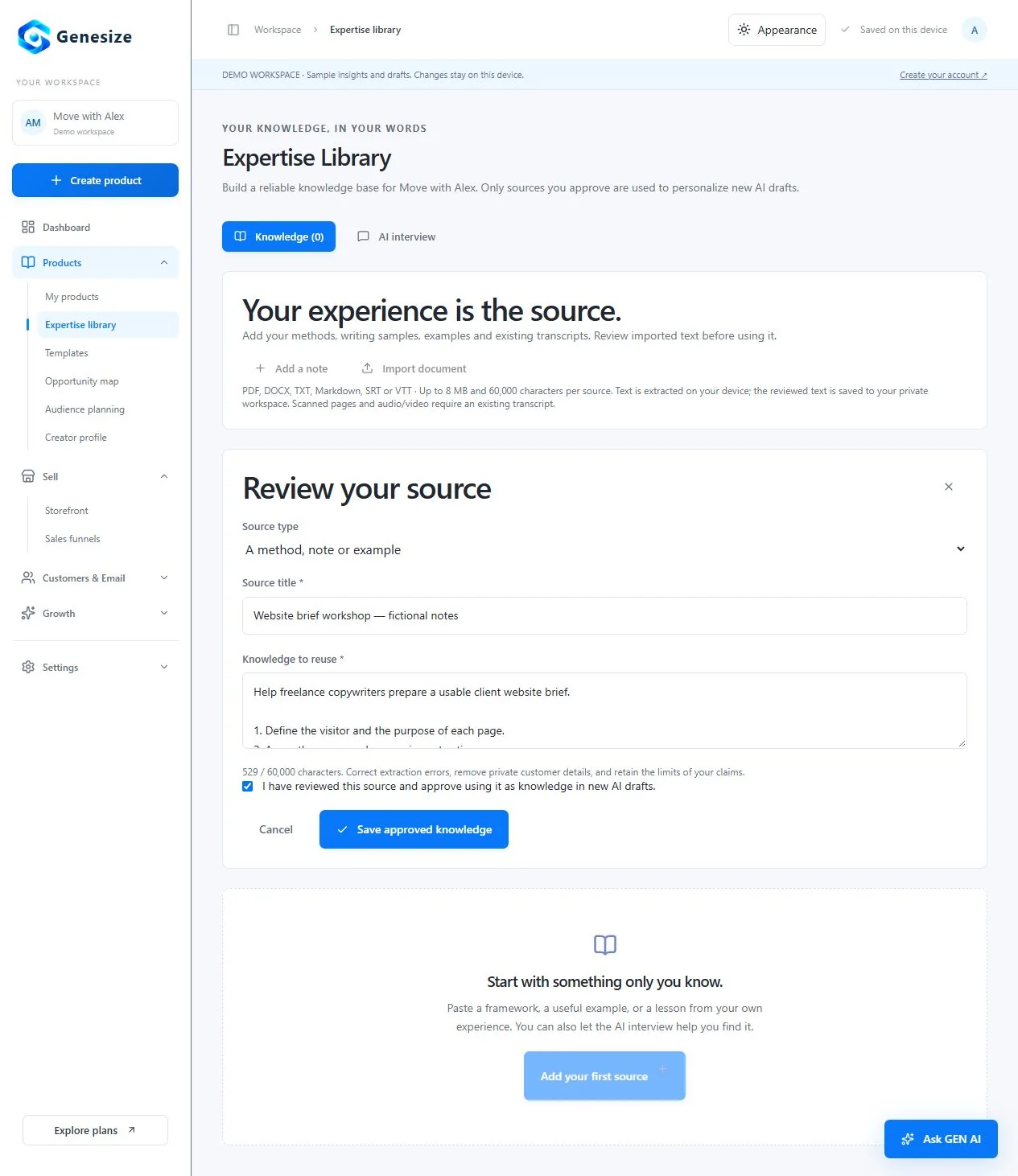
In Genesize, the Expertise library stores reviewed knowledge that can inform new product drafts. Keep each source focused and give it a descriptive title so relevant material is easier to identify.
- Open Products → Expertise library → Knowledge. Choose “Import document” for an existing file or “Add a note” for text you have prepared.
- Review the Source title and Knowledge to reuse. Correct extraction errors, remove private details and keep the knowledge relevant to the task. Importing a document extracts readable text; it does not retain the original page design or media.
- Approve deliberately. Select “I have reviewed this source and approve using it as knowledge in new AI drafts,” then choose “Save approved knowledge.” New imports are unapproved. Editing a source clears its approval so you can review it again.
- Choose Create product and define the brief. Quick Create asks what you want to create, who it is for and what result the customer should achieve. Advanced Create lets you develop and review a blueprint before generating the product. Put essential facts and exclusions in the brief.
- Review length and credits before generating. Ebook options include approximate 3,000, 8,000 and 12,000 words, plus a custom structure. The creation action shows its credit quote. Optional AI covers, funnels and revisions have separate costs; manual editing, design changes and exports use no AI credits.
- Inspect the product’s Sources and content. Compare the saved source context with the result, add missing explanations and correct inaccurate examples. Later library edits do not automatically update products that already hold a saved source snapshot.
Relevant excerpts, not whole-document conversion
Product generation selects relevant excerpts from approved knowledge using the topic and audience in the brief. It does not read every uploaded page into every draft or reproduce the original document unchanged. Use focused sources, repeat essential requirements in the brief and check for omissions. Import is not a promise that the original file will be sold unchanged.
Supported source files and important limits
The document importer accepts PDF, DOCX, TXT, Markdown, SRT and VTT files up to 8 MB and 60,000 characters per source. PDF extraction supports up to 150 pages and requires readable text. Scanned images and password-protected PDFs are not supported for this workflow. Text files need UTF-8 encoding.
For a podcast or webinar, supply an existing transcript you are entitled to reuse; this importer does not transcribe recordings. Replace references such as “look at this diagram” with a complete explanation or a properly supplied visual. Extraction happens in your browser, but reviewed knowledge is saved to the workspace and approved excerpts can be sent to the AI provider for generation.
5. Review the finished product, not only the draft on screen
Read the material in the order a buyer will encounter it. Check the introduction, each teaching section, the practice tasks and the final next step. A product can be grammatically polished and still give contradictory instructions or leave the reader without enough information to act.
- Every section helps the intended reader complete the stated task.
- Teaching comes before the exercise that relies on it, and the exercise has a useful review check.
- Names, prices, quantities, policies and example details stay consistent throughout.
- Facts agree with current primary sources; unsupported claims and invented results are removed.
- The text does not refer to missing slides, recordings, links or files.
- The chosen length contains useful detail rather than repeated advice or filler.
- Private information and material you are not entitled to reuse are excluded.
- The actual export opens, reads well on a phone and includes every promised asset.
Open the export and try the task
Use Design & exports to inspect the appropriate output, such as Designed PDF or Editable Word document. Read headings, tables, page breaks, links and exercise order in the actual file. If you offer a fillable workbook, test the fields in a compatible PDF reader, save a copy and reopen it to confirm the answers remain.
Ask someone close to the intended audience to try a small task without your spoken explanation. Note where they stop, misunderstand a term or need a missing example. That feedback is more useful than asking only whether the cover looks professional. Do not turn a single test into a claim that the product guarantees results.
Keep a versioned copy of your original sources and reviewed export. When a fact changes, inspect the product and buyer-facing offer together. Updating a knowledge source alone does not update every existing product or published edition.
6. Connect the useful product to a clear offer
Explain exactly what the buyer receives: format, contents, intended use, prerequisites, price, access and support. If the workshop became a written guide, do not sell it as a video course. If you promise a separate checklist or editable template, create and test that asset before listing it.
Use the annotated sales-page examples to write the offer, then review the pricing guide. A price should reflect the value and scope you can support; repurposing an existing asset does not guarantee that someone will buy it.
In Genesize, review the saved product, prepare its Store listing or sales funnel, complete the required Store and payment setup for a paid offer, and inspect buyer access and downloads. A draft preview has disabled checkout and does not establish a completed payment. Follow the funnel and buyer-journey guide for the connected setup.
After launch, use buyer questions, product feedback and meaningful analytics to decide what needs improvement. Clarify a confusing explanation before expanding the product with unrelated chapters. For permitted follow-up, our email marketing guide explains campaigns, buyer exclusions and delivery considerations. Publishing a product does not automatically start a marketing sequence.
Download the free content-to-product planning worksheet
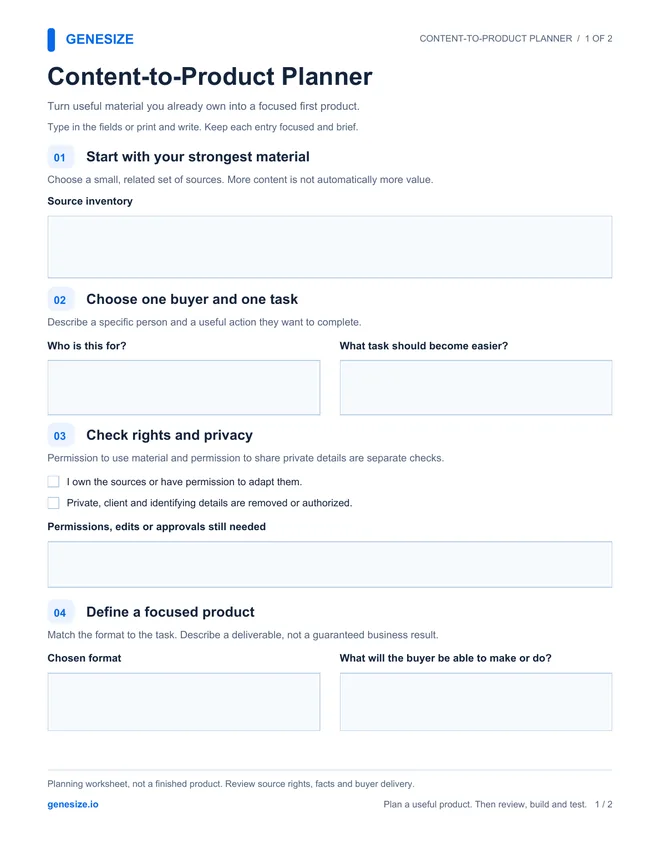
Use this two-page planner to inventory sources, choose a buyer outcome and decide what to keep, remove, reorder and add. It includes interactive fields and review checkboxes. The worksheet is a separately prepared editorial resource, not a finished sellable product or an unreviewed AI output.
Content-to-Product Planner
Download the PDF and open it in a compatible reader. Save a new copy after filling it in and reopen it to check your answers. You can also print it and write by hand; keep longer drafts in a separate document.
Download the free planning worksheetUse and adapt it for your own business and client work. Do not resell or redistribute the blank or modified worksheet as a standalone product. Review your source permissions, facts and actual buyer delivery.
Frequently asked questions about repurposing content into products
What existing content can I turn into a digital product?
Your own related articles, newsletters, workshop notes, readable documents, existing transcripts and repeatable processes can provide source material. Choose content you are entitled to reuse that helps one defined audience complete a useful task. Update it, remove private information and add whatever explanation, examples or practice the buyer needs.
Why would someone buy information I already share for free?
A paid resource can offer a more convenient sequence, deeper explanations, useful tools, worked examples or structured practice. That additional value must be real and accurately described. Repackaging free articles does not establish demand or justify a price by itself; test the proposed outcome with likely buyers.
Can AI turn my blog posts into an ebook?
AI can help group related posts, propose an outline and draft transitions or explanations from material you supply. You still need to remove duplication, check facts, fill gaps and review the finished product. In Genesize, paste or import text you are entitled to reuse into the Expertise library; automatic import from a website URL is not the workflow described here.
Does Genesize convert my entire uploaded document?
No. The Expertise library extracts readable text for review. Product generation uses relevant excerpts from approved knowledge based on the product brief, rather than converting every page unchanged. Original layouts and embedded media are not preserved. Keep sources focused, state essential requirements in the brief and inspect the resulting product for omissions.
Which files can I add to the Genesize Expertise library?
Supported files are PDF, DOCX, TXT, Markdown, SRT and VTT, up to 8 MB and 60,000 characters per source. PDF extraction supports up to 150 pages and needs readable text; scanned images and password-protected PDFs are not supported for this workflow. Text files need UTF-8 encoding. Review and approve the extracted knowledge before using it in new drafts.
Can I upload a podcast or webinar recording?
The document-import workflow does not transcribe audio or video. Provide an existing readable transcript, such as TXT, SRT or VTT, that you are entitled to reuse. Remove speaker information or private discussion that should not become part of the product, and rewrite references to visuals the reader will not have.
How long should my repurposed ebook be?
Choose the shortest length that explains the task well and provides the necessary examples and practice. Genesize offers approximate 3,000-, 8,000- and 12,000-word options and a custom structure. These are targets, not exact word-count guarantees. Check the current credit quote and avoid stretching a small idea just to reach a larger number.
Do I have to approve imported knowledge?
Yes. Review the Source title and Knowledge to reuse, select the approval checkbox and save the approved knowledge. Imported text is not automatically approved, and editing a source clears its approval. Approval records your review; it does not independently verify ownership, privacy, accuracy or the suitability of every future draft.
Will editing my sources update products I already created?
No. Existing products retain their saved source snapshot. Updating the Expertise library does not automatically rewrite them. Review and update the product itself, check its export and make a deliberate publication decision when the buyer-facing material needs to change.
What should I check before selling an AI-assisted product?
Check usefulness, facts, source rights, privacy, examples, instructions, file quality and consistency with the offer. Read the actual export and test buyer access. AI drafting does not establish demand, supply genuine testimonials or guarantee sales. The creator remains responsible for the finished material and its claims.
Start with material you already understand
Bring focused, approved knowledge into Genesize, draft a product around a specific buyer task and review the content, design and delivery before selling.
Start your 14-day trialEligible new subscribers receive 400 total AI credits and up to 3 saved projects during the 14-day trial. Payment method required. Your selected paid subscription starts after the trial and automatically renews unless canceled. Review current plans and allowances before subscribing.