
Checked November 19, 2026. Written by Genesize. Wix instructions below are sourced from its official documentation; editor versions can differ. The $19 offer is fictional, and the linked iPhone receipt evidence is an earlier Genesize test.
Start with a $19 PDF you can actually deliver
Our example is a fictional Client Kickoff Guide: a PDF covering the project brief, deliverables, client assets, feedback and the next milestone. Its hypothetical price is US$19, paid once. The free sample below shows how the finished file is packaged.
- Write one sentence explaining who it helps and what task it makes easier.
- List the exact files, required apps, usage permissions and support details.
- Show a separate safe sample; keep the full paid file in purchase delivery.
- Use the same title, price and currency on your Wix page and the checkout destination.
Plan and check your Wix download setup
A printable text worksheet for choosing the route, recording the public link and checking the buyer’s receipt and files.
Open the free kickoff PDF sample. It is a teaching sample, not a live $19 offer or a customer result. For help describing your own offer, use the worked mobile sales-page example.
Decide where the order, receipt and recovery will live
Use native Wix Stores when you want this download managed with your Wix store. Choose an external link when you want a separate creator store and are comfortable with the handoff. The useful question is where you want to support the buyer after they click.
| Step | Native Wix Stores | Wix button to Genesize |
|---|---|---|
| Product and order | A digital product and native store order in Wix. | A Genesize offer and order after the buyer follows the external link. |
| Receipt and download | Wix’s paid-order delivery flow. | Genesize’s purchase access and delivery receipt. |
| Buyer needs help | Look up the original Wix order. | Look up the original Genesize purchase; the link does not create a Wix order. |
| Site’s role | Introduces the offer and connects to its native store. | Introduces the offer, then sends visitors to the separate public product page. |
A mixed store needs clear support instructions. Avoid identical-looking buttons that send customers to different payment systems without explaining what they are buying.
Route 1: add a native Wix digital product
- As the site owner, open Products → +New Product → Digital file.
- Add the name and description. Use +Upload File → Digital file → Upload File, choose the file and select Add to Product.
- Set the price and add representative product media. Review and save the listing.
Wix is rolling out a different product page. If your first field is Images and videos, follow its older product-editor instructions. The upload must be made by the site owner. See Wix’s current digital-product guide.
Match the file to the native limit
Wix currently lists 1 GB for a PDF/document or ZIP. A native digital product has one file; combine a related pack into a ZIP. Genesize currently supports up to 10 attachments, 50 MB each, within workspace storage allowances. Its per-file limit is lower, so an external link is not a way around Wix’s larger-file limit.
Check the archive after compression: filenames, folders and instructions should make sense to a buyer. A short readme can explain which PDF to open first and how to use any editable templates.
Make the native store payment-ready
Wix allows store setup before upgrading, but customers cannot place native orders until the site has a plan that accepts payments. Confirm the eligible plan, payment provider and currency for your business before announcing the offer.
For native delivery, payment received triggers the download link in the confirmation email and Thank You page. Delayed or manual payments do not release it immediately. After the funds actually arrive, the seller can mark the order paid to trigger delivery. Wix’s delivery instructions.
Route 2: link a Wix button to your Genesize product
First prepare the destination. In Genesize, choose Add product → I already have a product → Files & digital downloads. Upload your finished PDF, save it, complete your own Stripe seller connection and review the offer. Publish it when ready, then copy its public product-page URL. AI creation is optional. Follow the upload guide and publishing steps.
- In Wix Editor, select the button on the page that explains your download.
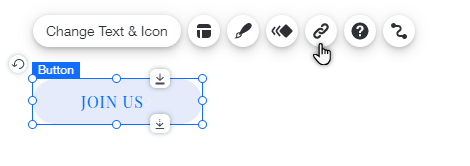
- Choose the Link icon, select Web address and paste the full public Genesize product URL.
- Choose the current-window or new-window behavior, then select Done.
- Test the link in Wix Preview, then publish your website change and check the public page on a phone.
These are the Wix Editor controls in its official button-link instructions. Other Wix editors can use different labels. A normal external URL does not add an item to the Wix cart or synchronize orders back into Wix.
Example page copy: “Client Kickoff Guide — $19 USD. A PDF to organize the brief, deliverables, assets, feedback and next milestone. See the sample, contents and purchase details on the product page.”
Button: “See the Client Kickoff PDF”
Paste the public offer address rather than a private receipt, temporary test link or direct URL to the paid PDF. The visitor should be able to inspect the offer before starting checkout. A public document link bypasses the purchase entirely.
Budget for the website, selling platform and payment processing
For native sales, check your payment-enabled Wix plan quote and payment-provider charges. Wix says prices vary by location and subscription period; the displayed annual equivalent is not necessarily a month-to-month bill. Check the actual checkout total for your account.
For an external route, keep your Wix website and domain costs in the budget. Genesize Free to Sell is $0 per month and charges a sales commission. Paid plans have a subscription plus their own commission rates. An ordinary external link does not make either service’s costs disappear.
| Plan | Direct-sale rate | Genesize commission |
|---|---|---|
| Free to Sell | 10% | $1.90 |
| Starter | 6.45% | $1.23 |
| Scale | 3.45% | $0.66 |
| Business | 1.45% | $0.28 |
The table excludes website costs, paid-plan subscriptions, Stripe processing and any other applicable charges. Marketplace-attributed sales use different rates. Compare the current plan terms and use the fee calculator with your order mix. Sellers also need to address applicable tax obligations; Genesize’s connected Stripe arrangement is described in its terms.
Test the website handoff and the delivered file separately
For our $19 example, the website test passes when a visitor reaches the intended product and sees the matching title, price, currency and file description. The delivery test passes when the correct purchase path opens the exact PDF. A working button establishes only the first part.
If the order will be in Wix
Use Wix’s current checkout-testing instructions. They distinguish visual checkout preview from order completion and recommend the Test Orders feature for a complete simulated purchase. Check the controls and supported flow in your own account. Do not assume an editor preview verifies a delivered digital file, and do not use a real payment method expecting it to be free.
Inspect the resulting order state, confirmation and actual download. For manual-payment testing, releasing a file after marking an order paid does not prove that a payment processor worked. Keep tests separate from a selling store’s live payment settings.
If the order will be in Genesize
- As the workspace owner, save your draft and inspect Buyer Preview.
- In Review & publish, choose Test buyer experience and complete the simulated checkout.
- Where sending is available, choose Send test receipt to use your verified seller email. Otherwise, open the private test delivery link.
- Open the test link while signed out on your phone, choose Open test purchase and try every file under Included downloads.
The Genesize simulation creates no order or charge. Its private draft link expires after 30 minutes and depends on the tested draft staying unchanged; generate a fresh test after an edit or expiry. Payment-triggered delivery needs a separate Stripe sandbox check.
Our earlier fictional-product test receipt reached the tester’s inbox and the PDF opened in signed-out iPhone Safari. See the real Studio screenshot and verified receipt walkthrough. That establishes the earlier Genesize sample’s delivery; it does not establish a native Wix sale or a new Wix-to-Genesize purchase.
Fix the problem in the system that owns the order
| Problem | Check first | Next action |
|---|---|---|
| Wix confirmation has no download | Whether payment was received or is delayed. | Verify the order and funds before changing its paid status. |
| An older Wix link has expired | The original Wix order. | In Orders, select it and use More Actions → Resend Download Link. |
| The external order is missing from Wix | The store named on the receipt. | Look in Genesize if that is where checkout happened; a button does not sync orders. |
| Visitors can open the paid PDF for free | The button’s destination. | Replace the public paid-file URL with the public product offer; keep only a limited sample public. |
| The file will not attach | Its type, size and the selected platform’s limit. | Use a supported file that fits. Do not assume Genesize accepts a larger file than Wix. |
| A Genesize buyer lost their receipt | The email used for the purchase. | Use My purchases to request a fresh private purchase link. |
Wix’s emailed download links last 30 days, and the seller can resend from the order. Native download recovery. For Genesize purchases, see the purchase recovery guide. Never ask a buyer to post a private access link or full card number in a public comment.
Common questions about selling digital downloads on Wix
Can I sell digital downloads on Wix?
Yes. Use a Wix Stores digital product, or link a Wix button to a separate store such as Genesize. Decide which platform will manage the order, receipt and download before choosing the route.
Can I accept native Wix orders on a free website plan?
Wix says customers cannot place native store orders until the site has a plan that accepts payments. An ordinary external product link uses the destination’s checkout instead. Your website costs and the destination store’s fees still need to be included.
Can I deliver a PDF and a ZIP together?
For a native Wix digital product, package multiple resources into one ZIP. Genesize supports several separate attachments within its file and workspace limits. Check that buyers receive all the files listed in your offer.
Will Genesize purchases appear in Wix Orders?
A normal external link does not synchronize orders. If the buyer checks out through Genesize, look up the purchase and its delivery there. Keep the order reference and store name clear when helping the buyer.
Why has a Wix download link stopped working?
Wix says its emailed download links are active for 30 days. The seller can select the order in Wix Orders and use More Actions → Resend Download Link. Check the original order and payment status before troubleshooting the file.
Should my paid-product button open the PDF directly?
Link to the public product offer with checkout. A public PDF address gives visitors the file without completing that purchase. Use a separate free excerpt if you want to show a sample, and keep private receipt and test links out of your website button.
Give your finished product a buying path you have checked
Choose where the order belongs, explain the file clearly and test delivery before sharing the offer.
Explore Free to Sell