

A worked example: a $19 PDF and a $9 editable client brief
Imagine a freelancer who wants a more organized client kickoff. The Client Kickoff Guide explains how to settle the brief, deliverables, assets, review process and first milestone. A separate Editable Client Brief gives the buyer a reusable DOCX to complete for a project.
| Buyer’s choice | What they receive | Price |
|---|---|---|
| Guide only | The 10-page educational kickoff PDF, including its process and reusable notes | $19 |
| Guide + optional brief | The same PDF, plus a separate editable DOCX brief | $19 + $9 = $28 |
The guide already contains reusable notes. The extra provides a convenient editable layout; it does not unlock information withheld from the main purchase. Buyers who prefer their own document can decline it. These prices are examples, not live offers, recommended market prices or evidence of increased sales.
Try the editable companion
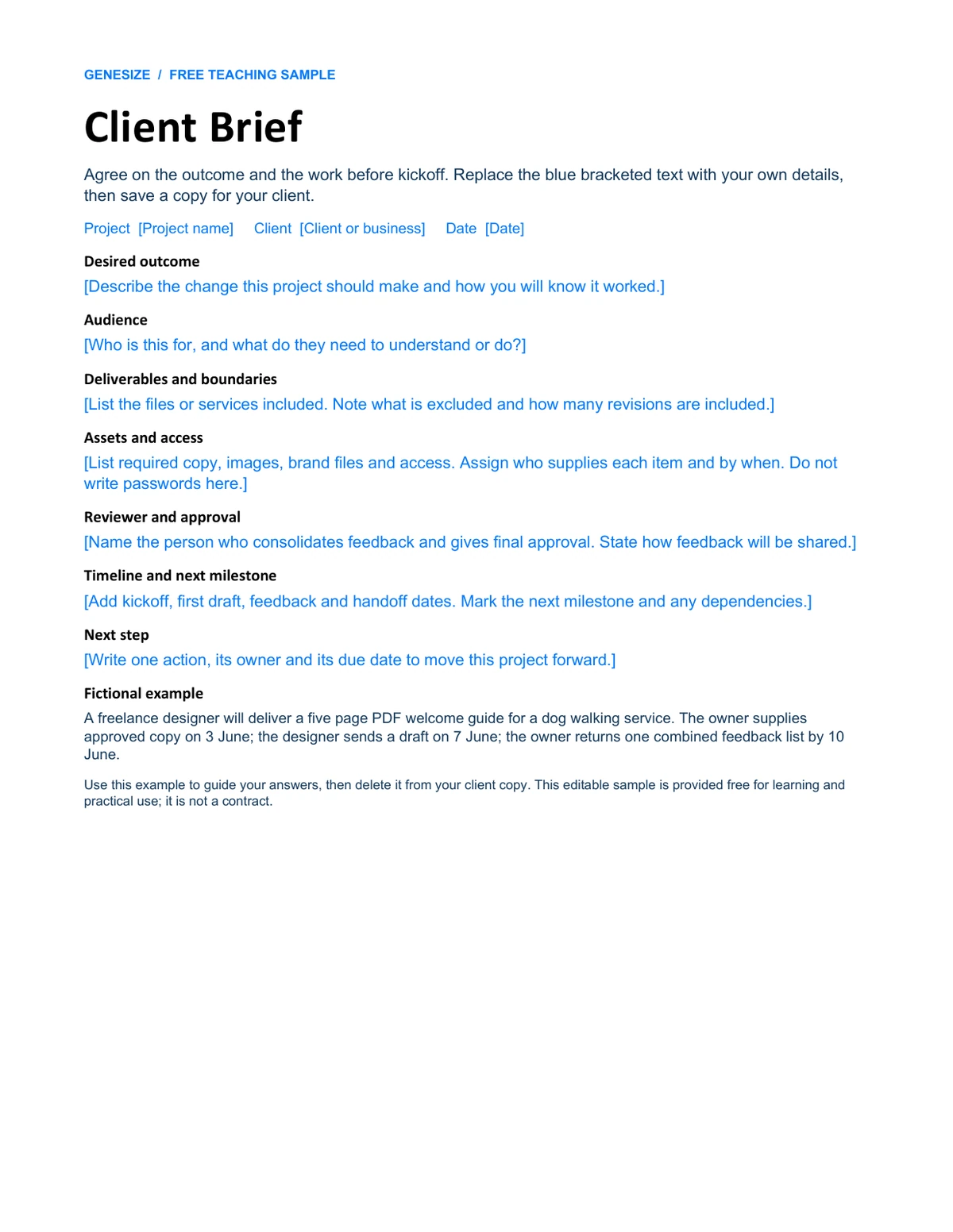
Download the free teaching sample. Replace the bracketed text in a DOCX-compatible editor, save a copy and reopen it.
Download the sample kickoff PDF to compare the two deliverables. Both samples are free here; you are not buying the fictional $28 offer. Adapt the brief for your own projects. Do not resell these teaching samples as an original paid product.
Choose an extra that solves the next practical problem
Ask what the buyer will do immediately after using the main product. A useful companion saves a specific piece of work. A large collection of unrelated files creates another decision without necessarily helping.
- Freelance guide → editable brief: turn the guide’s decisions into a document the buyer can reuse.
- Fixed-price course → practice workbook: provide exercises that apply the lessons, with the format and required software stated clearly.
- Digital planner → matching PNG sticker pack: offer an optional way to mark the planner, with compatible formats and import instructions.
Sell only files you have permission to distribute. Show a sample of the extra, list what is included and explain any app requirements. Avoid attaching a paid companion that is required to get the advertised result from the main product. If every buyer needs both, a single complete product or clearly described bundle may be easier to understand.
“Add the Editable Client Brief for $9 USD. Get a DOCX with prompts for your project outcome, deliverables, assets, reviewer and next step. Edit your own copy in a compatible document editor. The guide remains available on its own.”
Use specific deliverables rather than promises such as “double your results.” Improve the main sales page first if visitors still cannot tell what the original product does.
Optional upsell, bundle, discount or upgraded version?
Platforms use “upsell” in different ways. For example, Gumroad’s official upsell guide describes adding another product, replacing a product or upgrading a version. Check the actual buyer action rather than assuming all upsells work at the same point.
| Offer | Buyer’s decision | Example |
|---|---|---|
| Optional extra | Keep the main product; choose whether to add another | $19 guide, with a separate $9 brief |
| Bundle | Buy a defined set for one package price | A kickoff kit containing all listed resources |
| Discount | Buy an eligible product at a reduced price | 20% off the main guide during a stated launch sale |
| Upgraded version | Choose a more extensive version instead of the basic one | A standard kit or a larger professional kit |
This guide covers Genesize’s Optional upsell: one companion selected on the sales page before continuing to Stripe. It is not a post-purchase charge or a replacement of the main product.
How to add an optional upsell in Genesize
You need workspace-owner access on an eligible Starter, Scale or Business plan, including a valid eligible trial. Free to Sell does not include this tool. On Free to Sell, you can instead attach supported files to one uploaded product and sell the complete file pack for one stated price.
- Prepare and publish both individual products. Check their files, descriptions and fixed one-time paid prices. They must belong to the same owner and use the same currency.
- Open the main offer’s Optional upsell section. Save and publish any changes to the main product first.
- Choose Extra product to offer. Select the eligible companion, such as the Editable Client Brief.
- Select Review optional upsell. Check both product names, editions, prices and the combined total.
- Confirm the review and publish. Select “I reviewed this offer and want to publish this change,” then choose Publish optional upsell.
- Open the public product page. Check the unchecked option, the selected total and what the page promises before sharing its link.
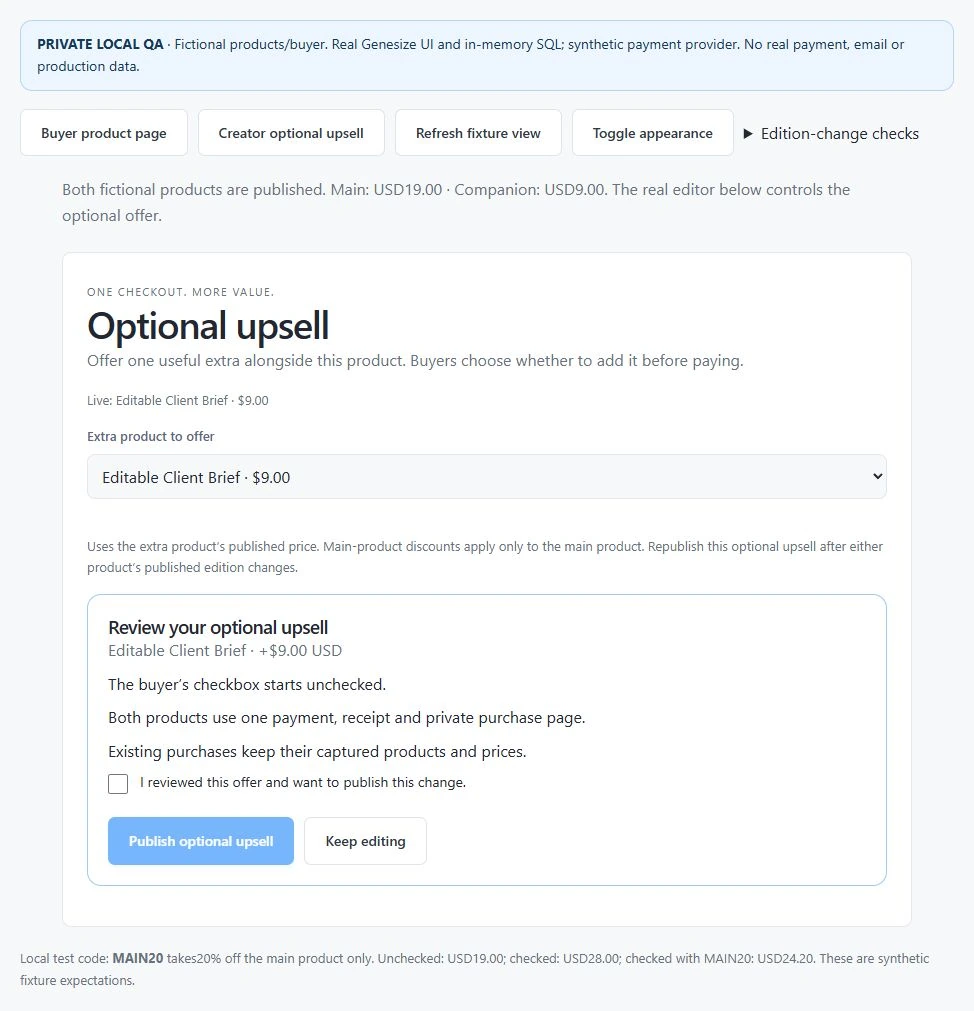
The main product and extra must be eligible individual offers. Bundles, product options, flexible pricing and community memberships do not use this optional-extra workflow. Publishing an upsell does not merge its files into a new document or ZIP.
Check both buyer choices and the delivered files
Test the path where the buyer declines as carefully as the path where they accept. The main purchase should remain easy to complete.
- Leave the box unchecked. Confirm the main product’s $19 example price and that the companion is absent from the total.
- Select the extra. Confirm the added $9 price and $28 combined total before tax. Clear it again and confirm the total returns to $19.
- Check the payment handoff in an isolated test environment. The amount and product selection should match the choice made on the sales page. Do not make a real purchase simply to test the UI.
- Check access after each test outcome. A main-only order should provide the PDF alone. A combined order should provide both products and their correct files.
- Open the actual downloads. Read the PDF, edit a copy of the DOCX, save it and reopen it. A successful download alone does not prove that a template is editable.
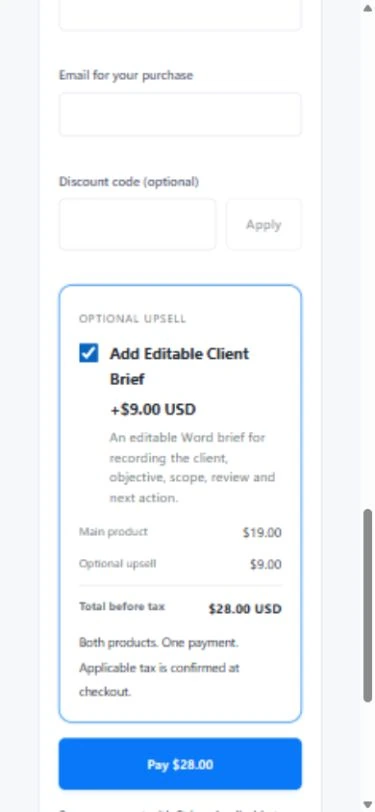
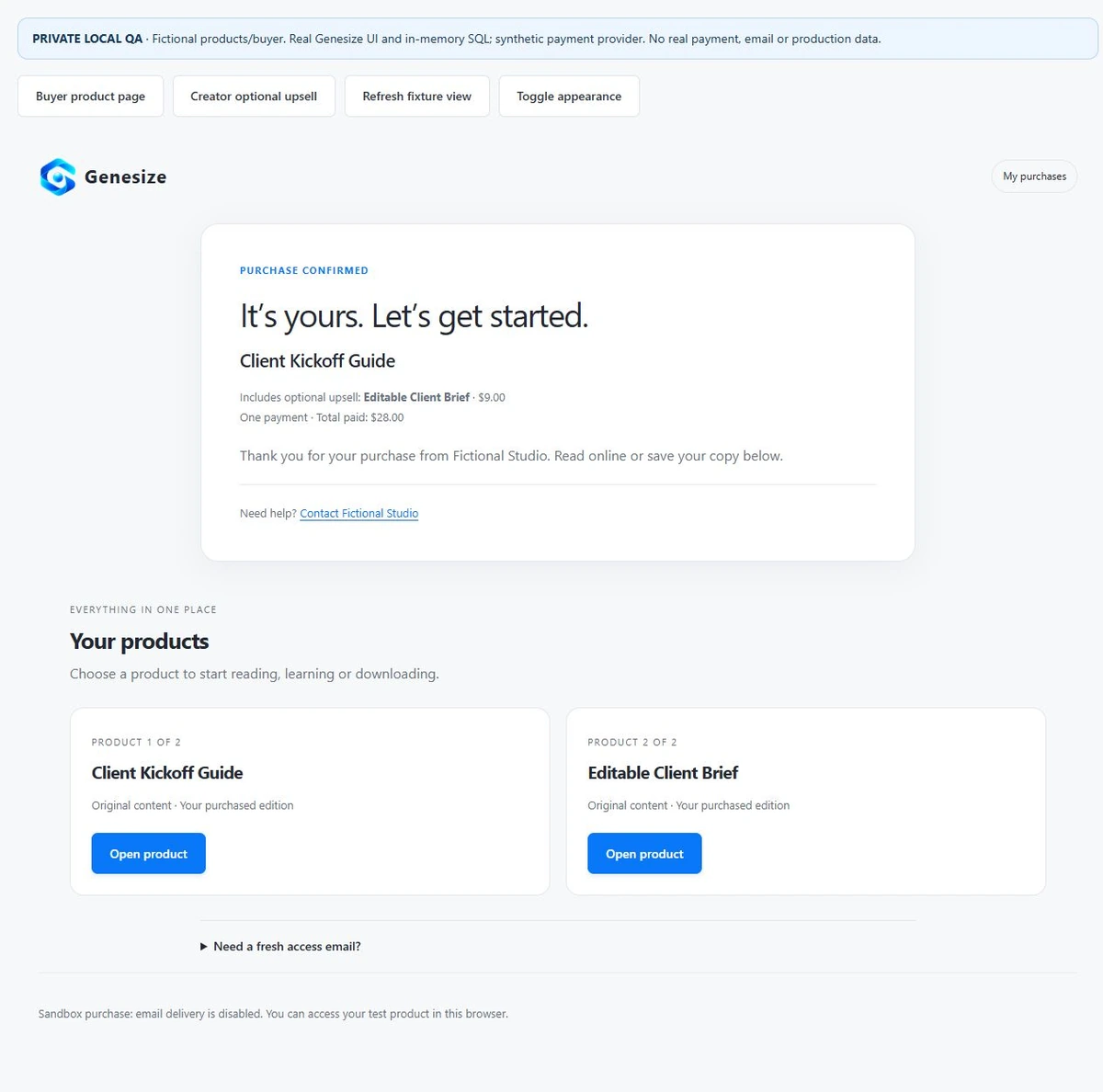
The private local tests checked $19 main-only and $28 combined purchases, the $24.20 main-only discount case, exact delivered PDF and DOCX bytes, blocked access to an unselected companion, and re-review after either published edition changes. Browser checks covered the unchecked choice, mobile totals and access to both products. The downloaded DOCX matched the original file; an edit/save/reopen check passed on a copy, and its final layout was reviewed in Word. Payment, authentication and storage adapters were simulated. No real payment or email was sent.
For a normal draft file check, Test buyer experience in Review & publish lets an owner inspect a simulated purchase and private delivery without creating an order or charge. That draft check does not by itself establish that a published optional-extra checkout, real payment, receipt or every device works. See the PDF selling and buyer-delivery guide for the separate file and receipt checks.
With a discount, the main product changes and the extra stays full price
Genesize applies an eligible Store discount to the main product. It does not apply the same reduction to the optional companion.
| Item | Calculation | Before-tax amount |
|---|---|---|
| Main guide | $19 − (20% × $19) | $15.20 |
| Optional brief | Companion remains full price | $9.00 |
| Both selected | $15.20 + $9.00 | $24.20 |
State this scope in your promotional copy. “20% off the guide” is clearer than implying that every item is discounted. Read the discount-code and launch-sale guide for dates, eligibility and use limits.
The checkout total is not the seller’s net earnings. Genesize sales commissions depend on the seller’s plan and direct or Marketplace attribution; they apply before tax. Stripe processing and other costs are separate. Use the digital product fee calculator to compare your actual plan and sales route.
Review the optional offer again after publishing product changes
If either product’s published edition changes, the saved optional upsell pauses until its owner reviews and publishes it again. Check that the new combination still makes sense, that the prices are correct and that the companion’s format matches the description.
Existing purchases retain their captured products, prices and editions. Updating the brief for future buyers does not silently replace a previous buyer’s file. Keep your support explanation consistent with the version that person purchased.
To stop offering the extra, select No optional upsell in the editor, review the removal and publish it. Removing the offer stops future optional sales; it does not remove the companion from completed purchases that included it.
Why is the optional extra missing or showing the wrong expectation?
| Problem | What to check | Next step |
|---|---|---|
| No optional-upsell controls | Plan eligibility and workspace-owner access | Check the paid plan’s access; use one file pack if the complete set belongs on Free to Sell. |
| Companion is absent from the selector | Published status, owner, currency and fixed one-time pricing | Use an eligible individual product; exclude bundles, options, flexible pricing and memberships. |
| A previously visible extra disappears | Whether either published edition changed or a product was unpublished | Restore eligibility, review the current offer and publish it again. |
| Buyer expected the extra to be included | Main product description and wording around the checkbox | List the main contents separately and name the extra’s added price. |
| Code reduces the guide but not the brief | Discount scope | This is the intended main-only behavior; show the correct combined total. |
| Buyer cannot edit the brief | Downloaded file type, compatible software and whether a copy was saved | Supply the actual DOCX and brief instructions; do not deliver only a preview image. |
Keep the extra only if it helps the buying experience
Record the period, main product edition, companion, price and offer wording. Count verified paid main-product orders and which of those actually included the extra. Keep simulated checks, free orders and refunded purchases identifiable rather than treating every checkout attempt as revenue.
For example, 3 combined purchases among 12 comparable paid main-product orders is a 25% attachment rate for that small sample. It does not prove that the offer caused more sales. Also inspect failed checkouts, questions, refunds and what remains after fees. A higher order value can still come with more friction or support.
If a buyer starts checkout but leaves before paying, a requested reminder is a different workflow from an extra product. See the $19 PDF checkout-recovery example before adding more offers or emails.
Change one part at a time and compare similar periods with enough traffic. If the main product is not selling at all, first use the sales troubleshooting guide to check the product page, audience, payment readiness and delivery. An extra is not a substitute for a clear original offer.
Common questions about digital product upsells
What is a digital product upsell?
A digital product upsell offers a buyer another purchase connected to the product they want. The term can describe an additional item or an upgrade. Genesize’s Optional upsell is one extra published product that the buyer may select before continuing to Stripe checkout. It is not an automatic charge or a post-purchase offer.
What is a useful upsell for an ebook or PDF?
Choose a companion that helps the reader apply the guide: an editable brief, practice workbook, planning spreadsheet or relevant template. The original product should remain useful without the extra. Explain the separate deliverable, format, required software and added price.
Can I add optional upsells on Genesize Free to Sell?
No. Native optional upsells require workspace-owner access on an eligible Starter, Scale or Business plan, including a valid eligible trial. Free to Sell can deliver several supported files as one uploaded product, but does not include the separate optional-upsell controls.
Does Genesize offer a one-click post-purchase upsell?
The Optional upsell described here appears before Stripe checkout. The buyer checks a box to add one companion, reviews the combined total and then continues to payment. It does not charge a stored card after the main purchase.
Does a discount code also discount the optional extra?
In Genesize, an eligible discount applies to the main product and the optional companion stays at its full price. In the fictional example, 20% off the $19 main guide makes it $15.20; adding the $9 brief makes the total $24.20 USD before applicable tax.
What does the buyer receive if they decline the extra?
The buyer receives the main product only and pays its applicable price. If they select the extra, the combined purchase provides access to both captured products and their included files. The extra should start unchecked so buying the main product remains a clear choice.
Can a Genesize bundle or membership be an optional upsell?
This workflow uses two published individual products from the same owner in the same currency, with fixed one-time paid prices. Bundles, product-option offers, flexible pricing and community memberships are excluded. Use the separate bundle or membership workflow when that is the actual offer.
What happens when I change a product in an optional-upsell offer?
A changed published edition of either product pauses the saved optional upsell until the owner reviews and publishes it again. Existing purchases keep their captured products, prices and editions; a later edit does not silently replace an earlier buyer’s files.
Sources and test scope
Reviewed November 20, 2026. Genesize instructions were checked against its current optional-upsell editor, eligibility rules, price snapshots and private delivery implementation. Screenshots show actual components in a private local fixture with fictional products and simulated payment, authentication and storage adapters. They are not customer results or evidence of a real charge or receipt.
Gumroad’s official upsell documentation supports the distinction between additional-product, replacement and version-upgrade offers. Platform workflows differ; the Genesize steps above describe its optional companion flow.
Make the extra easy to understand and easy to decline.
Start with two useful products, state their separate prices and check both buyer choices before sharing the offer.
Explore Genesize plans