

What is a digital product bundle?
A digital product bundle brings several products together in one offer. A buyer might get a guide that explains a method, a template that helps apply it and a checklist for reviewing the finished work.
The reason to buy the package should be easy to explain. “Prepare your first client kickoff” is clearer than “Get 30 files.” Keep the standalone products available if some buyers only need one part.
Bundle: the buyer purchases the full set. Optional upsell: the buyer chooses whether to add an extra product. Membership: the buyer pays for the stated ongoing access or experience. These have different promises and delivery rules.
If you are still deciding what to make, start with our digital product ideas. This guide focuses on packaging products that already have a useful purpose.
1. Choose products that belong together
Start with the buyer’s task. Write down the steps they need to take, then match a resource to each step. Remove items that repeat the same material or serve a different audience.
- Same buyer: are the language, skill level and tools suitable for one person?
- Connected use: does each product help them move to the next step?
- Ready to deliver: do the files, lessons, links and instructions work?
- Clear rights: do you have permission to sell every included resource?
A beginner’s workbook and an advanced technical manual can both be good products without belonging in the same starter kit. Likewise, five guides that repeat the same advice may create more reading rather than a better solution.
For a first test, a small set is easier to explain and check. You can always test a different package later. Use feedback from likely buyers rather than filling the maximum number of slots.
Three digital product bundle examples
These are original fictional examples. They show how the parts can work together; they are not customer results, validated offers or income forecasts.
| Bundle | Buyer’s task | Included products | How they fit together |
|---|---|---|---|
| Freelance client kickoff kit | Start a client project with clear expectations | Kickoff guide + meeting agenda template + handoff checklist | Read the guide, prepare the meeting, then check the handoff |
| Coaching practice pack | Put one coaching method into practice | Short written course + exercise workbook + progress tracker | Learn the method, complete the exercises, then record progress |
| Beginner photography field kit | Plan and review a first window-light practice session | Lighting guide + shot-planning worksheet + review checklist | Choose a setup, take the photographs, then compare the results |
The client kickoff kit is our worked example. A guide explains the process, an agenda prepares the conversation and a checklist helps review the handoff. Each part has a distinct job.
2. Set an honest bundle price
First check the current standalone prices and what each one includes. Then choose a package price you can support after payment fees, software costs, refunds and the time needed to help buyers.
You do not need to pick a standard discount percentage. The right question is whether the package is useful at its price and sustainable for you. Ask likely buyers what is unclear or unnecessary before assuming the price is the only problem.
| Product or calculation | Example amount |
|---|---|
| Client kickoff guide | US$19 |
| Meeting agenda template | US$12 |
| Handoff checklist | US$9 |
| Combined standalone prices | US$40 |
| Bundle price | US$29 |
| Difference | US$11 · 27.5% below the combined prices |
The calculation is 40 − 29 = 11, and 11 ÷ 40 × 100 = 27.5%. Those prices are editorial examples, not market benchmarks. A US$29 sale is gross revenue before costs, not US$29 profit.
If you use a savings claim in a real offer, compare genuinely available, like-for-like products and prices. Do not invent a “value” price to create a large discount. If the package includes a resource you do not sell separately, explain its usefulness without pretending it has an established standalone price.
For the broader process, see how to price digital products. If you add a launch discount, check the final checkout total and its expiry terms rather than assuming that every promotion stacks.
3. Explain what the buyer receives
Give the package a name tied to its use. Follow it with a short description of the buyer, the task and the included items. State required software, file formats and any support boundaries.
The Ultimate Freelancer Mega Bundle. Everything you need to succeed.
The Client Kickoff Kit: a guide, editable meeting agenda and handoff checklist for freelancers preparing a first client project.
Show a useful sample from each item, using material you own or are allowed to share. Explain which file to open first. An editable template should list the software it needs; a course should explain its lesson and video format.
Make exclusions clear. If the kit does not include legal advice, custom editing or private coaching, avoid copy that suggests otherwise. Our sales page examples show how to structure a specific offer.
4. Create a digital product bundle in Genesize
Genesize’s bundle editor reuses your published products. You can combine eligible original downloads, existing courses or products created with AI. You do not need to regenerate their content to package them.
- Prepare the individual products. Add your own material or finish the products you created. Review files, lessons, prices and delivery, then publish each eligible item in Store.
- Open Store and choose Create bundle. Add the bundle title, description, cover, currency and package price.
- Select the included products. Genesize currently supports 2–10 published individual products in one bundle. All must use the bundle’s currency. Pay-what-you-want products, other bundles, product-option offers and community memberships are not eligible components.
- Check the full offer. Review the included items, copy and displayed total. You can use a fixed one-time price or offer the bundle for free. Recurring Store bundle billing is not part of this workflow.
- Save draft, then choose Review & publish. Inspect the included published editions and confirm the offer before publishing. Saving a draft alone does not change the live bundle.
- Open View live bundle. Read the public page on a phone and follow the supported test purchase path before wider promotion. Paid selling also needs completed seller payment setup.
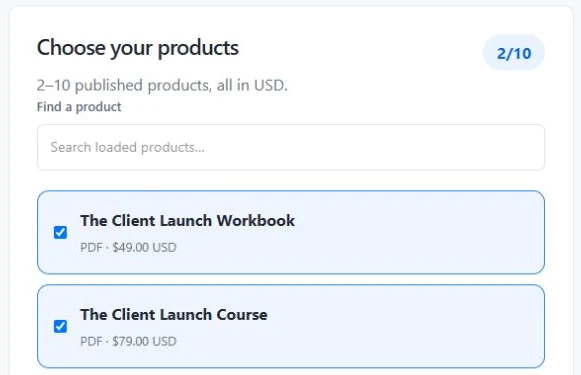
Product, file and storage allowances still apply. The bundle does not remove the requirements of its included products. For recurring access to resources and a community, use the separate community and membership workflow on any paid plan.
Platforms handle bundles differently. For example, Payhip’s bundle documentation describes recurring pricing and later additions for existing buyers. Do not assume those rules apply to Genesize: the current Store bundle uses the fixed published editions reviewed for the purchase.
5. Check the complete buying experience
A clear offer is only useful if the buyer can access every promised item. Use an authorized test environment to check the full route, keeping test orders separate from live customer activity.
- Before payment: the title, currency, price, contents and applicable terms match the offer.
- After payment: the receipt and access route open the purchased bundle, not a single product or a creator-only preview.
- For every item: the expected files or lessons open and the buyer knows where to start.
- On a phone: headings, download links, lesson navigation and support instructions are usable.
- For access recovery: a buyer who loses the original link can follow the supported recovery process.
Genesize provides access to the included products through one purchase. It does not automatically merge them into one PDF or build a ZIP archive. Tell buyers what they will receive.
Later product edits do not automatically replace an existing buyer’s purchased editions. Review and republish the bundle when preparing changes for future buyers. If an included product becomes unpublished, new bundle sales pause until it is available again; existing buyers keep their purchased products, subject to the order’s access status.
The digital product launch checklist covers the wider launch checks. Test refunds and access changes through an appropriate sandbox rather than using real customer orders as test data.
6. Review what buyers actually do
Offer the bundle where it is relevant: its product page, your storefront or a message to people who agreed to receive marketing. Explain the task the package helps with. Avoid presenting an unrelated extra as something everyone needs.
Track the time period, product-page traffic, paid orders, collected amounts, refunds and support questions where those records are available. Keep currencies separate. Compare the bundle with standalone purchases without assuming the audience and traffic were identical.
A larger order amount does not prove the bundle improved the business. Check whether more people completed a purchase, whether total net sales changed and whether support work increased. At low volume, a few conversations can explain more than a small percentage change.
If buyers only want one item, make the individual option easy to find. If they need help using the set, improve the starting instructions. Change one important part at a time so the next review is easier to understand.
Plan your bundle before you publish
Map each product to the buyer’s task, record genuine standalone prices, calculate your package price and check delivery. Includes the fictional kickoff-kit example and space for your own offer.
Open the digital product bundle plannerPrint it, save a PDF through your browser or copy the prompts into your notes. This is a manual planning sheet; it does not collect or save answers.
Digital product bundles: common questions
What is a digital product bundle?
A digital product bundle is a group of products offered together for one price. It might combine a guide, templates, a workbook or a course. A useful bundle helps one buyer complete a connected task; it does not need to include every product in your store.
How do I bundle digital products?
Choose a buyer and a task, select products that help with different parts of that task, check that each product is ready, set a price and explain exactly what is included. Publish the bundle through a platform that can deliver all included products, then test the full purchase and access path before promoting it.
How much should I discount a digital product bundle?
There is no required discount percentage. Consider the buyer’s needs, your costs and support workload, and what the products genuinely cost separately. If the individual products total US$40 and a fictional bundle costs US$29, the saving is US$11, or 27.5%. That arithmetic is an example, not a recommended market price or sales forecast. Only advertise savings against genuine comparable prices.
Can I bundle ebooks, templates and courses together in Genesize?
Yes. Genesize supports bundles of 2–10 eligible published individual products in the same currency. These can include supported downloads and existing or AI-created courses. Pay-what-you-want products, nested bundles, product-option offers and community memberships are not eligible components in this bundle workflow. Product, file and storage limits still apply.
Does creating a bundle merge the products into one PDF or ZIP?
No. Genesize gives the buyer access to the included published products through one bundle purchase. It does not automatically combine their content into a single PDF or create a new ZIP archive. Check each included product’s actual format, files and access instructions.
What is the difference between a bundle and an optional upsell?
A bundle sells a defined group of products as one offer. An optional upsell lets a buyer choose an extra product alongside the main purchase. Use a bundle when the full set serves a connected need; use an optional upsell when the extra item is useful for some buyers but not essential for everyone.
Can I sell a recurring subscription bundle in Genesize?
The Store bundle workflow currently supports a fixed one-time price or a free offer, not recurring bundle billing. For recurring access to resources and a community, use Genesize’s separate communities and paid-memberships workflow on any paid plan. Check the membership terms and payment scope before choosing that format.
What happens if I update a product after someone buys a bundle?
Genesize bundle purchases use the included published editions approved at purchase. Later product edits do not automatically replace an existing buyer’s editions. Review and republish the bundle for future buyers when its contents change. If an included product becomes unpublished, new bundle sales pause until it is available again; existing buyers retain their purchased products, subject to their purchase’s access status.
Sources and how this guide was checked
Reviewed November 10, 2026. Genesize’s editor labels, 2–10 product limit, eligible product selection, same-currency check, pricing modes, publication review and protected delivery were checked against the current implementation. The linked Payhip help page supports only the stated Payhip workflow differences; this is not a comparative performance test.
The three bundle ideas, kickoff kit, sample copy and price calculation are original fictional examples. The planner is an editorial aid. No customer revenue, conversion improvement or preferred discount rate is claimed.
Turn useful products into a clear package.
Bring your existing downloads and courses or create a product with AI. Use Genesize to prepare the offer, storefront, checkout and buyer access.
Get started for freeEligible new subscribers receive a 14-day trial with 400 total AI credits and up to 3 saved projects. Payment method required. The selected paid subscription starts after the trial and renews unless canceled. Product limits and payment processing fees apply. Review plans and billing terms.