

What makes a community worth paying for?
A paid community is a group where members pay for a defined mix of access, support, resources and interaction. The ongoing value might be useful feedback, regular practice or help applying a method. Access to a quiet discussion board is a weak offer on its own.
Start with the problem your customer has after reading the guide or finishing the lesson. Do they need someone to review their work? Do they get stuck on new situations? Would working alongside people with the same goal help them follow through?
A freelance designer plans a portfolio practice group for newer designers. Members bring one page at a time, use a review checklist and discuss improvements in a monthly group session. This is an original fictional example, not a Genesize customer or a claim about income or results.
If the problem can be solved with a single download, start there. Our guide to digital products for coaches and consultants can help you choose the right format.
1. Choose one shared goal and a reason to return
Finish this sentence: “This community helps these people work on this problem through this regular activity.” Keep the promise small enough to explain in a few lines.
A premium network for ambitious designers, with resources and support.
A portfolio practice group for newer freelance designers. Bring one project page, use a review checklist and join a monthly group feedback session.
The second offer explains who it serves, what people do and what the creator provides. It does not promise that joining will get someone clients.
- Member goal: what are they working toward?
- Recurring help: what makes the next month useful?
- Boundaries: what is included, how often do you respond and what is outside the membership?
For the example group, the creator could answer questions twice a week and run one monthly session. Unlimited private coaching would be a different offer with a different workload.
2. Test interest before building the whole community
Talk to a few people who fit the offer. Ask about the last time they faced the problem, what they tried and where they got stuck. Show the proposed activities and price, then ask what would make joining worthwhile.
- “When did you last ask someone to review your portfolio?”
- “What made that feedback useful or difficult to act on?”
- “Would you want help each month, or is this a one-time task?”
- “What would you need to know before joining this paid group?”
A compliment is interest, not a sale. Record specific objections, an agreed follow-up or a deliberate signup. Keep a waiting list separate from paid membership and make the launch date clear. The digital product validation guide explains how to record this evidence.
Choose free or paid access deliberately. A free pilot can help you learn about participation. A paid pilot can test whether the defined offer is worth paying for, provided you are ready to deliver it. Explain pilot terms and any later changes before people join.
3. Set a membership price you can keep supporting
Price the ongoing help as well as the content. A resource library, a monthly group session and individual weekly reviews each require different amounts of your time.
List your software costs, payment fees, expected support time and the number of members you can serve well. Then test a clear offer with likely members. A competitor’s price is a reference point, not proof of what your group should cost.
At a hypothetical US$29 monthly price, 10 paying members would produce US$290 in gross monthly charges before refunds, fees, software, taxes and your work. That is arithmetic, not a forecast. A founding price should still let you provide the promised help.
Start with one easy-to-understand membership option. Show the billing period, what renews, cancellation steps, refund terms and when access ends. If you offer a lower founding price, state how long it lasts and what happens later.
What does Genesize charge on paid memberships?
Starter, Scale and Business include communities and paid memberships. Starter costs US$34 per month on monthly billing. Your members pay the price you set for the offer.
| Plan | Direct checkout | Marketplace checkout |
|---|---|---|
| Starter | 6.45% | 20% |
| Scale | 3.45% | 10% |
| Business | 1.45% | 5% |
Genesize calculates its commission before tax. Stripe processing fees are separate. A membership that starts through the Marketplace uses the Marketplace rate, and recurring memberships keep the rate set when they start. See the commission terms and the pricing guide.
4. Plan a useful first month
Give members a clear first task and a simple rhythm. Too many empty spaces make a small group harder to use. Start with a welcome area, a place for questions and the resources needed for the first activity.
| When | What the creator prepares | What the member does |
|---|---|---|
| Before opening | Welcome post, one useful resource and a clear first task | Share one portfolio page and the kind of client you want to reach |
| Week 1 | Show what a useful review looks like; answer first questions | Use the review checklist to improve one page |
| Week 2 | Run a scheduled group feedback session | Bring a revised page and one specific question |
| Week 3 | Pair a small practice task with a discussion prompt | Write a clearer project description and ask for feedback |
| Week 4 | Review progress, ask what was useful and explain next month | Choose the next portfolio improvement to work on |
You do not need to write a complete course first. If a short lesson or checklist helps someone do the task, include it. Bring existing material you own rather than creating more content just to fill the library.
For events, state the time zone, format and what to bring. Decide what members who cannot attend will receive. Only promise recordings if you can provide them with suitable permissions and hosting.
5. Set up and test your paid community in Genesize
Genesize connects the products you create or bring with membership access, community activity and selling tools. Use that connection to keep the offer and the member experience aligned.
- Open Community and choose Create community. Add the name, About copy, welcome instructions and community rules. Explain who it is for and the regular help included.
- Prepare the included material. To include a course or download as a product resource, publish it in Store first, then select its published edition under Plans & resources. Supported private resource files can also be added. Check rights and plan limits.
- Connect Stripe and accept the commission terms. Connect your own Stripe account and complete the verification it requires. Accept the sales commission terms in Storefront settings.
- Set the membership offer. Choose the access plan, included resources and price. Paid community checkout supports USD prices and card or Stripe Link payments.
- Review and publish. Use Member preview and the launch checks to review access, release rules, prices and terms. Publish the reviewed offer and open the public link to confirm what members see.
- Choose how people will find it. Share your direct link. To list the community in the Genesize Marketplace, choose the membership offer and category in its Marketplace settings.
- Test the join path before wider promotion. In an authorized test environment, check signup, checkout and access. If you use member approval, test how someone applies and joins after approval. Check cancellation for recurring offers.
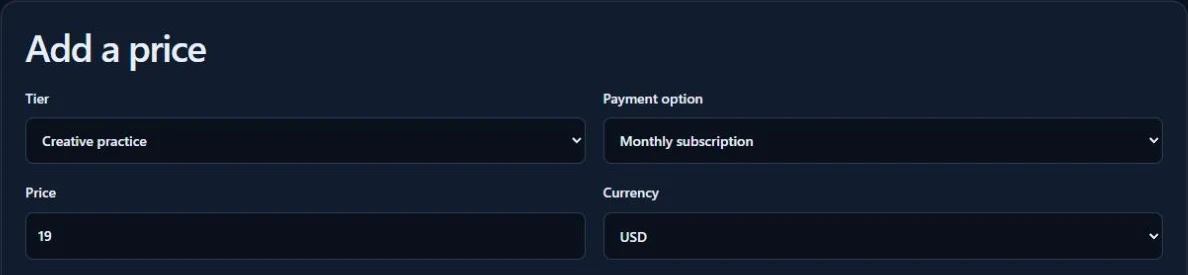
For courses, supported external video links can sit alongside written lessons and resources. Native long-video upload and hosting are not included in the current workflow. Live sessions need a suitable external meeting link. Check your video provider’s access and sharing settings; a community paywall does not make an otherwise public video private.
Creator eligibility depends on supported locations and payment requirements. Stripe’s availability page is a starting point, not a guarantee that every business or transaction is supported. Check the actual onboarding flow before promising paid access.
Genesize also provides community discussions, scheduled events, member onboarding, optional recognition tools and analytics. Use what serves the group’s goal. Review your support, refund and tax responsibilities in the terms before launch.
6. Find your first members with a specific invitation
Start where relevant people already know your work: past clients, product buyers who opted into marketing, a small email list or an agreed partner introduction. In other communities, follow their rules and ask before promoting.
Circle’s first-member launch guide also emphasizes personal outreach and a small founding group. The useful principle is to learn from real conversations; its examples are not predictions for your launch.
“I’m opening a portfolio practice group for newer freelance designers. Each month we’ll review a project page using a checklist, with a group feedback session and a place for questions. Would you like the details, including the price and schedule?”
Send the full offer to people who want it. Explain the opening date, what they get, what is not included and the recurring cost. Do not invent limited places or describe a deadline as urgent unless it is real.
If you have no audience yet, build a small route to the right people first. Our guide to selling without an audience covers practical ways to start those conversations. A marketplace listing or published community page alone does not guarantee traffic.
7. Help members make progress and want to stay
The first visit should answer three questions: Where do I start? What should I do? Where can I ask for help? For the example group, the first action is sharing one portfolio page and one question, rather than browsing every resource.
Keep a regular rhythm you can maintain. Answer the questions you promised to answer. Bring unanswered questions into the next session. Ask what members tried, what helped and what they still need.
- Joining: how many completed the join process, and where did others stop?
- First action: are new members doing the specific starting task?
- Participation: which discussions, resources and events help them work on the goal?
- Renewals and cancellations: what happened, and what reasons did people choose to share?
Use actual records and feedback. With a small group, one departure can change a percentage sharply. Keep the member counts and time period visible, and do not assume that a quiet member is unhappy.
Genesize’s Growth Agent can help interpret the business evidence it has and prepare follow-up drafts on eligible plans. Review its suggestions. Drafting a message is separate from approving a send, and marketing follow-ups need the appropriate consent and sending capacity.
Put your community launch on one plan
Write the member goal, recurring promise, price, first activity, opening-month schedule and launch checks before building. Includes the fictional portfolio-group example and blank space for your own offer.
Open the community launch plannerPrint it, save it as a PDF using your browser or copy the prompts into your notes. This is a manual planning sheet; it does not collect or save your answers.
Starting a paid community: common questions
How do I start a paid community?
Choose a specific group and a recurring problem you can help with. Test the offer with relevant people, set a price and clear membership terms, prepare a small resource library and a first activity, then test checkout and member access before inviting a founding group. Improve the experience from their questions and participation.
What should a paid community include?
Include what helps members make progress: useful discussions, access to relevant resources, clear support boundaries and a repeatable activity such as a review session or practice challenge. A large course library is optional. Describe exactly what you will provide and how often you will be available.
Can I start a paid community without an audience?
You can test an offer without a large following, but you still need a way to reach suitable people. Start with relevant conversations, permitted participation in existing groups, agreed partner introductions or an opt-in waiting list. A community platform does not guarantee discovery, members or sales.
How much should I charge for a paid community?
There is no single correct price. Consider the ongoing help, time required, member capacity, software costs, payment fees and alternatives. Test a clearly described offer with likely members. Start with a simple billing option and explain renewal, cancellation, refunds and access before someone joins.
Should I start with a free or paid community?
Use a free group if your immediate goal is to learn what people need and you can support it without membership revenue. A paid pilot can test willingness to pay when the promised help is ready. Be clear about what is free, what is paid and what existing members keep if you later change the offer.
Do I need a finished course before launching?
No. A community can center on feedback, peer practice, discussion and scheduled support. Prepare enough useful material for the opening experience. If a course or download is part of the paid promise, make sure it is ready and accessible before selling that promise.
Which Genesize plan includes communities?
Starter, Scale and Business include communities and paid memberships. Starter costs US$34 per month on monthly billing. Genesize's platform subscription is separate from the membership price you charge your members. Plan-based sales commissions, Stripe processing fees and applicable tax responsibilities are separate. Check current pricing and billing terms before subscribing.
Can I use existing courses, files and videos in a Genesize community?
Yes. You can bring supported original downloads or organize an existing course, publish the product in Store and include its published edition in a community plan. You can also add supported private resource files. Courses can use supported externally hosted video links; native long-video upload and hosting are not included in the current workflow. Only use material you have the rights to share.
Which payment methods can members use?
Paid Genesize community offers currently use USD pricing and card or Stripe Link checkout. This is a currency and payment-method scope, not a US-only member rule. Creator onboarding, buyer eligibility and payment acceptance depend on supported locations and Stripe's requirements. Other currencies and bank/debit payment methods are not part of this community checkout workflow.
Sources and how this guide was checked
On November 11, 2026, Genesize tested community setup, paid publication and the fees sent to Stripe on Starter, Scale and Business. Direct and Marketplace sessions were left unpaid and expired after verification.
The linked Circle guide supplies an external example of a small-group launch approach; Stripe supplies its own availability information. The portfolio community, schedule, invitation and price calculation are original fictional examples. The planner and launch advice are editorial recommendations, not tested customer results or promises of members, retention or revenue.
Give people a useful reason to come back.
Bring your existing material or create a written product with AI. Build the offer, connect member payments and keep the resources and community experience together in Genesize.
Get started for freeEligible new subscribers receive a 14-day trial with 400 total AI credits and up to 3 saved projects. Payment method required. The selected paid subscription starts after the trial and renews unless canceled. Community publishing and sending remain subject to plan and paid-access checks. Review plans and billing terms.