
Diagnose one product before changing everything
Record its public link, tested edition, setup checks, traffic source, measurement dates and one next action. Keep unknown answers marked unknown.
Open the printable sales diagnosticNo signup required. Print or save the page as PDF from your browser, or download the plain-text worksheet. The worksheet works with any selling platform.
Start with the symptom you can actually observe
| What you see | Check first | Next action |
|---|---|---|
| The shared page cannot be bought | Open the public link while signed out. Check publication, availability and payment readiness. | Fix the confirmed setup problem before interpreting sales. |
| The file or receipt cannot be verified | Inspect the saved edition, private test delivery and actual downloaded file. | Complete the missing check; an unrecorded test is not a failed test. |
| No visits are recorded | Check the link, traffic source, tracking consent and report coverage. | Separate missing measurement from a lack of relevant visitors. |
| Visits are recorded, with little checkout activity | Check who arrived and whether they can explain the offer. | Clarify one mismatch between the message, sample and product page. |
| Checkouts start, with few paid orders | Check current payment readiness, final amount and payment status. | Investigate a reproducible checkout issue or ask what stopped the buyer. |
| There are only a few observations | Read the dates and collect more comparable evidence. | Keep the result unresolved rather than declaring the product a failure. |
These are investigation routes, not diagnoses. Several can coexist. A product with a payment restriction needs that restriction resolved even if its headline also needs work.
1. Confirm that someone can buy and use the product
Open the exact link you shared in a signed-out browser on your phone. Confirm the right product appears, the purchase action works and the published price matches your intended offer. An editor link, draft preview or private test link is not your public sales link.
Check payment readiness separately. In Genesize, use Storefront → Settings → Payments and review the current connection status. Follow any required setup steps. A test-mode account or a simulated checkout is not evidence that a live customer payment completed.
- As the workspace owner, open the individual product’s Review & publish → Test buyer experience. Inspect the saved offer and choose Complete simulated checkout.
- Open the private test delivery, download the included file and open it in the application your listing names.
- If available, use Send test receipt for your verified seller email. Check the inbox and open its private link while signed out.
- Use Refresh saved checks. Confirm file opening or inbox receipt only after you actually completed that check.
Genesize distinguishes a prepared file response, a browser-prepared export and your confirmation that a file opened. Email-provider acceptance is separate from finding the message in your inbox. “Not verified” means evidence is missing; it is not a failed-purchase verdict.
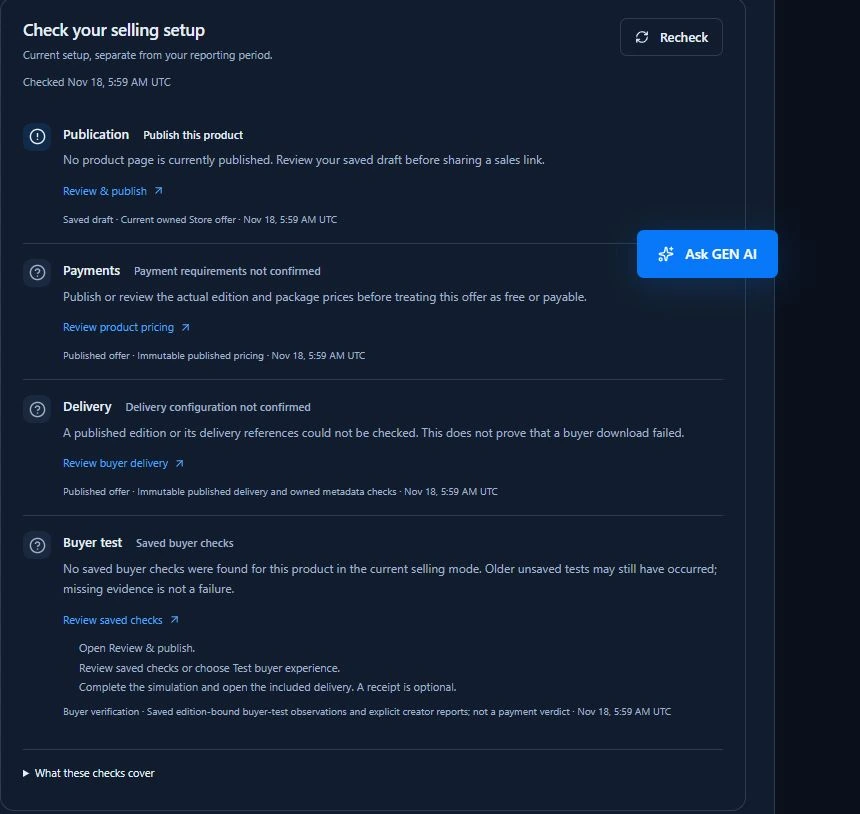
Newer draft edits can coexist with a working published edition. Identify which edition you checked. Use the buyer-test and publication instructions, finished-file launch checks or delivery troubleshooting guide for the repair you need.
2. Check what your numbers actually measure
Write down each report’s product, dates, channel, live or test mode and definition. A page load, link click, checkout start and confirmed payment answer different questions. Check which interaction each number represents.
A social post’s impressions are not visits to your product page. Recorded visits depend on the measurement setup and consent. A checkout start is not a payment, and a free claim is not a paid sale. Privacy controls and cross-device use can leave a genuine purchase without a preceding measured visit.
Do not manufacture a funnel from unrelated totals. In Genesize Growth’s product diagnostic, visits and checkout starts exclude the final 24 hours; paid orders use the full payment-date range and include all sales channels. Dividing those paid orders by those visits does not establish a conversion rate.
Use a matched cohort only when the report explicitly supplies one: the same eligible visitors or checkouts, defined dates and completion rules. Otherwise, keep the observations separate. See the matched-cohort example.
3. Find out whether relevant people reached the offer
If tracking is working but very few suitable people visited, you have limited evidence about the product itself. Check where you shared the link and what the message promised. Ask whether that audience has the problem your resource addresses.
Choose one appropriate route, such as answering a question from someone seeking that resource. Keep the message and destination consistent. Record the actual link and sharing date. The finished-product first-sale plan covers choosing a route without an established following.
If Google Search is a traffic source for a site you manage, Search Console’s performance reports show search impressions and clicks by query and page. Use them to understand that search route. Search impressions are not product-page visits, and search clicks do not establish purchases.
On Scale or Business, Growth → Promote lets you review a message, save a promotion with its own link and explicitly mark it shared. Copying does not post or send it. Saved-link results have their own dated review; they do not establish that the wording caused a purchase.
4. Separate offer questions from checkout friction
When relevant visitors arrive, ask a willing reader to describe what they would receive, who it suits, the required software and the total commitment. Listen for a specific misunderstanding. “A useful toolkit” is less informative than naming the actual files and showing one completed example.
For page clarity, review the $19 PDF sales-page example. Fix one mismatch: an unclear headline, unreadable sample, omitted compatibility requirement or an inaccurate access promise. Keep the page consistent with the delivered product.
If checkouts start but payments do not complete, inspect the final amount, currency, payment status and mobile flow. A payment still processing requires its own check. Ask interested buyers what held them back rather than treating every unfinished checkout as a price objection.
Use the checkout troubleshooting steps. Pause further promotion if you reproduce a material buying or delivery problem. Any reminder email must follow the supported consent and sending rules.
A fictional example: the $19 Client Kickoff Guide
A freelance designer sells a $19 PDF checklist and project brief. They record eight consented visits, one checkout start and no paid orders in an early review. These invented counts are not a matched conversion cohort or a useful performance benchmark.
The public page opens. Payments are ready. The creator opens the downloaded test PDF and confirms the receipt arrived. A willing reader then asks whether the product includes an editable document; it includes only the PDF.
The next action is to clarify the format and show a readable completed page. The creator records the earlier wording, saves one revised description and publishes it after review. They keep gathering relevant visits and buyer questions. This example demonstrates a reasonable investigation, not proof that the description caused the lack of sales or that changing it increases revenue.
5. Make one change and give the evidence time
Use the worksheet to schedule seven days of consistent observation. Record the edition and change date, keep the traffic route understandable and note what buyers ask. A seven-day schedule organizes the work; it does not guarantee sales or enough evidence to judge an offer.
- Start: resolve confirmed setup problems and record what remains unknown.
- During the week: share the correct link where relevant, record feedback and investigate reproducible errors.
- Review: read the eligible dates and definitions. Allow recent checkouts time to complete; extend observation when traffic is sparse.
With Growth on Scale or Business, after reviewing and saving suggested copy for an individual product with an earlier published edition, you can choose Track this improvement. Tracking keeps the exact selected edits. Open product editor remains the separate route to review and publish them.
Tracked improvements distinguishes Waiting to publish, Collecting evidence and Review. Its before and after windows are seven days each, with another 24 hours for checkout outcomes. Unknown earlier publication history cannot be reconstructed by refreshing; short or interrupted coverage cannot support a complete comparison.
These tracked-review counts differ from Overview’s paid-date totals: they follow exact-edition checkouts started in each window. Their paid orders require a positive, currently paid, unrefunded purchase completed within 24 hours. Read the report’s definitions before comparing either view.
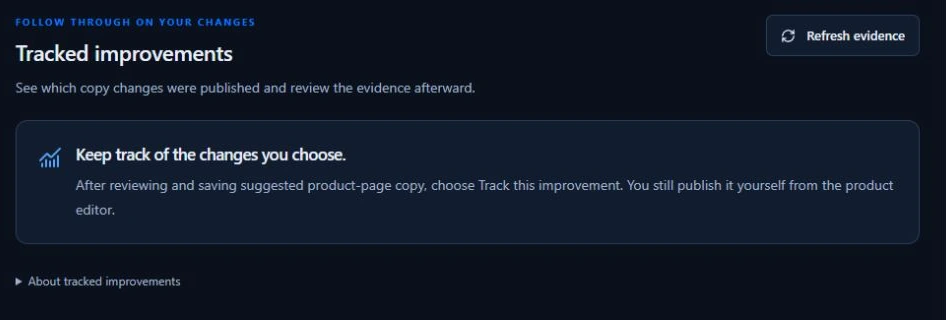
Even complete windows can contain too little activity to judge a change. A before-and-after observation does not isolate copy from audience, seasonality or other influences. A later publication or availability change can interrupt the review while the earlier edition IDs remain in history.
Follow the tracked-improvement instructions. Growth is optional and plan-dependent; see current plan access. The worksheet, manual checks and decision process remain useful without it.
Common questions when a digital product is not selling
Why is my digital product not selling?
Possible causes include an unavailable product page, incomplete payment setup, too few relevant visitors, an unclear offer or checkout friction. Missing tracking can also hide activity. Start with a signed-out check of the published page and buyer experience, then inspect dated evidence before choosing one change.
Why am I getting views but no sales?
Views alone do not show whether the intended buyers reached the offer or understood it. Check the traffic source, sample, contents, compatibility, price and purchase button. Investigate checkout separately, and do not divide totals from different channels or date windows to invent a conversion rate.
How many visitors do I need before changing my product?
There is no universal visitor count that proves an offer works or fails. A few visits are weak evidence, especially when traffic is poorly matched or tracking is incomplete. Record the source, dates, buyer questions and eligible observations, then change a specific problem you can explain.
Does a successful buyer test prove a paid checkout works?
No. Genesize’s simulated buyer test can help inspect the saved offer, private delivery, files and optional test receipt without a charge. Stripe readiness and actual payment confirmation are separate. Use a supported payment sandbox when payment testing is needed, and keep test activity separate from real sales.
Should I lower the price when nobody buys?
First establish whether suitable people reached a working checkout and understood the product. A lower price does not repair a broken link or explain missing contents. If price is a credible concern, choose a deliberate price test, record its date and review feedback and costs alongside purchases.
Can Genesize help me diagnose a product that is not selling?
On Scale or Business, Growth can show current selling-readiness checks, measured activity and suggested next actions. Creators can review copy suggestions, save selected edits to a draft and optionally track their publication and dated evidence. You control sharing and publication. The free worksheet and manual checks in this guide do not require Growth.
Sources and what this guide verifies
Reviewed November 18, 2026. Google Search Central’s Search Console documentation supports the search-traffic checks. Genesize’s interface, Help Center and current implementation were checked for readiness, buyer-test evidence, promotion records and tracked copy reviews.
The screenshots show an actual test product. The $19 PDF, its eight visits and its reader question are fictional examples. No live customer results, verified conversion lift or causal sales improvement are claimed.
Choose the next check your product needs
Start with the worksheet and your published link. If your finished product still needs a selling setup, explore Genesize Free to Sell. If it is already available to buy, follow the evidence to one specific next action.
Open the free sales diagnostic