

A finished $19 PDF: what should the reminder actually do?
Imagine a freelancer considering the Client Kickoff Guide, a PDF offered at a fictional $19 USD before tax. They open checkout and request one reminder, but do not complete payment. The useful next step is a chance to review the guide again—not an unexpected charge or a series of increasingly urgent emails.
A reminder can restate the guide’s purpose, clarify the file format and link back to its public offer. It should not provide the paid PDF before purchase, promise that an old discount still applies or claim that a downloadable file is nearly out of stock.
You asked for a reminder about the Client Kickoff Guide. It explains five kickoff decisions: the brief, deliverables, assets, feedback and first milestone.
If it still fits your project, use Review current offer below to check the current contents and price before buying.
Genesize adds the product title, Review current offer button and sender/unsubscribe details. The $19 price is an article example, not a live promotion or a promised recovery result. The copy deliberately avoids repeating a price that may change before someone returns.
The reminder settings are shared across the workspace’s eligible checkouts. The example above assumes the guide is its only eligible product. For a store with different products, use the general template below so a planner buyer does not receive an email describing a kickoff guide.
Download the reminder copy and checklist
Three plain-text message alternatives, a setup checklist and a small results log. Choose one; these are not an automatic three-email sequence.
If people leave because the original offer is confusing, first improve the sales page and its $19 PDF example. A reminder cannot repair a broken payment button or a file that buyers cannot open.
Should the reminder go after 1 hour, 24 hours or 48 hours?
There is no universal best delay for every digital product. Start with one timing and review comparable results before changing it. Genesize defaults to 24 hours when configuring a new reminder; enabling it still requires your review.
| Choice | When it may be useful | What to understand |
|---|---|---|
| After 1 hour | A buyer asked for a prompt reminder to revisit a straightforward download. | For a new opted-in checkout, the Stripe link lasts one hour. Sending follows expiry and payment checks. |
| After 24 hours | You want to give the buyer time to return on their own before a single follow-up. | The delay starts when checkout opens. The checkout must also be expired and unpaid. |
| After 48 hours | The buyer may need more time to decide whether the resource fits their work. | A longer wait does not reserve the old price, contents or availability. |
The one-hour option is not a guaranteed email at exactly minute 60
If an opted-in buyer opens a new one-hour checkout at 9:00, its payment link is set to expire around 10:00. Genesize then needs confirmation that it expired unpaid. Scheduled processing, queue capacity and sending checks can delay acceptance by the email provider. A payment still processing is excluded.
Changing the setting later does not rewrite the timing or message promised by an existing checkout. The new settings apply to new checkouts. Do not describe the timer as beginning at the moment a visitor closes their browser; that is not what this workflow measures.
Platforms handle timing differently. Gumroad documents one fixed 24-hour abandoned-cart email. Shopify’s newer automation offers workflow timing controls. Those are different implementations, not evidence that one delay will perform best for your product.
Three abandoned checkout email examples for a digital download
Choose one message that fits all eligible offers in your workspace. Genesize currently saves one timing, subject and body per workspace and payment mode, not per product. Its reminder body is plain text without merge-tag replacement; the actual product title and current-offer button are added separately. Do not paste a customer’s private purchase link, an expired Stripe URL or unsupported personalization tags into the message.
A general reminder for a store with several products
Subject: Your product reminder
You asked for a reminder about the product named above. If it still fits what you need, use Review current offer below to check the current contents, price and availability before buying. If you have a product question, reply to this email.
This is the save-ready starting point for a store with several products. Genesize inserts the actual product title separately; the reminder body does not replace merge tags.
Single-product store: clarify the PDF contents
Subject: A quick look at the kickoff guide
You asked for one reminder about the Client Kickoff Guide. The product is a PDF with a practical kickoff process, a fictional project example and reusable notes. It is a digital download, not a consultation or printed book. Review the current offer below to decide whether it is useful for your next project.
Use this specific example only when every eligible offer in the workspace matches it. For a mixed catalogue, use the general reminder instead.
Single-product store: help the buyer check the fit
Subject: Is this guide useful for your next project?
Here is the reminder you requested for the Client Kickoff Guide. It is intended for freelancers who want to agree on the brief, inputs, review process and next milestone before starting client work. Use Review current offer below to check the details. If you have a product question, reply to this email.
This is another single-product-store example. Check that the description fits every eligible offer and your reply address is monitored.
A discount is optional, not a required part of recovery. If you deliberately run a promotion, configure and check it on the actual offer. The reminder itself does not generate a code or automatically apply a saving. Use the discount-code guide for real campaign dates, eligibility and final-price checks.
For signup, launch and post-purchase messages, use the separate digital product email-marketing guide. A requested checkout reminder does not grant permission for that broader sequence.
How to set up abandoned checkout recovery in Genesize
Recovery sends customer email through your verified sender setup. It requires eligible active paid Scale or Business access after the first verified payment, current billing and no sending block. Free to Sell, Starter and an unpaid trial do not include this sending access. Existing plan allowances and provider limits still apply; see current plans.
- Open Email campaigns in Studio and select Settings. Complete your sender identity, reply address, business name and business mailing address.
- Open Checkout recovery. Resolve anything listed under Before enabling recovery.
- Choose Send a reminder. Select one of the 1-hour, 24-hour or 48-hour options and read the checkout-expiry explanation.
- Enter Email subject and Your reminder. Use general copy if you sell different products: these settings are shared across eligible offers. Check the content preview. The subject supports up to 120 characters and the body up to 1,200.
- Select Enable recovery for new eligible checkouts. Then tick I reviewed this reminder and its sending rules.
- Choose Save recovery settings. The confirmation applies to new eligible checkouts. Past attempts are not enrolled retroactively.
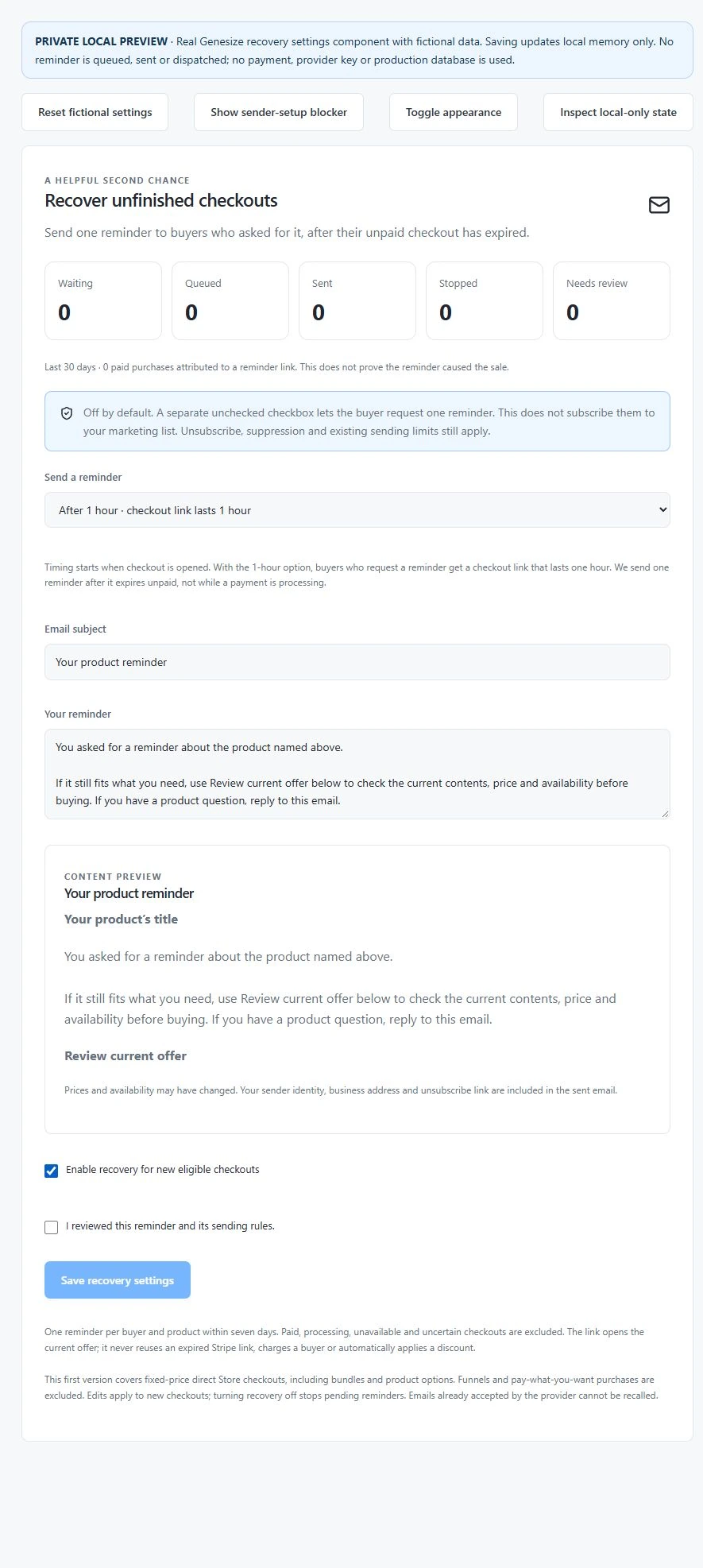
This workflow covers native fixed-price Store checkouts, including bundles and product options. Funnels and pay-what-you-want purchases are excluded. Recurring memberships use a separate billing flow; do not assume this Store reminder follows an incomplete membership checkout.
The Help Center setup guide provides a shorter reference for the same controls.
The buyer requests one reminder, then reviews the current offer
On an eligible purchase form, the separate checkbox starts unchecked:
Email me one reminder if I don’t finish this purchase. I can unsubscribe at any time.
A buyer who leaves it unchecked is not enrolled. Selecting it records that reminder request; it does not subscribe the buyer to general marketing, clear a prior unsubscribe or override a suppression. With the one-hour option, the purchase form also explains that the checkout link expires after one hour.
After an eligible expired-unpaid checkout, Review current offer leads back to the current public product page. The buyer checks its latest details and starts a fresh checkout if they still want it. The email does not restore an old Stripe session, reserve the old price, supply paid files or charge a saved card.
Genesize limits this workflow to one reminder per buyer and product within seven days. Unsubscribes, suppressions, sender readiness and sending limits continue to apply. The system checks purchase and payment status before preparing and sending the message.
If someone already paid but cannot find their file, treat that as purchase-access support. Help them use the verified recovery route in the PDF selling guide; do not tell them to buy again.
Why did an abandoned checkout reminder not send?
Not every page visit, entered email or unpaid checkout is eligible. A reminder may correctly remain unsent because the buyer did not request it, the checkout is still open, payment is processing or the offer is unavailable.
| State | What it tells you | What to check next |
|---|---|---|
| Waiting | The reminder has not reached a confirmed ready-to-send outcome. | Check the chosen delay, checkout expiry and current payment state. Do not assume the timer alone makes it eligible. |
| Queued | A message is prepared but has not been accepted as sent. | Check sending capacity, current sender/plan access and delivery processing. Avoid making a duplicate campaign. |
| Sent | The provider accepted the email. | Review delivery events or bounces if it is missing. Acceptance is not proof that it reached the Inbox. |
| Stopped | The workflow will not continue that reminder. | Review purchase status, opt-out/suppression, offer availability or whether recovery was turned off. |
| Needs review | An uncertain result needs checking rather than an automatic repeat. | Investigate the provider/payment outcome. Do not send a replacement merely because you cannot yet confirm the first one. |
If the buyer says the email never arrived
First distinguish not eligible, still queued and provider accepted. Then check the recipient’s address, available delivery events, bounces and suppressions. Ask the buyer to look in Junk as well as Inbox. Do not keep retrying an unsubscribed or bouncing address.
If you want to change or stop the workflow
Edit the message or timing, review it again and save for new checkouts. Turn recovery off stops pending reminders. An email already accepted by the provider cannot be recalled. Turning the feature back on does not justify backfilling old checkout addresses.
Measure paid outcomes without calling every return a recovered sale
The Checkout recovery panel shows the last 30 days of activity and paid purchases attributed to reminder links. The purchase count can include orders that were later refunded; it is not a count of retained sales. Reported net attributed sales subtract recorded refunds and are grouped by currency. That is not a profit figure: processing, platform fees and other costs are separate.
Attribution means a link was connected to a later purchase; it does not prove that the reminder caused the sale. A buyer might have returned anyway. Sent counts also do not mean every recipient saw the email.
For your own comparison, use the same product, price and audience conditions, with a defined sending cohort and enough time for its purchases and refunds to arrive. For example, two attributed paid orders among 20 comparable sent reminders is 10% for that hypothetical cohort. Do not divide unrelated rolling-period totals or treat that small example as an expected conversion rate.
Also review replies, unsubscribes, delivery failures and checkout problems. Fix a broken buyer path before changing the delay or adding an optional upsell. Use the sales-funnel guide to separate reach, product-page interest, checkout and confirmed paid orders.
A short checklist before you enable recovery
- The published product, payment connection and download work without a reminder.
- Your plan and sender setup are eligible, and the reply inbox is monitored.
- You chose one delay and understand the one-hour checkout expiry if selected.
- The buyer’s reminder checkbox is separate and unchecked by default.
- Your message accurately describes the current product without a false deadline or promised old price.
- The link returns to the current offer, and you know how to stop pending reminders.
Fifteen local test groups passed for consent, timing and sending safeguards, including late payments, processing sessions, opt-outs, uncertain provider outcomes and retries. Stripe and email-provider responses were simulated in an isolated in-memory test. Browser checks of the actual settings component covered the one-hour choice, message preview, mandatory review, saving and turning recovery off. The screenshot shows fictional data with zero activity. No real email, payment or live store change was made for this guide.
Use a private test environment for checkout and email checks. A settings preview alone does not confirm payment handling, actual inbox delivery or every device. This article does not enable recovery or change your live store’s settings.
Common questions about abandoned cart emails
What is an abandoned cart email for a digital product?
It is a reminder to someone who started a purchase but did not finish paying. For digital products, the message can explain the download and provide a route back to the offer. Genesize’s Checkout recovery sends one reminder only when a buyer asks for it and an eligible checkout expires unpaid.
When should I send an abandoned checkout email?
Choose a delay that fits the offer and the buyer’s request rather than assuming one timing always converts best. Genesize offers one selected delay of 1, 24 or 48 hours, measured from checkout opening. Sending also requires confirmed expiry without payment and current eligibility, so the delay is not an exact delivery promise.
Does Genesize send three abandoned cart emails?
No. The 1-hour, 24-hour and 48-hour choices are alternatives for one reminder, not three messages in a sequence. Genesize also limits reminders to one per buyer and product within seven days.
Can I write a different reminder for every product?
Genesize currently saves one checkout-recovery timing, subject and message for the workspace’s payment mode. These settings apply to new eligible Store checkouts, rather than configuring a separate reminder for each product. The actual product title and current-offer button are inserted automatically; the reminder body has no merge-tag replacement. Use general copy when the store has several different products.
Can I use checkout recovery during a trial or on Free to Sell?
Customer email sending requires eligible active paid Scale or Business access after the first verified payment, together with ready sender details and no sending block. Free to Sell, Starter and an unpaid trial do not include this sending access. Publishing products and receipts are separate workflows.
Does typing an email at checkout subscribe the buyer?
No. Genesize requires a separate unchecked checkbox requesting one checkout reminder. Choosing it does not subscribe the buyer to a general marketing list or override an unsubscribe or suppression. A checkout address alone is not enough to trigger the reminder.
Will the reminder stop if the buyer pays?
Genesize checks the order and Stripe session before preparing and sending recovery. Paid and processing checkouts are excluded. A payment confirmed before final sending checks stops the reminder; an email already accepted by the provider cannot be recalled.
Why does the recovery dashboard say Sent but the buyer has no email?
Sent means the email provider accepted the message; it does not prove inbox delivery. Check delivery events, bounces, suppressions, the recipient’s address and their Junk folder. A queue or an uncertain provider result is a different state and should not be treated as delivered.
Does the reminder restore the old price or payment link?
No. Review current offer opens the latest product page so the buyer can check the current contents, price and availability and start a fresh checkout. It does not reuse an expired Stripe session, reserve a discount, include private paid files or charge the buyer automatically.
Sources and review scope
Reviewed November 20, 2026. Genesize instructions were checked against the current recovery settings, checkout consent, eligibility checks and sending safeguards. The product and prices in the examples are fictional.
- Gumroad Workflows documentation: its single abandoned-cart email and fixed timing.
- Shopify’s newer abandoned-checkout automation: workflow controls and delivery exclusions.
- Genesize Help Center: current setup steps and checkout scope.
Email rules vary by location and context. Follow the requirements that apply to your business as well as the platform’s consent, sender and unsubscribe controls. A checkout reminder is not a purchase receipt.
Give interested buyers one useful way back.
Keep the offer clear, respect the buyer’s request and check the outcome before sending more.
Compare Genesize plans