

Checked November 19, 2026. This guide is written by Genesize and covers one-time downloads. The provider’s migration tooling is announced for December 2, 2026; we have not tested that unreleased flow. Recheck its migration planning guide before making account changes.
Start with one $19 PDF, not your whole store
Imagine you sell a fictional Client Kickoff Guide for US$19. It contains a PDF and a checklist ZIP. You have the original files, a sales page, and previous customers who were promised continued access.
| Buyer | What must work | What does not solve it |
|---|---|---|
| A new customer | The replacement $19 page lists both files; a confirmed new order unlocks the correct downloads. | Copying the old sales-page text without attaching the files. |
| Someone who bought last month | A verified, private replacement route retrieves the edition and updates they are entitled to, without another purchase. | Sending them to the new $19 checkout or keeping only an order CSV. |
Download the one-product migration worksheet
Record the files, past-buyer access plan, delivery checks and links to replace. Keep customer records in your private systems.
1. Save the product files and export the records
Make a private inventory for that one product. Open the PDF and ZIP yourself. Keep earlier editions if buyers were promised them, and check that links inside the files lead somewhere you can maintain.
- Deliverables: original files, filenames, sizes, version dates, instructions and any external template links.
- The offer: price, currency, variants, images you own, refund terms, support contact and promised updates.
- Access promises: who receives which edition, whether updates are included, and how refunds or canceled subscriptions affect access.
- Sales entry points: website buttons, bios, emails, ads, affiliate links, embeds and integrations.
Export orders from Lemon Squeezy
- Open the store’s Orders page and select Export.
- Retrieve the generated CSV from the store owner’s email.
- Check the relevant product and variant, order references, dates, currency and totals against your store records.
The CSV includes customer and financial information, so store it privately. It is a record of orders, not a backup of the product files. Follow Lemon Squeezy’s order-export instructions.
Save the financial and tax documents you need separately before account access ends. The provider’s wind-down FAQ explains record retention steps. Do not treat an exported purchase email as permission to add that customer to a marketing sequence.
2. Resolve past buyers’ access before calling it migrated
Lemon Squeezy currently keeps purchases accessible while sellers prepare. Its digital-fulfillment guidance says historical orders and subscriptions need a replacement fulfillment solution before March 31, 2027; otherwise buyers may lose access to files, links or license keys afterward.
Uploading your PDF to Genesize does not import those historical purchases. An order CSV does not create Genesize receipts or private purchase entitlements. Use Genesize for the replacement offer only after checking it fits your new-sale needs; arrange legacy access separately with the providers involved.
- Define the entitlement. Write down what a past buyer can retrieve: the purchased edition, included extras and any promised updates.
- Confirm the destination can deliver it. Ask how the provider verifies an old purchase, grants private access, handles refunded orders and lets a buyer retrieve a lost link. Get an answer before importing customer data.
- Test an authorized old purchase. Use an order you are allowed to check, or ask a willing buyer to try their own. Confirm access to the promised files without another charge. Check that a visitor without a valid access grant cannot retrieve another purchase. Keep receipt links private: a bearer link can work for anyone who holds it.
- Keep a support route. Prepare a private way to look up an order reference and resolve access problems. Never publish a customer CSV or a shared folder containing paid files.
If that replacement is unresolved, the migration is incomplete. You can prepare a new sales page while resolving it, but do not close the old setup or promise uninterrupted historical delivery on the strength of a new checkout alone.
3. Build and price the replacement offer
For the $19 example in Genesize, choose Add product → I already have a product → Files & digital downloads. Upload the guide and checklist ZIP, give each a clear filename, and save the draft. AI creation is optional. See the existing-product upload guide.
On the sales page, show a safe sample, what each file contains, required apps, license terms and support details. Keep the paid files attached to delivery rather than exposing them through a public sample link. Set the intended currency and price, and finish the connected Stripe setup before publishing a paid offer.
Choose the payment model as well as the storefront
Lemon Squeezy and Stripe Managed Payments provide merchant-of-record services. Managed Payments leaves storefronts and file fulfillment to other tools, according to its feature comparison. Genesize’s current connected Stripe checkout is a separate arrangement; it is not a Managed Payments integration. Sellers remain responsible for their sales and applicable tax obligations under Genesize’s terms.
If merchant-of-record coverage is essential to you, resolve that requirement before choosing the new payment path. For a Genesize offer, compare current plan fees and processing costs using your own sales mix. The worked sales-page example helps you make the replacement offer clear.
4. Test the new page, receipt and downloads
For the Client Kickoff Guide, a pass means the buyer sees the $19 price, understands that the PDF and ZIP are included, and can open those exact files on a device they use. An attractive page alone is not a delivery check.
- Open Buyer Preview. Check file names, included contents, instructions and links inside the PDF. Download and extract the ZIP.
- As the workspace owner, save the draft. In Review & publish, choose Test buyer experience and complete the simulated checkout.
- Where sending is available, choose Send test receipt to send it to your verified seller email. Otherwise, use the private test delivery link to check the saved draft.
- Open the receipt link in a signed-out mobile browser, choose Open test purchase, and try each file under Included downloads.
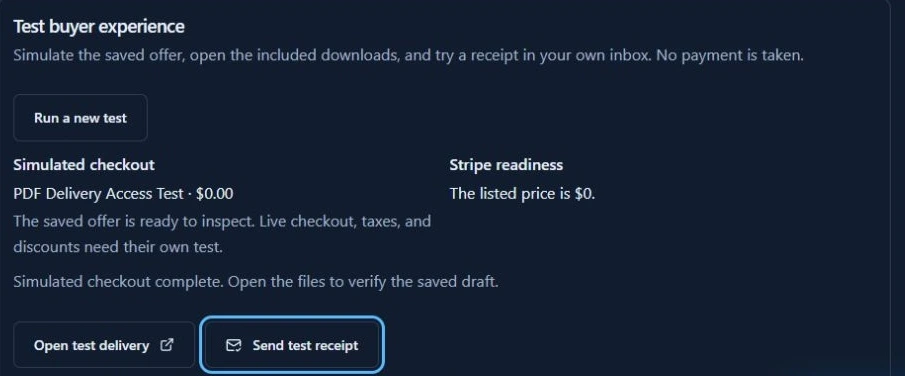
The private draft test link expires after 30 minutes and depends on the tested draft staying unchanged; generate a fresh test if it expires or you edit the product. A simulated checkout creates no order or charge and does not verify a live charge, tax calculation or recurring renewal. If you need to check the payment trigger, use a separately configured Stripe sandbox. Compare what each delivery test proves before marking the new payment path ready.
5. Replace sales links in a controlled order
Lemon Squeezy says old checkout links, storefronts and integrations do not redirect automatically. Its link inventory guidance is a useful starting point. A new product URL will not repair an old embedded checkout or webhook.
- Publish and inspect. Open the replacement page signed out on desktop and mobile. Confirm its price, currency, contents and payment availability.
- Change one entry point first. Replace a website button you control. Follow it as a visitor and confirm it reaches the correct offer.
- Update the rest of your inventory. Work through bios, scheduled posts, email templates and help pages. Record links you cannot edit, including previously sent emails.
- Check special flows separately. Discounts, affiliate attribution, overlays, APIs and webhooks need their own replacements and tests. Copying the destination URL is not enough.
- Retest both buyer paths. Verify the replacement offer and the agreed legacy-access route. Monitor support questions and delivery failures during the change.
Record the last verified working destination and who can restore it. Before the shutdown deadline, returning traffic to the old checkout is an option only if you have confirmed it still accepts the intended orders. After the cutoff, do not use it as a payment fallback. Pause the affected promotion while repairing the new route instead.
Keep subscriptions, licenses and customer messages on separate checklists
| Dependency | Confirm before changing it |
|---|---|
| Recurring billing | Provider-supported migration, eligible payment methods, buyer authorization where required, next renewal date and no duplicate charges. |
| Membership access | Which access follows the old subscription, when it ends, and how the destination verifies paid status. |
| License keys | Key validity, activations, validation endpoints and support for previously issued keys. |
| Email audience | Purchase notices versus marketing consent, unsubscribes and suppression records. An email subscriber list is not a list of recurring subscriptions. |
For recurring offers, use the provider’s subscription migration guidance and confirm the destination’s requirements. The planned Managed Payments tooling is for eligible stores, not a generic transfer into Genesize. Do not cancel existing renewals or ask buyers to repurchase until the agreed replacement is ready.
If you export an email audience, use the separate subscriber export and preserve its subscription status. Send any necessary access instructions through an appropriate, verified channel; do not expose private download links in a public migration announcement.
Common questions about Lemon Squeezy migration
When do I need to move my Lemon Squeezy store?
Lemon Squeezy says payment processing ends March 31, 2027. Plan the replacement sales and delivery paths before that deadline. Keep a separate plan for subscriptions, records and support.
Can I import Lemon Squeezy orders into Genesize with a CSV?
No automatic historical-order import is covered by this workflow. An order CSV is a private sales record; it does not create Genesize purchases, receipts or buyer access. Rebuilding a product sets up future orders. Resolve past buyers’ entitlements separately.
Will old Lemon Squeezy download links keep working?
Do not rely on them indefinitely. Lemon Squeezy says customers may lose access to files, links and keys after March 31, 2027 if historical fulfillment is not migrated. Verify a replacement access route for past buyers before treating the move as complete.
Does Stripe Managed Payments deliver my PDFs or ZIPs?
No. Managed Payments provides merchant-of-record services, while storefront and digital fulfillment require separate solutions. Genesize’s connected Stripe checkout is a different setup; this guide does not describe a Managed Payments integration.
Can I move a finished PDF to Genesize without using AI?
Yes. Add an existing product, upload your files, set up its sales page and connect Stripe. AI creation is optional. Test the exact files, receipt link and mobile delivery before sending buyers to the published page.
Does moving the file also transfer subscriptions and saved cards?
No. Uploading files does not transfer recurring billing, payment authorization or license validation. Arrange those with the providers involved, verify the next renewal and access rules, and prevent duplicate subscriptions before changing the old setup.
Can I test the replacement without making a real payment?
Genesize’s Test buyer experience simulates checkout for a saved draft. Where receipt sending is available, the workspace owner can send one to their verified email. It creates no order or charge. Use a separate Stripe sandbox test to verify a payment-triggered path.
Test a new home for your finished download
Build one offer, inspect its delivery and keep legacy access on its own checklist before moving your traffic.
Explore Free to Sell