

1. Package the Excel workbook buyers will use
Keep your master workbook and save a separate sales copy with a name buyers can recognize, such as monthly-budget-v1.xlsx. For a workbook that works without macros, use the standard Excel Workbook (.xlsx) format.
- Start Here. Tell buyers what software to use, where to enter data, and what the workbook calculates.
- Blank Budget. Keep the inputs empty. Mark editable cells by label as well as color, and leave the formulas in place.
- Worked Example. Fill in fictional numbers and show the expected result so buyers can tell whether the file works.
Download the sample Excel workbook
The fictional budget includes all three tabs. Open a copy and try the same checks you’ll use on your finished template.
2. Remove private data and dependencies
Review the sales copy for real names, comments, hidden sheets and rows, and cached data in tools such as PivotTables. In desktop Excel on Windows, open File → Info → Check for Issues → Inspect Document. Review each result before removing anything. Deleting a hidden sheet can break a formula that uses it. Run the workbook test again after cleanup. Microsoft’s Document Inspector guide.
Check Data → Workbook Links and review any queries or connections. If a formula needs a workbook on your laptop or a file in your company drive, a buyer may see stale values or a refresh error. Bring any approved reference data the template needs into the workbook and update the formula to point there. Save a separate copy before breaking links. Excel can replace linked formulas with their current values when you break a link. Microsoft’s workbook links guide.
3. Check compatibility before promising it
| Buyer’s app | Check in the downloaded copy |
|---|---|
| Desktop Excel | Open without a repair prompt. Change an input, check the result, then save and reopen the file. Test the Excel versions you list. |
| Excel for the web | Upload a separate copy. Check whether the cells buyers need are editable, formulas recalculate, and any charts or dropdowns still work. |
| Google Sheets | Test a separate copy for formulas, dates, validation and formatting before listing Sheets compatibility. |
List the apps and versions you actually checked. Excel for the web and desktop Excel handle some workbook features differently. If your product is built around a Sheets copy link, follow the separate link and sharing workflow. Microsoft’s browser compatibility guide · Sell a Google Sheets template.
4. Sell the finished Excel template through Genesize
- In Studio, open Add product → I already have a product → Files & digital downloads. Name your product and select Add my product.
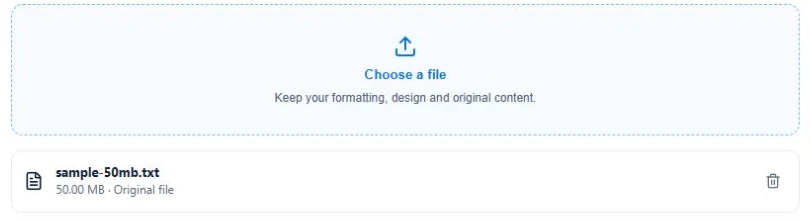
- Under Your content, select Choose a file, attach your tested
.xlsx, and select Save draft. - Use Review & sell → Preview buyer experience to check the files. Set up the sales page with what the buyer gets, the apps you checked, and the price.
- For a paid offer, complete Stripe setup under Storefront → Settings → Payments. Review the offer, publish it and copy the sales page link.
Once payment is confirmed, the buyer can open the purchase and find your workbook under Included downloads. The receipt gives them a private link to return. Genesize delivers the file you attach. Make spreadsheet edits in Excel before you upload it. Upload an existing product · Publish a product.
5. Test the exact file a buyer gets
Download the attachment from Buyer Preview, then open that copy in the app you’ll list. Use a device or profile that lacks access to your private files to catch hidden dependencies. For the sample budget, enter these values in the blank tab.
| Test | Inputs | Expected balance |
|---|---|---|
| Check the starting calculation | $2,400 income, $1,000 rent, $300 groceries | $1,100 |
| Check recalculation | Change groceries to $350 | $1,050 |
Pre-launch checklist
- The filename and tabs match the sales page.
- The blank tab is ready for input and the example uses fictional data.
- The workbook opens and recalculates without needing your other files.
- The product page names the apps you tested and lists exactly what the buyer receives.
- The download works from Buyer Preview. A separate order test checks confirmation and receipt access.
Buyer Preview lets you verify the attachment and layout. Use a sandbox payment if you also need to exercise a paid checkout without a real charge. What each delivery test verifies.
What to check when a buyer gets stuck
- They only see a preview. Ask them to save the
.xlsxfrom Included downloads and open the saved file in the supported app. - The workbook asks for another file. Reproduce the error from a clean copy. Review Workbook Links and external data connections, then retest the revised workbook.
- The total stays the same when an input changes. Check whether the total still contains a formula, the input is numeric, and calculation is set to Automatic in desktop Excel.
- They can’t find the workbook. Start with the private access link in the receipt. If access is missing, check the order’s payment and access status before replacing the file or sending a new link.
Common questions about selling Excel templates
Can I sell an Excel spreadsheet as a digital download?
Yes. Prepare an Excel workbook you have the right to sell, upload the finished .xlsx file, connect a payment method for your store and publish the product page. In Genesize, the buyer gets the uploaded file after payment is confirmed.
Can Genesize edit the formulas in my Excel template?
Edit and test the workbook in Excel. Genesize hosts the product page, connects Stripe checkout and delivers the original workbook you attach.
Can buyers open my Excel template in Google Sheets?
Some workbooks also work in Google Sheets. Test the exact file there before promising support for it. Check formulas, validation, dates and formatting. If your product is designed for Sheets, you can deliver a view-only copy link instead.
Do buyers get my edits after they download the spreadsheet?
A downloaded workbook is a separate copy. Changes you make to your own file do not update a buyer’s copy. If you release a revision, explain how buyers can get it and how to move their existing data to the new version.
Have an Excel workbook ready to sell?
Upload the finished file, publish your product page, and share your link.
See Free to Sell