
What makes a workbook different from an ebook or template?
A workbook asks the reader to identify a problem, compare options, draft a plan, practice a method or review a result. Explanations support that work. A collection of inspirational questions with little guidance may leave the buyer wondering whether they answered well or what happens next.
| Format | The buyer’s main need | What to include |
|---|---|---|
| Ebook or guide | Understand a subject or follow a method | Explanations, examples and a clear reading sequence |
| Workbook | Apply a method and produce their own answers or decisions | Short teaching sections, exercises, response space and review checks |
| Worksheet | Complete one focused task | A single activity with instructions and enough space to finish |
| Template | Adapt a starting asset instead of creating it from scratch | A reusable structure, editing instructions and a completed example |
These formats can overlap. A guide may include worksheets, and a course may include a participant workbook. Choose around the task. If readers mainly need an explanation, use our ebook creation guide. If they need an editable starting asset, the template guide covers that separate workflow.
1. Choose one buyer and a practical outcome
Finish this sentence before designing the cover: “This workbook helps [specific person] complete [specific task], using [the knowledge or materials they already have].” Make the result something the reader can inspect, such as a draft client brief, a short content plan or a completed project review.
A workbook to transform your marketing and grow your business.
A workbook that helps an independent pottery teacher outline three posts for an introductory workshop, using confirmed workshop details and common beginner questions.
The second version defines the reader, inputs and deliverable. It does not promise bookings, income or a particular audience response. Keep the scope small enough that someone can finish without needing a second course to understand it.
Ask likely buyers how they currently complete the task and where they get stuck. Show a sample exercise and ask them to try it. Interest in a topic is not proof that someone wants this exact resource; use the product validation guide before building a large workbook.
2. Turn the outcome into a sequence of exercises
Work backward from the completed result. What must the buyer know or decide first? Put those tasks in order and remove activities that do not contribute. Digital.gov’s plain-language guidance recommends organizing process information in the order people need to follow it.
| Exercise | Task | Completed output |
|---|---|---|
| 1. Clarify | Choose a buyer question the content will answer | One specific question and the facts available to answer it |
| 2. Build | Turn three questions into a short content plan | Three post outlines with distinct jobs and next actions |
| 3. Review | Check the claims and choose the first draft to write | A corrected plan and one practical next step |
Give every exercise a helpful structure
- Explain the method. Give enough context to understand the decision before asking the reader to make it.
- Show a completed example. Demonstrate the level of detail expected. Label invented examples clearly.
- Give specific instructions. Name the inputs, steps and deliverable. Replace “reflect on your audience” with a question the reader can answer.
- Provide response space. A paragraph-sized task needs more than a single line.
- Add a completion check. Explain how to spot a missing fact, vague answer or contradiction before moving on.
Carnegie Mellon’s teaching guidance connects objectives, instruction and assessment. Applied to a workbook, if the promised outcome is a usable plan, the practice should produce and review that plan. A definitions quiz alone would not demonstrate that the buyer can do the task.
Worked example: a three-post content planning workbook
This is an original fictional editorial example, not a customer result or a paid AI-generation test. Mira runs the fictional Harbour Clay Studio. Its introductory workshop is a 90-minute hand-building session for adult beginners, focused on making a small pinch pot. Bookings use the studio’s existing workshop page. Dates, price and availability must be checked there; they are not invented in this example.
Exercise 1: choose a question you can answer with facts
Teach: a useful post begins with a question the intended reader has. Separate that question from your sales claim. “Will I feel out of place as a beginner?” is a question. “Everyone becomes an expert” is an unsupported promise.
- Reader
- An adult considering their first pottery workshop.
- Question
- “I have never worked with clay. Can I join?”
- Available facts
- The introductory hand-building session is for adult beginners, lasts 90 minutes and uses a small pinch pot activity.
- Completed answer
- This 90-minute introductory hand-building session is designed for adult beginners and starts with a small pinch pot activity.
Your turn: write one reader question, two or three facts you can verify, and one sentence explaining how those facts answer it. Completion check: the answer addresses the actual concern without adding a result you cannot support.
Exercise 2: turn three questions into a small plan
Teach: give each post a distinct job. One can address a concern, another explain the experience and another clarify the next action. Keep the offer details consistent rather than changing the duration or audience between examples.
| Planned day | Reader question | Post outline | Next action |
|---|---|---|---|
| Monday | I have never worked with clay. Can I join? | Explain that this fictional workshop is for adult beginners; show the first step in making a pinch pot. | Read what the introductory workshop covers. |
| Wednesday | What happens during the session? | Outline the 90-minute hand-building session and the small pinch pot activity. | Check the workshop details on the booking page. |
| Friday | How do I book? | Point to the workshop page for its current dates, price and booking details. | Visit the booking page and choose a suitable available session. |
Your turn: choose three questions, outline one post for each and add an appropriate next action. These days are an example plan, not a required schedule or a claim about the best times to post. Completion check: each post answers a different question and points to an action the reader can actually take.
Exercise 3: check the facts and choose one next step
Teach: a completed table is still a draft. Check whether the facts, links and next steps agree. Keep information that changes, such as availability, on a page you can maintain instead of inventing it in a reusable example.
Mira checks that all three outlines describe the same 90-minute beginner hand-building session and small pinch pot activity. She confirms that the workshop page contains current booking details and removes an unsupported “perfect pot in one session” claim. Her next task is to draft Monday’s beginner question post and review it before scheduling.
Your turn: mark anything unverified, resolve conflicting details and choose the first post to draft. Completion check: you can explain what you will make next and which facts still need confirmation. The workbook has produced a working plan, not a promise that three posts will generate sales.
3. Choose a printable or fillable workbook format
A printable workbook is designed for handwriting after printing. A fillable workbook contains interactive fields for typing into a compatible PDF reader. A rectangle drawn on a page does not make it a fillable PDF, and a PDF is not automatically comfortable to use on a phone.
| Consideration | Printable PDF | Fillable PDF |
|---|---|---|
| How buyers use it | Print the PDF and write by hand | Type into interactive fields in a compatible PDF reader |
| What to design for | Writing space, readable text, margins and economical printing | Clear labels, useful field sizes, keyboard order and saved answers |
| What to test | A printed page at the intended size; no clipped instructions or faint lines | Enter answers, save, close and reopen; check long answers and printing |
| What to state in the offer | Paper size, file format and whether printing is expected | That it is a fillable PDF, reader requirements and editing limits |
Choose around how the buyer will work. A short planning exercise may suit a printed page; someone carrying out a digital process may prefer typed answers. Offering both is useful only if both files are prepared and tested. Include the paper size and reader requirements in the listing.
Design for completing the task
Use clear headings, consistent labels and enough room for a realistic answer. Keep instructions close to their response area. Use readable contrast and avoid relying on color alone. Test a printed page before adding heavy backgrounds that consume ink.
For digital use, check labels, keyboard navigation, zoom and long responses. Adobe’s interactive form guidance explains selecting fields, keyboard navigation and saving the completed form. Test your file in the reader you tell buyers to use. Interactive fields alone do not establish that the whole PDF is accessible.
4. Create the content and export a workbook in Genesize
Genesize can help draft explanations, activities and examples, then export the reviewed content. There is no separate “Workbook” product type. Choose an ebook for a guide with exercises, a written course for a lesson sequence, or a template pack for worksheet assets. Choose the structure around the actual material.
- Prepare the brief. State the buyer, outcome, exercise sequence, example facts and exclusions. Review and approve any source material in the Expertise library before using it in new drafts.
- Choose Create product. Define what you are making, who it is for and what they should be able to do. Review the structure and current credit quote before generation. Do not choose a long word target merely to make a short workbook look substantial.
- Review and edit. Put teaching before its activity. Check that instructions, completed examples and review checks agree. Remove repetitive prompts and add missing facts.
- Open Design & exports. Set the document style, accent, author, footer and cover treatment. The PDF layout called “Workbook” uses larger body text; choosing it alone does not add interactive fields.
- Choose the export. “Designed PDF” creates the standard document. The separate “Fillable workbook” export adds standard text response boxes for relevant activities, next actions and notes. “Editable Word document” supports further document editing.
- Test the downloaded file. Inspect content and page breaks. For a fillable export, enter answers, save a separate copy and reopen it. Check that the response boxes suit your exercises.
Know what the workbook export adds
The fillable export is not a custom form designer. It does not automatically turn every table cell or blank into a checkbox, calculation or specialized field. Its response boxes follow the saved content structure. Review their placement and size before advertising a particular interaction.
A focused brief to adapt
Create a practical workbook for independent pottery teachers who want to outline three posts for one introductory workshop. The result is a reviewed three-post plan, not guaranteed bookings.
Use three exercises: choose a beginner question and supporting facts; outline three posts with different jobs; check the claims and choose the first draft to write. Explain each method before its exercise. Include a completed fictional answer, instructions and a completion check.
Keep the fictional Harbour Clay Studio details consistent: adult beginners, a 90-minute hand-building session, a small pinch pot activity and an existing workshop booking page. Do not invent dates, price, availability, customer results or guaranteed outcomes. Flag missing facts for review.
The brief guides drafting; it does not guarantee accuracy or consistent examples. Manual editing, design changes and exports do not use AI credits. Optional AI generation, covers and rewrites have quoted costs. If you are starting with notes or a process, see the guide to turning existing content into products.
5. Test the workbook before selling it
Ask someone close to your intended reader to complete an exercise without your spoken explanation. Watch where they hesitate, ask what a label means or run out of room. That difficulty may reveal a missing instruction rather than a need for more pages.
- The opening explains who the workbook is for, what they will make and what they need before starting.
- Each exercise follows the teaching it needs and includes a completed example or clear model.
- Every task has instructions, response space and a useful way to check the answer.
- Names, durations, offer details and next actions agree throughout the example.
- The actual PDF has readable text, sensible page breaks and no clipped tables or response areas.
- Any advertised interactive fields work after saving and reopening in the stated reader.
- The buyer receives the exact format and assets described in the offer.
Read the file in buyer order. A polished cover cannot compensate for an exercise that relies on a lesson placed later or an example that contradicts the instructions. Keep a small ledger of example facts so names, quantities and actions stay consistent.
Test on a phone and a larger screen. Check whether reading and typing require excessive zooming and whether long answers disappear outside the visible field. If the workbook works best on a computer or printed page, say so clearly.
6. Price, describe and deliver the workbook you promise
There is no universal workbook price. Consider the problem, quality of your method, useful examples, included assets, support and alternatives. Test a clear offer rather than pricing only by page count. Our pricing guide explains how to compare scope, costs and buyer feedback.
State the intended reader, completed task, formats, paper size, reader requirements, examples, permitted use and support. Show sample pages so people can judge the approach. Do not use invented testimonials or describe a short written workbook as a video course.
Plan three posts for your next introductory pottery workshop. Work through three exercises with completed fictional answers and review checks. Supplied as a printable PDF for handwriting. You bring your confirmed workshop details and booking page. This is a planning resource; it does not guarantee reach, bookings or revenue.
This example describes a printable PDF deliberately. Use “fillable PDF” only when the delivered file contains tested interactive fields. Add the price, final page count, paper size and specific support terms once confirmed for your finished resource.
Check the Store delivery format separately
Genesize’s current built-in Store PDF download uses the standard designed product PDF, not the separate Fillable workbook export. Exporting a fillable file does not automatically attach it to a Store offer. If you promise that separate interactive file, arrange and verify a delivery method that actually supplies it before selling. Do not advertise the standard Store PDF as fillable.
For the built-in Store workflow, add the saved product, prepare the sales page and choose PDF or Word plus online reading. Complete the Store and payment setup required for a paid offer. Use Buyer preview to inspect the actual buyer download before Review & publish. A printable offer still needs response space in that file; do not assume the standard PDF includes boxes added by the separate fillable export. A draft preview has disabled checkout and does not prove a completed purchase.
Use the sales-page examples to explain the offer and the funnel guide to review the buying journey. Improve unclear sections using real questions and exercise feedback. Publishing does not automatically start an email campaign; prepare any permitted follow-up separately.
Download the free Workbook Creation Planner
Use this two-page planner to define your buyer and outcome, outline three exercises and specify the teaching, worked answer and completion check for one activity. The second page includes a file and delivery review checklist.
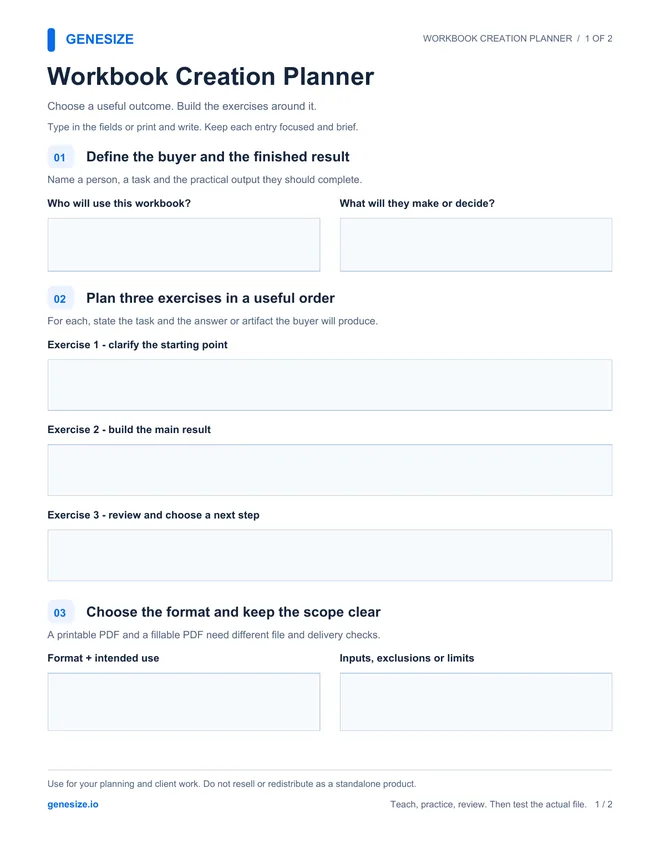
Workbook Creation Planner
Download the PDF and type into its fields in a compatible reader, or print and write by hand. Save a copy and reopen it to check your answers. Keep longer drafts in a separate document.
Download the free workbook plannerThis is a separately prepared editorial resource, not a Genesize product export or a finished workbook to resell. Use and adapt it for your own business and client work. Do not resell or redistribute the blank or modified planner as a standalone product.
Frequently asked questions about creating workbooks to sell
What is a digital workbook?
A digital workbook helps a reader apply a method through exercises, prompts, response areas and review checks. It is often delivered as a PDF that can be printed, filled in digitally, or both. Its value comes from the useful work the reader completes, rather than the number of pages.
How do I create a workbook to sell?
Choose one buyer and a practical outcome, plan exercises in a useful order, and add the explanation, completed examples and response space each exercise needs. Choose a printable or fillable format, test the exported file with a likely reader, then prepare an accurate offer, price, checkout and delivery route.
How many pages should a workbook have?
There is no required page count. Use enough pages to explain the method, demonstrate the tasks, provide suitable response space and review the result. Start with a small complete sequence and test it with an intended reader. More blank pages or repeated prompts do not automatically make the workbook more valuable.
What is the difference between a printable and a fillable workbook?
A printable workbook provides space to write by hand after printing. A fillable workbook contains interactive form fields for typing into a compatible PDF reader. A visible blank box is not automatically an interactive field. Test the actual file, saved answers and printing, and describe the supported use clearly.
Can I create a workbook with AI?
AI can help draft an outline, explanations, exercises and fictional worked examples from a focused brief. You need to check facts, consistency, teaching order, usefulness and the exported file. AI does not validate demand, guarantee results or remove the need to test the exercises with someone close to the intended audience.
Does Genesize have a separate Workbook product type?
No. Use an existing structure, such as an ebook for a guide with exercises, a written course for lessons, or a template pack for worksheet assets. Design & exports includes a separate Fillable workbook export. The PDF layout option named Workbook changes body text sizing; it does not itself create interactive fields.
Can I design custom PDF form fields in Genesize?
The Fillable workbook export adds standard text response boxes for relevant activities, next actions and notes. It is not a drag-and-drop form designer and does not automatically turn every table cell or blank into a custom checkbox, calculation or specialized field. Review the result before promising a particular interaction.
Will a Genesize Store buyer automatically receive the fillable workbook export?
The current built-in Store PDF download uses the standard designed product PDF, not the separate Fillable workbook export. Do not describe that standard download as interactive. If your offer promises the separately exported fillable file, arrange and verify a delivery method that actually supplies it before selling; exporting it alone does not attach it to the Store offer.
How much should I charge for a digital workbook?
There is no universal price. Consider the specific problem, quality of the method, included examples and assets, support, alternatives, selling costs and evidence from likely buyers. Test a clear offer and review actual feedback. Do not set the price only by page count or assume a workbook will sell because it is fillable.
Can I sell the free planner from this article?
No. The free Workbook Creation Planner is for planning your own products and client work. You may use and adapt it for those purposes, but may not resell or redistribute the blank or modified planner as a standalone product. Create your own original workbook content, exercises and finished assets to sell.
Turn your method into useful practice
Draft and review your explanations, examples and activities in Genesize. Design the document, test the export and match the offer to what the buyer will actually receive.
Start your 14-day trialEligible new subscribers receive 400 total AI credits and up to 3 saved projects during the 14-day trial. Payment method required. Your selected paid subscription starts after the trial and automatically renews unless canceled. Review current plans and allowances before subscribing.