
Find the export for your ebook
- Open an editable ebook from My products and go to Design & exports. If you uploaded a finished file and want to edit the text, start an editable manuscript project.
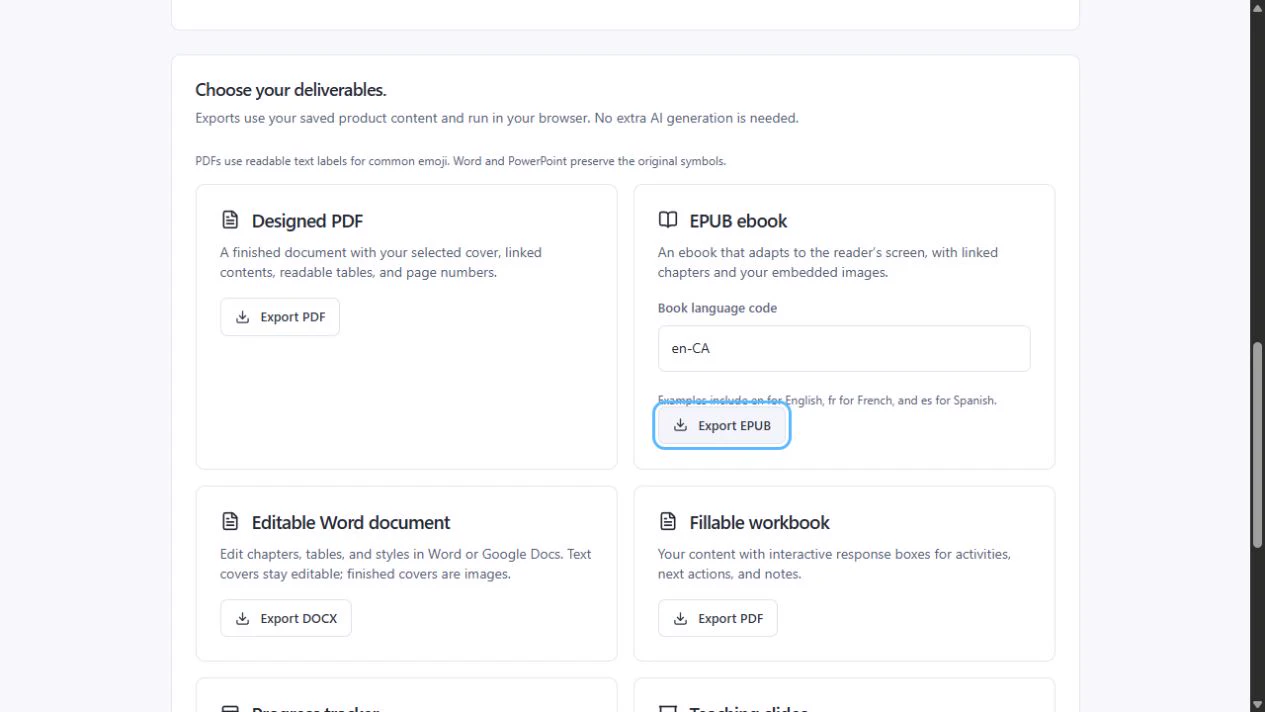
- Under Designed PDF, choose Export PDF. Under EPUB ebook, enter a Book language code such as en, fr, or es, then choose Export EPUB.
- Keep the page open while the file is prepared. When it’s ready, check your browser’s downloads. Open the EPUB in a compatible reading app to check the chapter links and images.
Fix an error before retrying
- If you see Add product content before exporting, open Content and add text to the ebook. Return to Design & exports and try again.
- If a chapter image can’t be accessed, reopen the ebook and check the image under Chapter images. Replace it if needed, then export again.
- If a finished cover can’t load, try again or choose Text cover in Design & exports. If the PDF font can’t display certain characters, replace those characters or choose Export DOCX to keep editing in Word.
PDF keeps a fixed page layout. EPUB lets readers change text size and may show different page breaks.
Check the version buyers will get
- In Publish & sell, choose PDF delivery and save the Store draft. Editable ebooks published with PDF delivery include both PDF and EPUB.
- Open Buyer Preview and choose Saved draft. Check Download preview PDF and Download preview EPUB before you publish.
- Publish the reviewed changes to offer this edition to new buyers. Earlier orders keep the edition and formats included at checkout.