
What is a mini course, and how is it different?
A mini course helps a learner do one focused thing through a short sequence of teaching and practice. It might help a freelancer write a project update, a tutor build a revision plan, or a maker plan product photos. A broad promise such as “master your business” is too large for that job.
Thinkific's mini-course guide also emphasizes a specific skill and a small promise. There is no universal length: use the time and lesson count needed for your task, then test them. For our example, five written lessons and a final email draft are a planning choice, not an industry standard.
| Format | Main job | Choose it when |
|---|---|---|
| Ebook or guide | Explain a subject or method in a useful reading order | The buyer mainly needs an explanation or reference |
| Mini course | Teach one focused skill through linked lessons and practice | The buyer needs a short path to complete one task |
| Larger course | Teach several connected skills with more practice | The outcome needs a longer learning path and support |
Short does not mean unfinished. The buyer should be able to reach the promised finish line without buying your next product. A larger offer can be optional. If you are still choosing the format, use our ebook versus online course comparison.
Choose one learner and one useful result
Start with a task people already ask you about. Look at questions from your work, permitted customer feedback or conversations with likely buyers. Ask what they have tried, where they get stuck and what they want to finish. A popular topic is not enough; you need a specific problem you can teach.
Help [one kind of learner] complete [one task] using [a method or supplied inputs]. By the end, they will have [something they can check].
For this guide: Help a new freelance designer turn project notes into a clear client update. By the end, they will have a checked email draft that reports progress, explains a blocker and requests the next action. They need basic writing skills, but no special software. The course does not teach contracts, project pricing or how to win a client.
Other focused ideas include turning a syllabus into a one-week revision plan, writing a product description from verified specifications, or planning five photos for one handmade item. Choose a subject you can check for accuracy. Validate the need before drafting a large course; our product validation guide gives practical ways to gather that evidence.
Plan the final task before the lessons
Decide what learners will make and how they will check it. Then teach the parts they need in order. This follows Cornell's course-design guidance: define the outcome, decide how learning will be checked, and choose the teaching and activities that support it.
Our final task is a 100- to 150-word project-update email plus a subject line. The word range is a practice constraint. The important checks are accurate facts, a visible blocker and an answerable request.
Mini-course example: five lessons that lead to one finished draft
Write a Clear Client Project Update is an original fictional course plan, not a customer case study. All five lessons use the same Cedar Studio website-project facts. The proposed learner task is to draft an email; no real message is sent.
Keep the teaching brief and allow time for practice. You might initially budget about an hour for this example, including the final draft, then time a real reader and adjust. Do not advertise an exact completion time before testing it.
1. Separate facts from guesses
Teach: An update reports what is confirmed. Sort your notes into finished work, current work, a blocker and the next decision. Keep an unknown clearly marked instead of filling it with a guess.
Show: For the fictional Cedar Studio website project: the client approved the page structure; the homepage draft is ready for review; the client has not supplied the final photos; no launch date has been agreed.
Practice: Make a four-part fact list from those notes. Add a separate line for anything you still need to ask. Use only the supplied facts.
Self-check: Your list does not say that the homepage is approved or that the site is ready to launch. Both would go beyond the brief.
2. Build a simple update structure
Teach: Put the main status first. Then use three short sections: completed, needs attention and next step. A reader should find the decision without searching through your whole work history.
Show: Status: homepage draft ready for review. Completed: page structure approved. Needs attention: final photos are missing. Next step: request draft feedback and the photos.
Practice: Place each fact from lesson one into that structure. Leave out background details that do not help the client understand the current task.
Self-check: The missing photos remain visible, and the update clearly separates an approved structure from a draft waiting for review.
3. Explain the blocker plainly
Teach: Name the missing input, explain the specific effect and ask for the next action. Avoid blame and promises you cannot control. If timing is unknown, say that you will confirm it after the input arrives.
Show: ‘The final photos are still needed to complete the homepage images. Please send the approved files or tell me when they will be available. I will confirm the remaining schedule after reviewing them.’
Practice: Write your own two- or three-sentence blocker paragraph using the same facts. Do not invent a delay length or a launch deadline.
Self-check: The reader can identify what is missing, why it matters and what to send. You have not promised a completion date.
4. Make the requested action easy to answer
Teach: Ask the right person for a clear action. Distinguish a proposed reply date from a deadline the client has already agreed to. When several questions matter, list them separately.
Show: ‘Could you send one combined set of homepage comments and the approved photos by Thursday? If that timing does not work, please suggest another date.’ Thursday is a proposed reply date, not an agreed launch date.
Practice: Add that request to the blocker paragraph. Keep the distinction between a suggested reply date and a confirmed commitment.
Self-check: The client can answer the request directly. The message does not treat Thursday as an existing agreement.
5. Assemble and check the final message
Teach: Combine the status, completed work, blocker and request into a short email. Compare every claim with the brief. Read it from the client's point of view before sending anything.
Show: Use the completed sample below to see how the parts fit. The course task is to draft and review an update, not to send a real client email.
Practice: Write a 100- to 150-word update with a useful subject line. Check it against the four facts in lesson one and the proposed reply date in lesson four.
Self-check: Your message identifies what is approved, what is awaiting review, the missing files and the requested action. It invents no launch date, approval or customer result.
A completed example of the final task
Subject: Cedar Studio homepage draft: feedback and photos
Hi Cedar Studio team,
The page structure is approved, and the homepage draft is ready for your review. This draft shows the proposed page layout and text; it is not a finished site ready to launch.
The final photos are still needed to complete the homepage images. Please send the approved files or tell me when they will be available.
Could you also send one combined set of homepage comments by Thursday? If that timing does not work, please suggest another date. Thursday is a proposed reply date, not a confirmed deadline.
After I review your comments and photos, I will confirm the remaining schedule. No launch date has been agreed yet.
Thank you,
Your designer
The example reports the approved structure without calling the draft approved. It names the missing photos and asks for a response. It also leaves the launch date open. Those are observable checks a learner can use on their own draft.
Write lessons that teach before they ask for work
Use the same four-part pattern throughout: explain the method, show a worked example, ask the learner to apply it, and provide a check. Supply the facts, files or instructions the practice needs. An exercise should not depend on a resource you forgot to include.
If you use AI, give it the learner, outcome, course boundaries and final task. Include your approved source material and a single fact sheet for the example. Ask it to flag missing information rather than invent details. Remove private client information before using any material in a product.
Draft a five-lesson written course for a new freelance designer. The final task is a 100- to 150-word client update with a subject line. Use these facts throughout: Cedar Studio approved the page structure; the homepage draft awaits review; final photos are missing; no launch date is agreed. A Thursday reply date may be proposed, but is not agreed. Teach before each exercise. Include one worked example, a practice task and a self-check per lesson. Do not invent approvals, deadlines, testimonials or sales results.
Review the output as if you were taking the course. Follow every task, check repeated facts and remove filler. Ask a likely learner to try it without you filling in gaps. Record where they needed help and revise that teaching. AI can speed up a draft; it cannot establish that the lesson works.
For the longer content and editing process, see how to create and sell an online course with AI. Keep this mini-course plan narrow rather than copying a larger curriculum into fewer pages.
Create and review a written mini course in Genesize
A mini course is a scope choice, not a separate product type. Genesize's Course workflow creates written modules, lessons and practical exercises. These steps were checked against the implementation on October 21, 2026.
- Prepare the brief. Write the learner, one result, prerequisites, exclusions and final task. Bring your own approved notes and examples.
- Choose Course in Create product. Review the structure and depth controls, and inspect the credit quote before generating. Keep room for revisions; do not assume the trial covers every possible structure.
- Review Structure and Content. Compare the actual lessons with your five-step plan. Edit any extra scope, missing teaching or inconsistent facts. A generation may need changes to match your intended outline.
- Use Design & exports. Inspect the layout and open the actual PDF or Word export. Check lesson order, headings, examples and practice on a phone as well as a larger screen.
- Prepare the offer and buyer preview. Check the Store listing or funnel, support details, price and selected download. Inspect the saved buyer edition before publication.
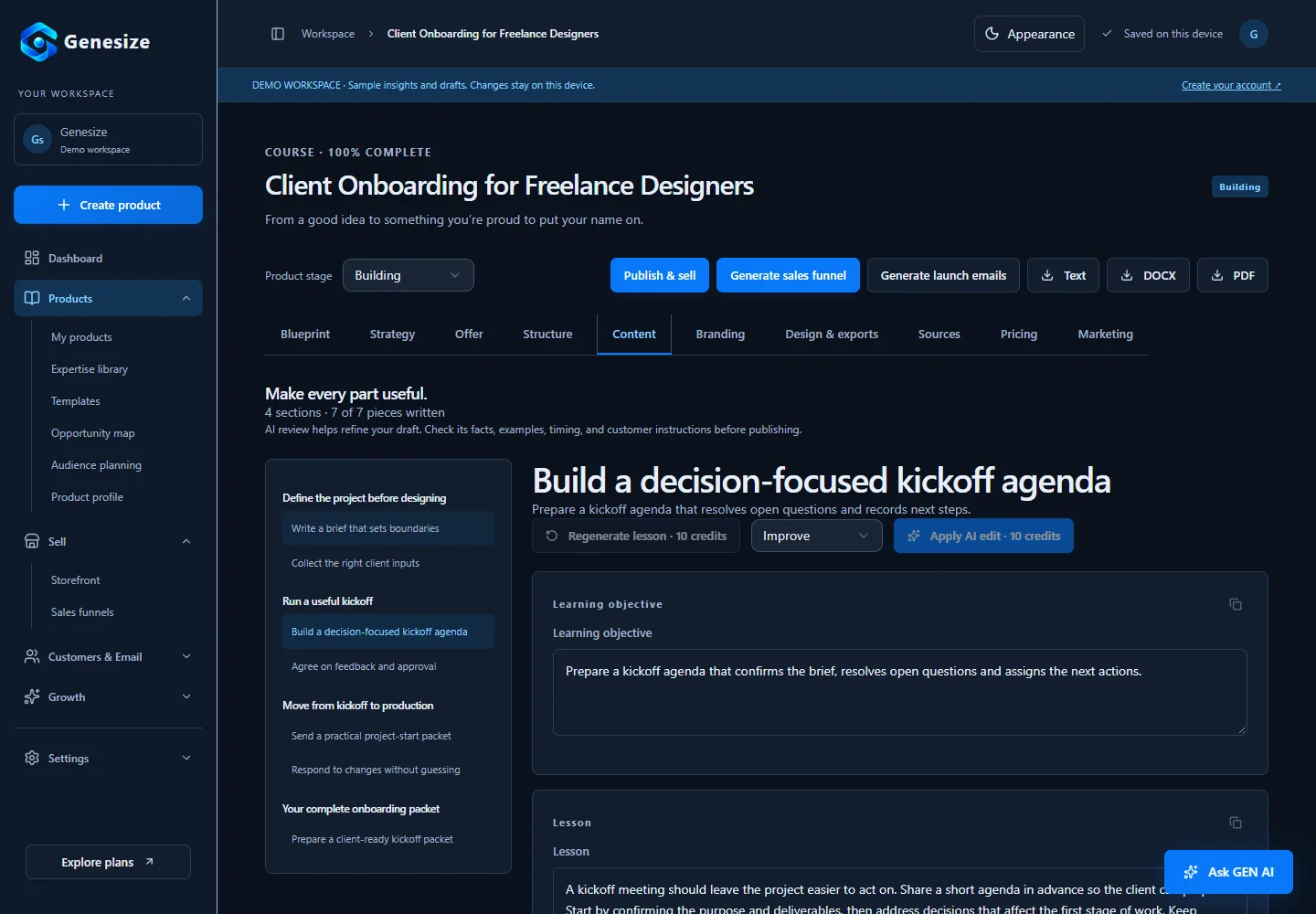
Written-course buyers can read through private purchase access, mark lessons complete manually and resume saved progress. Check the saved offer's selected download. Genesize does not currently provide video hosting, automatically graded quizzes, certificates or creator-facing learner reports. Manual completion records progress; it does not prove mastery.
A private buyer preview inspects saved material and disables checkout and forms. It does not prove a paid purchase or email delivery worked. Use an appropriate sandbox setup for those checks. A separate exported worksheet is not automatically an extra attachment to the Store offer; advertise only the files your actual delivery includes.
Should your mini course be free or paid?
Choose based on its purpose. A free course can introduce your teaching and offer an optional next step. A paid course should deliver a complete useful result on its own. Do not hold back essential instructions just to force another purchase.
| Decision | Free course | Paid course |
|---|---|---|
| Main purpose | Introduce a useful method and let people try your teaching | Deliver a focused result worth purchasing |
| Evidence to collect | Whether the right people use it and ask for the relevant next step | Willingness to pay, usable delivery and specific learner feedback |
| Keep separate | A signup or free claim is not a paid sale | A purchase or completion tick is not proof of a learning result |
Set a price to test, not a universal mini-course price
Review the problem's importance, the alternatives, what is included and how much support you provide. For our fictional written course, $29 USD paid once is a proposed test price. It is not a market average, a tested offer or a recommendation for every subject.
At that example price, ten purchases would be $290 in gross sales before payment fees, tax, refunds, support and software costs. This is arithmetic, not a sales forecast. Include creation and review time in your decision, and test the offer with suitable buyers before making a larger course.
Keep fees and currencies clear. Our digital-product pricing guide explains cost calculations and ways to test a price. If the goal is a free introduction, the lead-magnet guide covers a useful resource and permitted follow-up.
Sell the small result, then check the complete buyer journey
Make your page answer four questions: who is this for, what will they practice, what do they receive, and what does it cost? Name the format early. A written course should not look like a video program with personal coaching if neither is included.
Example offer: Write a clearer client project update. A five-lesson written mini course for new freelance designers, with one consistent project example, short practice tasks and self-checks. Prepare a final email draft from supplied notes. Proposed price: $29 USD once. No video lessons, personal feedback or guaranteed client outcomes.
That is draft offer copy. Add your actual access method, selected download, support route and purchase terms before publishing. Show a representative lesson. Use our sales-page examples to make the promise and next action easy to find.
- The final task can be completed using the teaching and inputs supplied.
- All five lessons use consistent facts and teach before practice.
- The page states the actual format, contents, price, support and exclusions.
- The correct saved edition opens in the reader and the selected file downloads.
- Payment readiness and the appropriate sandbox purchase-and-delivery checks are complete.
- You have one relevant route to first buyers and a way to handle access questions.
Find the first learners and improve from their experience
Share one useful part of the method where the intended buyers already spend time, and follow each community's promotion rules. Use an existing permission-based email list or an agreed partner introduction where appropriate. Link to one clear offer rather than asking people to figure out your entire product range.
After launch, separate relevant visits, paid purchases, access problems and learner feedback. If several readers misunderstand the same step, improve it. If few suitable people see the page, address distribution before assuming the price is wrong. Small numbers are useful observations, not reliable conversion benchmarks.
Use the launch checklist for the final checks and the email marketing guide for reviewed follow-up messages. Keep the course useful even if a learner never buys another product.
Download the free mini-course outline
Plan the learner, outcome, final task and five-lesson path on page one. Page two helps you develop one lesson and record the offer and delivery checks. Start with the course you can teach clearly, then add only what the learner needs.
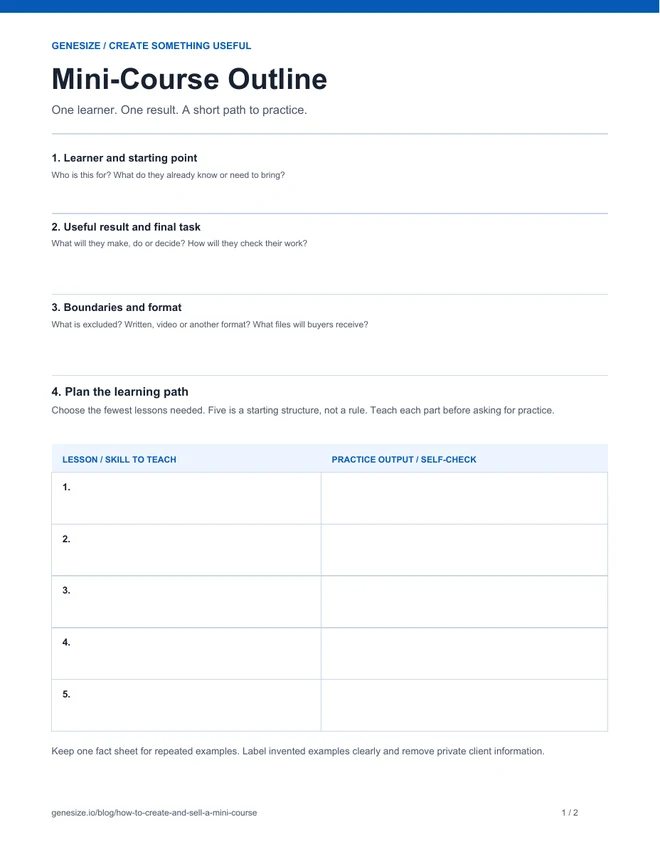
Mini-Course Outline
Download the two-page printable PDF and write by hand. For typing, use the editable plain-text version in your own editor. The PDF does not contain interactive form fields.
Download the free mini-course outlineDownload the editable text outline
A separately prepared editorial planning resource, not an automatic Genesize export or a finished course. Use and adapt it for your own business and client work. Do not resell or redistribute the blank or modified outline as a standalone product.
Questions about creating and selling mini courses
What is a mini course?
A mini course is a short learning product that teaches one focused skill or task through a small sequence of lessons and practice. It can use text, video, audio or a mix. Its defining feature is a narrow, complete outcome, not a fixed number of minutes or lessons.
How many lessons should a mini course have?
Use the fewest lessons needed to teach and practice the promised skill. Three to five is a useful starting structure, not a rule. This guide uses five lessons because each prepares one part of the final project-update task. Test the learning time with a representative reader.
Can I create a mini course without video?
Yes. Text lessons can work well when learners need to read a method, inspect an example and write or plan something themselves. Use video when the skill needs a visual demonstration. Make the format clear on the sales page before someone buys.
How much should I charge for a mini course?
Choose a price to test using the buyer's problem, the useful result, alternatives and the support you include. The illustrative course in this guide uses a proposed $29 USD one-time price. That is not a market average or evidence that people will buy. Review costs and test willingness to pay before expanding.
Can AI write a mini course for me?
AI can help outline a sequence and draft teaching, examples and exercises. You still need to supply reliable material, check facts, keep examples consistent and test whether a learner can complete the task. A finished generation is not proof that the course is ready to sell.
How does Genesize deliver a written mini course?
Genesize supports written courses with modules, lessons and practical exercises. Buyers use private purchase access to read, mark lessons complete manually and resume their saved progress. The saved offer's selected PDF or Word download should be checked before launch. Video hosting, automatically graded quizzes, certificates and creator-facing learner reports are not currently included.
Should my mini course be free or paid?
Choose free when the main purpose is a useful introduction or an optional route to a larger offer. Choose paid when the course delivers a complete result worth buying on its own. A free claim is not evidence of willingness to pay, and buying a course does not by itself prove a learner achieved the result.
Can I sell the free outline from this article?
The outline is a planning resource for your own business and client work. You may adapt it for that work, but may not resell or redistribute the blank or modified outline as a standalone product. Create your own teaching, examples and finished course to sell.
Turn a useful method into your first written course
Bring your expertise to Genesize. Build the lessons, check the learning path and prepare a clear offer with a place to sell it.
Start your 14-day trialEligible new subscribers receive 400 total AI credits and up to 3 saved projects during the 14-day trial. Payment method required. Your selected paid subscription starts after the trial and automatically renews unless canceled. Review current plans and allowances before subscribing.