
What should an AI course creator do?
An AI course creator helps turn knowledge into a learning sequence. Depending on the tool, that can mean an outline, written lessons, exercises, assessments or media. A learning management system, or LMS, adds a place where students sign in, work through lessons and have their progress recorded.
Start with the outcome: what should a student be able to do after finishing? A practical written course can work well for planning, checklists and reusable documents. A technique that needs demonstration may call for video. A training program that requires proof of completion needs appropriate assessment and reporting. Choose those requirements before the software.
- Creation: Does AI draft lesson content, or only suggest titles? Can you edit a lesson without rebuilding the course?
- Practice: Does each lesson lead to something the student can try, produce or explain?
- Delivery: Will the buyer download materials or use a hosted course player? Are video, quizzes and progress included?
- Selling: Where do the sales page, checkout and buyer access live?
- Total cost: Include the plan, AI allowances, payment fees, learner limits and any extra hosting.
A good course is not simply a long AI document. Its lessons should build toward the promised skill, with examples and practice that expose misunderstandings before the student moves on.
Compare five AI course creation platforms
These are different approaches to building and selling a course. Prices below are selected USD plans on monthly billing, checked October 9, 2026. They are not equivalent feature bundles. Taxes, payment processing and other applicable fees are additional.
| Platform | Best fit in this comparison | AI creation | Student delivery | Selected monthly price |
|---|---|---|---|---|
| Genesize | Written course materials plus selling tools | Module and lesson drafts, examples, practice and a final project | Written-course reader with manual completion and resume; PDF or DOCX downloads; no video hosting | Starter: $34/month |
| Coursebox | AI-assisted training and LMS exports | Course content, quizzes and other training media | Hosted learning and learner reporting; exports vary by plan | Free plan available; check current paid pricing |
| Thinkific | Hosted courses and student delivery | Outline titles and quizzes from your existing materials | Course player, video, quizzes and completion dashboards | Basic: $54/month |
| LearnWorlds | Interactive learning and a course school | Outlines, assessments and copy assistance | Hosted lessons and learner progress; advanced features vary by plan | Starter: $29/month + $5 per paid enrollment |
| Kajabi | A course and marketing business | Course modules and lessons, plus marketing assets | Hosted multimedia lessons, quizzes and drip delivery | Basic: $179/month |
Official pricing: Genesize, Coursebox, Thinkific, LearnWorlds and Kajabi. Coursebox’s paid prices did not render in the source we could verify, so we have not quoted a paid amount. Check the exact plan before subscribing.
Genesize: for written courses with a connected selling workflow
Genesize starts with your topic, audience and intended result. Its course workflow builds modules and written lessons, including learning objectives, teaching, worked examples, action steps, optional practice and a final implementation project. You can edit the content yourself or use AI actions to improve, shorten, expand or regenerate a lesson.
Creator exports include a designed PDF, editable Word document, fillable workbook, Excel tracker, PowerPoint teaching slides and resource ZIP. Store buyer delivery supports online reading and PDF or DOCX downloads. Written-course buyers can mark lessons complete and resume their saved progress through private purchase access. The wider export options help you prepare teaching materials.
The finished product can connect to a storefront and an AI sales funnel, with existing Stripe checkout, buyer access and sales analytics. Genesize does not take a platform share of product revenue; Stripe fees apply. The paid Creator plan adds CRM, email campaigns, automated follow-ups and Growth Agent guidance. Starter includes buyer records rather than the full CRM and email tools.
Cost and limits
Starter costs $34 USD per month with 1000 monthly AI credits and 3 saved projects. Annual billing costs $285.60 USD upfront. Credits refresh monthly on either option and do not roll over. Saved-project limits describe what you keep in your workspace, not a monthly creation allowance.
A standard-depth course with three modules and two lessons per module has seven content units including the final project, and costs 100 credits to generate. An optional AI cover uses 20 and a lesson rewrite uses 10. Manual edits, design changes and exports use none. Funnel generation and other AI work have separate displayed quotes.
Choose another delivery platform if you need: hosted video lessons, automatic quiz grading, certificates or creator-facing learner reports. Buyer progress records manual lesson completion, not watched videos or assessment results. Genesize communities and paid memberships are coming soon in a future release.
A practical example: Client Onboarding for Freelance Designers
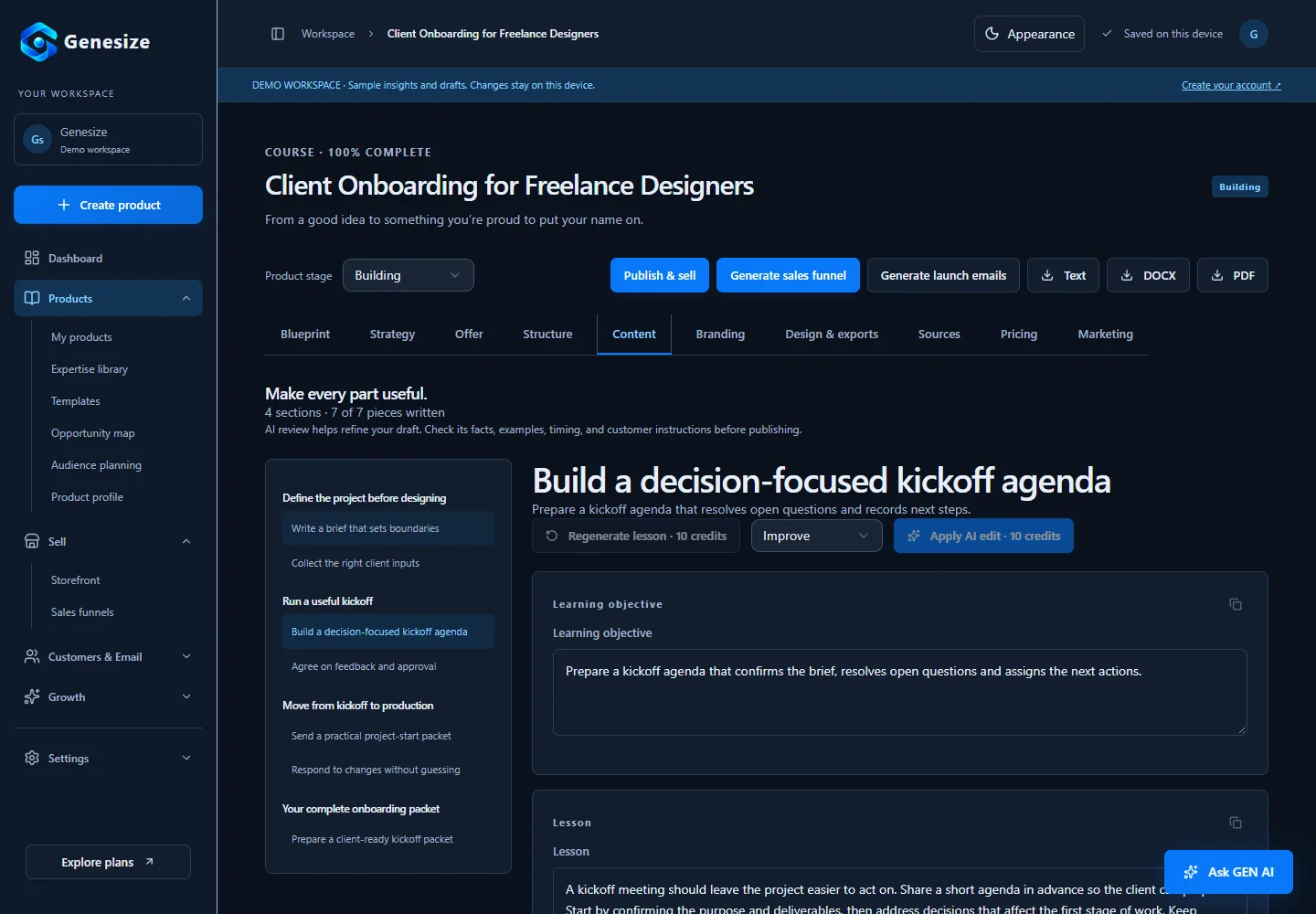
Instead of asking AI for “a course about freelancing,” give it a specific learner and a task. In this example, the learner is a freelance designer preparing a new client project. The outcome is a usable project brief, deliverable list, review process and kickoff recap. This is an original editorial illustration; we have not presented it as an AI run or measured customer outcome.
Teach a process the learner can actually complete
- Module 1
- Define the project: write a usable brief and collect the right client inputs.
- Module 2
- Run the kickoff: prepare the agenda and agree on feedback and approval.
- Module 3
- Start production: assemble the project-start packet and respond to changes.
- Final project
- Combine those working documents into a kickoff pack for one real or practice project.
Every lesson should leave the student with an output they can use in the next lesson.
Make the lesson specific
A weak instruction is “communicate clearly with the client.” A useful lesson explains what to discuss, in what order and what to record. For a kickoff agenda, that might mean confirming the brief, checking deliverables, assigning missing inputs and choosing the next review milestone together.
Example exercise: write the meeting agenda
Choose a real or practice project. Write four agenda items. For each, name the decision you need, the person who can confirm it and the note you will save afterward. Replace “discuss the design” with a question such as “Which flyer size and export format does the printer require?”
Review your agenda: can someone tell what the meeting needs to settle without asking you to explain it? Anything that cannot be settled yet should become an open question with an owner.
Download the sample course PDF
Read the six written lessons and final project. This original sample was manually authored and exported through Genesize’s course export pipeline. It is a course document, not a hosted video program.
Download the sample courseConnect the course to a clear offer
Once the content is ready, use the product to generate a sales funnel. Review the headline, what is included, FAQs and checkout connection. The offer should accurately describe written lessons and downloads. It should not promise video, personal coaching or automatic grading unless you actually provide them.
Start your next client project with a clear plan.
A practical written course for freelance designers. Work through six lessons to prepare your brief, deliverables, input checklist, review process and kickoff recap. Apply the process to your own project as you go.
Included: three modules, six written lessons, practice tasks and a final kickoff-pack project.
CTA: Get the course materials.
Coursebox: for AI-assisted training and LMS exports
Coursebox combines AI course authoring with hosted learning. It can use a topic or documents to draft content and offers quizzes, scenarios and other training media. Learner reporting and assessments make it a candidate when your requirement extends beyond a downloadable document.
Watch the plan boundaries: its pricing page lists three free mini courses, up to five pages each, with branding. PDF, HTML and dynamic SCORM exports appear on paid plans; self-hosted SCORM has a higher-plan requirement. SCORM is a course package format used by compatible learning systems, not a feature every creator needs.
Its payment documentation describes connected payment providers. Confirm fees before selling: the sales page advertises zero commission, while its Fees and Charges page still describes commission for free users. We have not treated that as an unconditional no-fee promise.
Thinkific: for a course player and student management
Thinkific is worth considering when your students should sign in, watch lessons and work through a hosted course. Its Basic plan includes video lessons, quizzes, checkout and sales and student completion dashboards. It costs $54 USD per month on monthly billing.
Know what its AI generates: the documented AI Course Outline Generator creates chapter and lesson titles, not the lesson content. You add the teaching materials. Its AI quiz workflow can use existing course content to draft questions.
Payment processing costs remain separate. Thinkific’s gateway-fee documentation describes an additional 5% fee on Basic when processing payments through Stripe in specified regions. That additional gateway fee does not apply with Thinkific Payments. Check your country and payment setup rather than assuming one universal rate.
LearnWorlds: for a learning-focused course school
LearnWorlds combines hosted courses with AI assistance for outlines, assessments and editing. Its AI authoring guide explains how AI fits into course creation. Its broader learning tools make it a candidate for interactive lessons rather than download-only delivery.
The Starter plan costs $29 USD per month on monthly billing, plus $5 per paid enrollment. Pro Trainer is $99 per month on monthly billing and removes that enrollment fee. Payment processing is separate. Compare the fee structure against your expected enrollments, alongside the features you actually need.
Check the required tier: interactive video, advanced reporting, funnels and bulk email have plan-specific availability. Its learner-progress documentation shows actual activity and completion reporting. Confirm that your chosen plan provides the learning and reporting experience you intend to advertise.
Kajabi: for courses with a broad marketing system
Kajabi connects course delivery, checkout, email and funnels. Its course documentation describes AI-created modules and lessons, multimedia content, quizzes and drip delivery, plus supporting marketing assets. It is a candidate if you want a broad course-business system and have the budget for it.
Its Basic plan costs $179 USD per month on monthly billing. Check product, contact and account limits against your needs. Payment processing applies; the payment-fee policy also describes an additional 2% fee on Basic when using third-party Stripe in regions where Kajabi Payments is supported. That additional fee excludes Kajabi Payments and PayPal.
Watch: Kajabi’s course documentation says it is not SCORM compliant. Do not choose it on the assumption that hosted multimedia lessons also provide corporate LMS package portability. For a wider comparison, see our guide to Kajabi alternatives.
Check the complete buyer journey before launching
Use the same small brief in your shortlisted tools: one audience, one outcome and one lesson with a worked example. This is a suggested evaluation process, not a head-to-head test we claim to have completed.
- Review the structure. Can each lesson name a skill or output? Remove repetition and prerequisites the student cannot meet.
- Edit a real lesson. Add an example from your experience, check every factual claim and make the exercise concrete.
- Try it as a learner. Open the PDF on a phone or sign in to the hosted course. Check navigation, readable text, video playback and any completion rules.
- Inspect the offer. Name the format, contents, access method and support you actually provide. Do not add invented reviews, guarantees or income claims.
- Test checkout and delivery. Use the platform’s supported test mode or preview. Confirm the right product, price, payment confirmation and buyer access.
- Plan a route to customers. Start with useful content, conversations or a relevant partnership. Measure actual interest before expanding the course.
If you need a first resource to introduce your teaching, our lead magnet guide explains how to create something useful and connect it to a next step. Our guide to selling without an audience covers ways to start reaching buyers.
Frequently asked questions
What is the best AI course creator in 2026?
Choose by the learning experience you need. Genesize suits creating written course materials and connecting them to a storefront and sales funnel. Coursebox suits AI-assisted training and LMS exports. Thinkific suits hosted courses, LearnWorlds suits interactive learning, and Kajabi suits a broader course and marketing business. These are recommendations based on documented capabilities, not a measured ranking of course quality.
Can AI create an entire online course?
AI can help plan modules, draft lessons and build exercises. Some platforms also generate quizzes or videos. You still need to verify the content, add your expertise, check that the exercises teach the promised skill and test delivery. An outline generator alone does not create a finished course.
Does Genesize host video courses and track student progress?
Genesize offers an online reader for purchased written courses, with manual lesson completion and saved progress across devices through private purchase access. Buyers can also download PDF or DOCX files. Video hosting, graded quizzes, certificates and creator-facing learner reports are not currently included. Communities and paid memberships are coming in a future release.
Is there a free AI course creator?
Coursebox offers a free plan with three mini courses of up to five pages each, unlimited learners and Coursebox branding. Check current AI allowances and payment terms before using a free plan for your full course. A trial is temporary access to a paid product, not a permanent free plan.
How much does creating a course with Genesize cost?
Starter is 34 USD per month on monthly billing, with 1000 monthly AI credits and 3 saved projects. A standard-depth course with three modules, two lessons per module and a final project uses 100 credits. An AI cover uses 20; a lesson rewrite uses 10. Manual editing, design adjustments and exports use none. Funnel generation and other AI actions have separate displayed costs.
Can I sell an AI-assisted course without an audience?
Yes, but you still need a way to reach suitable buyers. Start with one useful outcome, speak to people with that problem and test a clear offer. You can also partner with a creator who already reaches those buyers. A course builder can prepare the product and checkout; it cannot guarantee demand or sales.
Create the course. Build the offer around it.
Bring your expertise to Genesize. Turn it into editable written lessons, refine the teaching materials and connect the product to your storefront and sales funnel.
Start your 14-day free trialEligible new subscribers receive 300 total AI credits and up to 3 saved projects during the trial. Payment method required. Cancel before the trial ends to avoid charging. Your selected subscription renews unless canceled. Live marketing campaigns and automations require a paid Creator or Business plan; trial users can prepare drafts and previews.