
1. Attach your finished file to the Shopify product
- Install Shopify Digital Products. This is the current name of Shopify’s own app. If a guide calls it Digital Downloads, use the official app listing to find it.
- Upload the file in the app. In Shopify admin, go to Apps → Digital Products. Use the file upload to start a new product or open an existing product and add the file as an asset. Attach each file to the variant its buyer should receive.
- Review the product details. In Products, set the title, price, and sales channel. In Shipping, turn off Physical product for a digital-only item. Keep it in draft while you finish setup, then make it available to your test checkout.
Shopify’s app accepts multiple files or a ZIP for each variant. The limit is 50 files and 5 GB combined per variant. Uploading from the admin product page has a 500 MB cap per file. Zip a folder before uploading it. Shopify’s official app listing · Shopify’s shipping settings for digital products
| Variant | Files attached | What to check |
|---|---|---|
| Printable planner | Garden-Planner.pdf | Print a calendar page and check its scale and margins. |
| Planner and planting tracker | Garden-Planner.pdf and Planting-Tracker.xlsx | Open both files. Enter a sample planting date and check the spreadsheet result. |
Name the files consistently across the listing and the download email. If buyers need a particular app or paper size, say so before checkout. For a spreadsheet, also check the formulas in the application you promise to support. Excel template packaging guide
2. Set up automatic delivery after payment
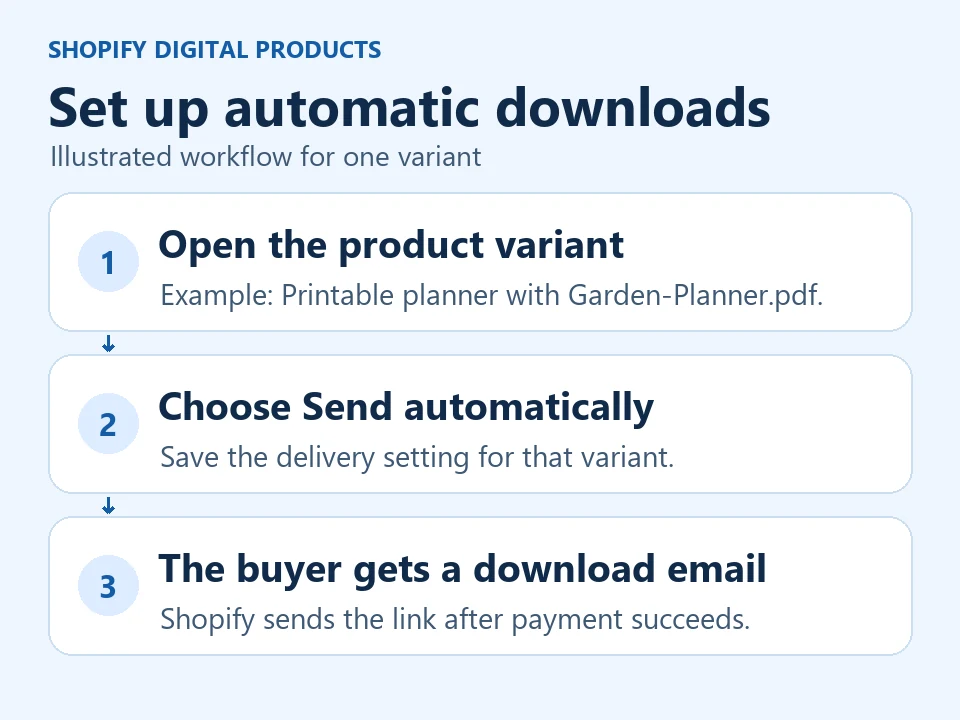
In Shopify admin, go to Apps → Digital Products. Open the product and select the variant with the right file attached. Under Delivery method, choose Send automatically and save. Shopify emails the download link after successful payment. If you choose Send manually, fulfill the order to trigger the email.
If you also want the link on the Thank you or Order status page, add the Digital Products block to those pages in the checkout editor. Shopify documents that manual-delivery variants do not show a link there. Those checkout links are also unavailable on development, paused, or inactive stores. Shopify’s checkout block instructions
Selling access to a hosted template? The app can deliver links from supported providers. The destination’s sharing settings control what buyers can open or copy. Test the link while signed out of your Canva, Notion, or Google account. Shopify’s file and link delivery guide
3. Place a test order and open the delivered file
Shopify’s test payment options simulate checkout without a real charge. Shopify says payment gateway testing requires a paid plan. If your store already takes orders, use a separate test store because payment test mode interrupts live card checkout. Confirm that live payments are enabled before launch. Shopify’s test payment instructions
- Order the actual variant. Open the listing in a fresh browser, check the price and confirm that a digital-only checkout stays free of shipping choices.
- Check the access email. Use an inbox you control. Follow its link as a buyer and open every file. If you enabled the post-purchase block, check that link too.
- Return to the purchase on a phone. Open the email again and check that the file name, contents, and access work. Repeat for another variant if it contains different files.
Save the order number and record which links and files you opened. For the garden planner, the printable variant should deliver the PDF and the tracker variant should deliver both files. A test is complete when the buyer receives and can use the files they selected.
Why isn’t the Shopify download link showing?
| What the buyer sees | What to check |
|---|---|
| No download email | Check the order’s payment status, checkout email address, and chosen variant. For manual delivery, check fulfillment. Open the order in Digital Products to resend if needed. |
| An email arrived but the Thank you page has no link | Check the checkout block, store eligibility, and the variant’s delivery setting. |
| The file is wrong or missing | Compare the assets on the purchased variant with the sales page. Test the updated package before sharing the listing again. |
| A hosted link asks for permission | Check sharing on the original host and try the link from the same account type the buyer uses. |
If you set a download limit, resending the same link keeps its existing count. Before replacing a file, check what past buyers should receive. Shopify says an original link can deliver the replacement if it has the same filename. Use a versioned filename and test a previous link when the edition matters. Shopify’s order support instructions · Shopify’s file replacement guide
When to use Shopify or a standalone product page
An existing Shopify store can put downloads alongside physical products and use the same checkout. If you’re starting with a single finished file and sharing its link yourself, compare what you would pay for a store subscription, payment processing, and any extra apps with what you need for that one offer. Shopify’s current plans
Genesize Free to Sell includes a hosted product page, Stripe checkout and automatic delivery at $0 per month, with a fee on each sale. Check the current rates and file limits for your product before choosing. Genesize Free to Sell details
Common questions about selling digital downloads on Shopify
Is Shopify’s Digital Products app free?
Shopify lists its Digital Products app as free. The store subscription and payment charges are separate. Compare your plan, payment provider, and any extra apps you need.
Does Shopify email a digital download automatically?
Yes. With Send automatically selected for the purchased variant in Shopify’s Digital Products app, a successful payment triggers an email with the buyer’s access link. With manual delivery, you mark the order fulfilled before the email is sent.
What is Shopify’s file size limit for digital downloads?
Shopify’s Digital Products app allows up to 50 files with a combined size of 5 GB per variant. Uploads from the Shopify admin product page have a separate cap of 500 MB per file.
Can I sell a digital download and a physical product in the same Shopify store?
Yes. In a mixed order, an entirely digital item set to send automatically can go out after payment while physical items follow your shipping and fulfillment settings. Test a mixed order separately, especially when one product itself includes a shipped item and a download.
Have a finished download and need a link to sell it?
Upload the file, connect checkout, and check what buyers receive before sharing your page.
Explore Free to Sell